Proximity voice chat on a Bedrock server: what works (and what doesn't)
"Simple voice chat bedrock" is one of the most searched questions around our Minecraft servers, and the honest answer is short: it doesn't exist. Simple Voice Chat is a Java mod that has to be installed on every player's PC, and on Bedrock (Xbox, PlayStation, Switch, phone, Windows app) you can't install mods. So Bedrock players who join a Java server through Geyser hear nothing either. But proximity voice chat on a Bedrock server is possible. There are two projects that do it well, and they both follow the same recipe: an addon in the world, a separate voice server and an app on the player's side.
Why it works differently on Bedrock
On Java, Simple Voice Chat sits in the client as a mod: the mod knows where you are, records your microphone and talks directly to the server plugin. Bedrock has no such option. What is possible: a behavior pack (addon) on the server that passes player positions to a separate program through the scripting API, and an app on a phone or PC that handles the audio. So position comes from the game, sound comes from the app, and a voice server ties the two together. That also means there is always a second piece of software needed alongside the game server.
Option 1: Bedrock Voice Chat
Bedrock Voice Chat (BVC) is built for Bedrock Dedicated Server, the official server software our Bedrock packages run as well. It consists of three parts: a behavior pack you put in the world, the BVC server (written in Rust, light and fast) and a client app for Windows 10/11, iOS and Android. Players open the app, link it to their player name and from then on hear everyone nearby, quieter as the distance grows. Anyone playing on a console runs the app on their phone; that is the intended way, because no app can run next to Minecraft on the console itself.
BVC's strength: it is made for exactly this situation and in-game it feels the most like the Java experience. Its weakness: it targets Bedrock Dedicated Server; a Java server with Geyser falls outside its scope.
Option 2: VoiceCraft
VoiceCraft takes a broader approach. It has client apps for Windows, Linux, macOS, Android and iOS, a separate voice server, a Bedrock addon and a Java bridge for Paper and Folia servers. That bridge is interesting for anyone running a Java server with Geyser and Floodgate: Java players and Bedrock players then share the same voice space, something Simple Voice Chat can never manage. VoiceCraft also works with a separate server and an app on the player's phone or PC.
VoiceCraft's strength: the widest platform support and the Geyser route. Its weakness: more moving parts, so a bit more to keep up with when Minecraft updates, and the documentation assumes you are reasonably comfortable with config files.
What you need on the server
- The addon in the world. Upload the behavior pack to your server and add it to the world (via
world_behavior_packs.jsonin the world folder, or through the panel if it has pack management). Without the addon, the voice server doesn't know where anyone is and you hear everyone at the same volume. - Somewhere to run the voice server. This is a separate program with its own port. On a shared game server you usually can't run a second program alongside, so put it on a small VPS. Both projects are light: a VPS at €2.00 per month with 1 GB of memory is plenty for a group of friends, and you pick it in the same location (Hengelo) as your game server, so the delay between game and voice stays minimal.
- Port open. Note the voice server's port and open it in your VPS firewall. This is the step that gets forgotten most often: the app "connects", but no sound comes through.
- An address for your players. Share the IP address and port of the voice server, plus a short explanation for the app. Put that explanation in your Discord or on your website; otherwise you'll get the question every week.
What your players have to do
Install the app (phone or PC), enter the voice server's address and link it to their player name, usually with a code the addon shows in the game. On a console that means the phone next to the controller. A headset plugged into the phone works fine; through the TV it gets choppy. Be honest that this is a hurdle for younger players or big groups: every new player has to install an app, and that is exactly why many servers end up (also) using Discord.
The honest alternatives
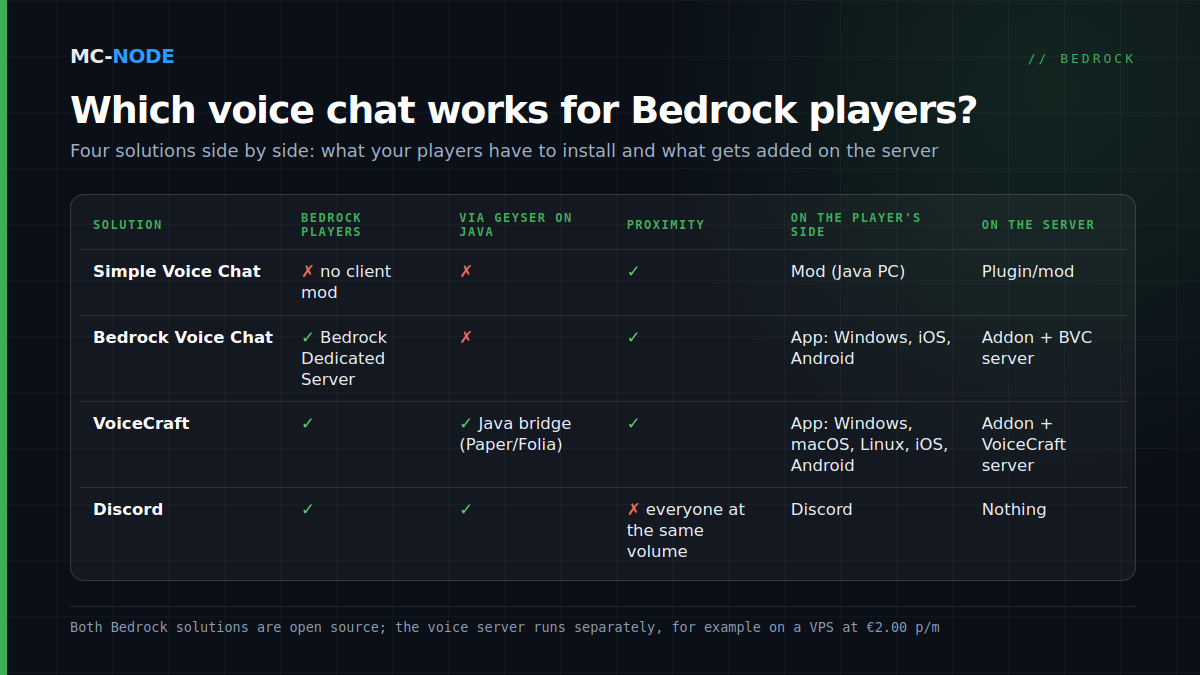
| Solution | Bedrock players | Proximity | Extra app |
|---|---|---|---|
| Simple Voice Chat | No, not via Geyser either | Yes | Mod on the PC |
| Bedrock Voice Chat | Yes (Bedrock Dedicated Server) | Yes | App on phone or PC |
| VoiceCraft | Yes, also via Geyser on Java | Yes | App on phone or PC |
| Discord | Yes | No | Discord |
| The console's party chat | Only that console | No | None |
For a group of five friends who are in a Discord call anyway, proximity chat is fun but not necessary. For an SMP or roleplay server with twenty players it is half the experience, and then BVC or VoiceCraft are well worth it. If you run a Java server with Geyser so console friends can join, VoiceCraft is the only route where everyone can hear each other.
Cost and upkeep
Both projects are open source and free. You only pay for the place where the voice server runs: a Bedrock server with us starts at €2.50 per month, the VPS next to it at €2.00, both cancellable monthly. Expect a big Minecraft update to break the addon temporarily now and then; keep an eye on the project pages and don't update the server on the evening of your big event. If you want to try the Java side first, the knowledge base explains how to install Simple Voice Chat and how to link Geyser and Floodgate.