Minecraft server: how to ban, unban, OP and whitelist players
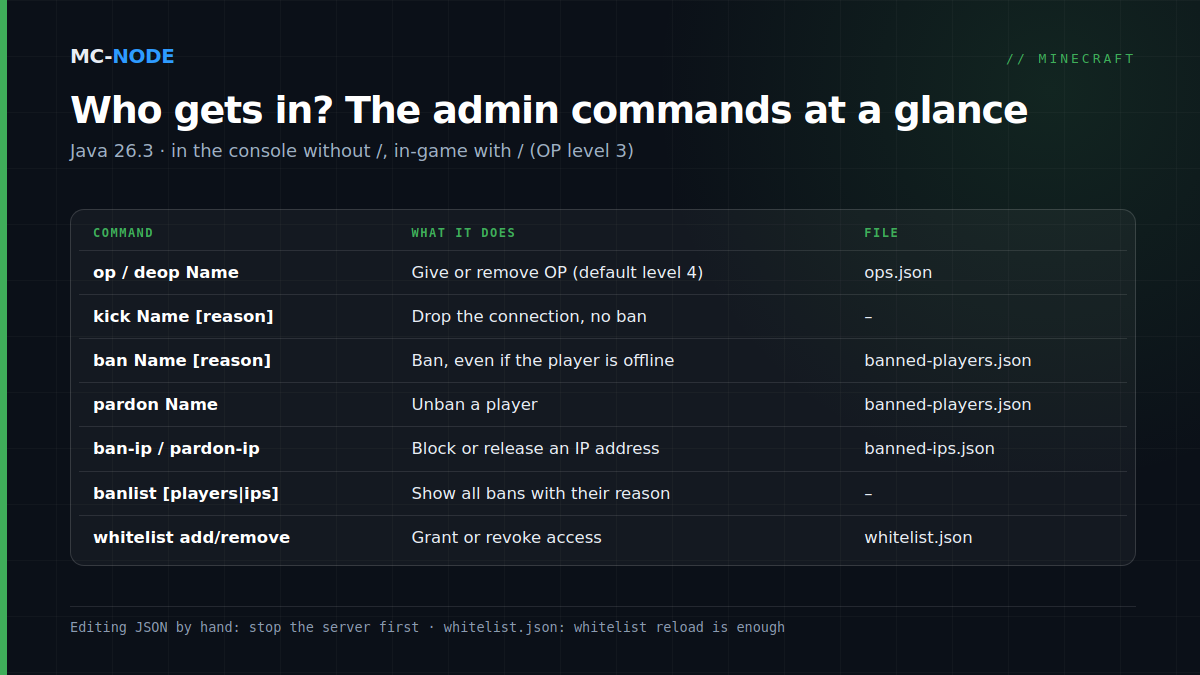
To unban someone on Minecraft on a Java server, type pardon PlayerName in the server console, or /pardon PlayerName in the game. Banning works with the Minecraft ban command ban PlayerName reason; you block an IP address with ban-ip and release it with pardon-ip, and banlist shows who's blocked. To give OP in Minecraft, use op PlayerName. Below you'll find, for each command, what it does, where it's stored and where things go wrong, tested on a plain 26.3 server and on Paper 26.3.
You type commands in the console or in chat
In your server's console, you type commands without a slash: ban PlayerName. In the game you put a / in front, and then you have to be an operator with at least level 3; on Java, ban, pardon, kick, op, deop and whitelist all fall under that level. The console can always do everything.
At MC-Node you open the console via your server's Console tab in the game panel. The panel also has a player overview where you ban, unban and whitelist with a single button; the knowledge base shows where to find it. No server yet? Pick one in the Minecraft store. On vanilla and Paper, the commands work the same way.
Giving OP in Minecraft: op, deop and the four levels
op PlayerName makes someone an operator; the console replies with Made PlayerName a server operator. To take it away, use deop PlayerName. The server looks the name up at Mojang, so the player doesn't have to be online, and capitalisation doesn't matter: in our test, op notch simply became Notch.
Operators are stored in ops.json, with a level and bypassesPlayerLimit (may join when the server is full) for each player. Which level a new OP gets is set by op-permission-level in server.properties; the default is 4.
- Level 1: may build inside the spawn-protection.
- Level 2: most game commands and command blocks.
- Level 3: player management: kick, ban, pardon, op, deop and whitelist.
- Level 4: everything, including server management such as
stop.
Want to give one player a lower level? Stop the server, change the number in ops.json and start it again. Step by step: making yourself OP.
The Minecraft ban command: kick, ban and ban-ip
kick PlayerName reason only drops the connection; the player can come straight back. It only works on players who are online; otherwise you get No player was found.
ban PlayerName reason puts someone on the ban list and removes them from the server right away if they're online. Fill in the reason: the player sees You are banned from this server. Reason: … on every new attempt, and you'll see it again in banlist. Without a reason it says Banned by an operator. Because the name is looked up at Mojang, you can also ban someone who is offline.
ban-ip blocks an IP address. You give it an address, or the name of a player who is online at that moment; an offline name gives Invalid IP address or unknown player. Use it sparingly: an IP ban hits everyone behind that address, including housemates or an entire school Wi-Fi.
The vanilla commands have no temporary ban: every ban gets "expires": "forever". For a ban of a day or a week you need a plugin, such as EssentialsX with tempban PlayerName 3d reason. More on moderation plugins in Server rules and moderation.
How to unban someone on Minecraft: pardon and pardon-ip
- Type
banlistin the console. You'll see all bans with their reason, for example jeb_ was banned by Server: Griefing at spawn. Usebanlist playersorbanlist ipsto filter. - Type
pardon PlayerName. The reply is Unbanned PlayerName. - If the player is also on the list with their IP address, type
pardon-ipwith the address frombanlist ips. As long as that IP ban stands, they can't get in from that address with any account. - If the whitelist is on, check with
whitelist listwhether the player is still on it.
If the server says Nothing changed. The player isn't banned, that name isn't on the list: compare it with banlist, or the block is on the IP address.
Editing banned-players.json by hand: only with the server off
Bans are stored in banned-players.json, with uuid, name, created, source, expires and optionally reason for each player; IP bans are in banned-ips.json. You can edit them in the file manager, but our test on 26.3 turned up three catches:
- Editing while the server is running doesn't work. The server only reads the file at startup. A line you add in the meantime doesn't show up in
banlist, and on the nextbanthe server overwrites the file.reloaddoesn't reread the ban list either. - So: stop, edit, start. Then the server does pick up your change.
- One forgotten comma has consequences. With invalid JSON, a vanilla server crashes on startup. Paper does start, but it sets your file aside as
banned-players.json.backupand starts with an empty ban list: all your bans are gone until you restore it.
So stick to ban and pardon where you can, and make a backup first if you edit by hand.
The whitelist has been on by default since 26.3
Since Minecraft 26.3 (15 September 2026), a newly created server.properties contains the line white-list=true, on the official server and on Paper. If you get You are not white-listed on this server! on a fresh server, this is why. On Java, operators always get in. If white-list is already in your server.properties, that value stays as it is.
whitelist add PlayerNameandwhitelist remove PlayerName: the player doesn't have to be online.whitelist onandwhitelist off: also changeswhite-listinserver.properties, so it sticks after a restart.whitelist list: who's on it.whitelist reload: rereadswhitelist.jsonafter you've edited it by hand, without a restart.
Also set enforce-whitelist=true in server.properties. The server then kicks players who aren't (or are no longer) on the list straight away as soon as you remove someone, turn the whitelist on or reload it. With the default value false, a removed player keeps playing until they log out. More in Securing your Minecraft server and in the knowledge base under using a whitelist.
Bedrock players via Geyser and Floodgate: mind the dot
With Geyser and Floodgate, Bedrock players get a dot in front of their name by default (username-prefix: "." in Floodgate's config). In commands, that dot is part of the name: ban .Gamertag reason. Do this while the player is online. The server looks up an unknown name at Mojang, and it doesn't exist there: in our test, ban .Steve123 only returned That player does not exist. For the whitelist, Floodgate has its own command, fwhitelist add Gamertag, which looks up the Xbox ID itself and is operator-only by default. See linking Geyser and Floodgate. A standalone Bedrock server, by the way, has no ban or pardon; there you control access with the allowlist.
Don't give moderators OP: use LuckPerms
A moderator doesn't need OP to ban people. With OP they can also stop the server, give themselves everything and remove other operators. With LuckPerms you give a group only the commands that fit the role. On Paper, every vanilla command has its own permission, such as minecraft.command.kick, minecraft.command.ban and minecraft.command.pardon; regular players don't have them by default.
lp creategroup moderator
lp group moderator permission set minecraft.command.kick true
lp group moderator permission set minecraft.command.ban true
lp user PlayerName parent add moderator
How to build ranks is explained in LuckPerms: Setting Up Ranks and Permissions Properly; the installation is in the knowledge base.
When you don't need any of this
If you play with a fixed group of five friends, this is enough: whitelist on, only you as OP, and whitelist remove if someone misbehaves. Bans, IP bans and a moderator group only become useful once your server is public or you let other people moderate.
Frequently asked questions
How do I unban someone on my Minecraft server?
Type pardon PlayerName in the server console, or /pardon PlayerName in the game if you're an operator with level 3 or higher. If the player is also banned by IP address, type pardon-ip as well, with the address from banlist ips.
Can you ban a player in Minecraft who is offline?
Yes. On a Java server, ban looks the name up at Mojang, so the player doesn't have to be online. That doesn't apply to ban-ip with a player name: that only works if the player is online.
Why can't anyone join my new 26.3 server?
Since Minecraft 26.3, white-list=true is the default in a new server.properties. Add players with whitelist add PlayerName, or turn the whitelist off with whitelist off in the console. On Java, operators always get in.
Can I ban someone temporarily in Minecraft?
Not with the standard commands: a vanilla ban lasts forever, until you use pardon. A plugin can do it, for example EssentialsX: tempban PlayerName 3d reason bans someone for three days.