Minecraft server crashing? How to read the crash report
If your Minecraft server is crashing, the cause is almost always there in black and white in the crash-reports folder or in logs/latest.log. Reading a Minecraft crash report takes three steps: look at the Description: line, at the first lines of the stack trace and at the last Caused by:. That's usually where you'll find the plugin or mod at fault. No crash report? Then check latest.log and the console; it's often memory.
Where are the crash report and the logs?
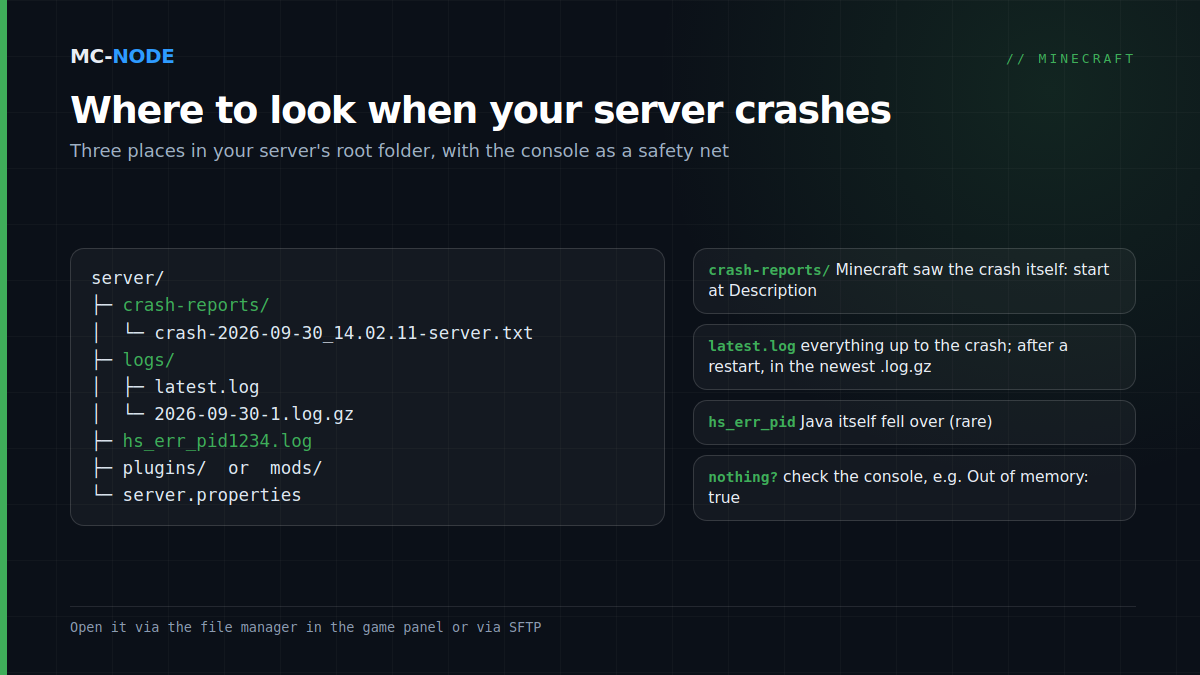
Everything is in your server's root folder, which you open in the game panel's file manager or via SFTP.
crash-reports/: one file per crash, with the time in the name, such ascrash-2026-09-30_14.02.11-server.txt. A report like this is only created when Minecraft itself notices that something is going wrong.logs/latest.log: the log of the current session. On every start (and every new day) the previous one is compressed, for example aslogs/2026-09-30-1.log.gz. So after a restart, the crash is in the newest.log.gz.hs_err_pid<number>.log: Java itself fell over, not Minecraft. That's rare.
Found nothing? Then look in the panel's console. After a crash it shows Detected server process in a crashed state!, with Exit code and Out of memory below it. If it says Out of memory: true, the server was stopped because it went over its memory limit, and Minecraft never got the chance to write a report.
How to read a Minecraft crash report
A shortened example from a modded server:
---- Minecraft Crash Report ----
// Who set us up the TNT?

Time: 2026-09-30 14:02:11
Description: Ticking entity

java.lang.NullPointerException: ...
	at com.example.mobmod.ZombieAi.tick(ZombieAi.java:88)
	at net.minecraft.world.level.Level...

A detailed walkthrough of the error, its code path and all known details is as follows:
-- Head --
Thread: Server thread
-- Entity being ticked --
Details:
	Entity Type: minecraft:zombie (...)
	Entity's Block location: World: (120,64,-340), ...
-- System Details --
...- Description is the summary.
Ticking entity,Ticking block entity,Exception in server tick looporWatching Serveralready point you in a direction. - The line below it is the error itself, such as
java.lang.OutOfMemoryError: Java heap space. - The
atlines are the stack trace; the top one is where it went wrong.net.minecraftis Minecraft itself;io.papermc,org.bukkit,org.spigotmc,com.destroystokyoandca.spottedleafare Paper. Any other package name is usually a plugin or mod. Caused by:is the underlying cause; if there are several, the last one is the deepest. Lines like... 12 moreare repetitions.- The blocks below give context: for a ticking entity, the type and coordinates; at the bottom, in
System Details, the Java version, the memory and the JVM flags.
Since 26.1, Minecraft Java Edition is no longer obfuscated, so the Minecraft lines in your stack trace have readable class names too.
The five most common causes
1. Not enough memory
If you see java.lang.OutOfMemoryError: Java heap space, the Java heap is full. That doesn't have to be a leak; often the heap is simply too small. A lower view-distance and fewer loaded worlds help. If things stay tight, choose a bigger Minecraft plan.
Trickier is a crash without a report, with a log that stops abruptly and Out of memory: true in the console. Besides the heap, Java also uses memory for things like loaded classes and threads. If the heap is allowed to fill the whole plan, the process can go over the limit and is killed hard. At MC-Node you control this with the startup variable Geheugenlimiet (%) (the memory limit) in the panel: the share of your plan's memory that Java may use as heap, between 50 and 95. Empty means 100%. A value around 85 leaves some headroom; heavy modpacks may need a lower one. Restart afterwards. See also how much RAM your server needs.
2. A plugin or mod that doesn't fit 26.3
On Paper you'll then often see Error occurred while enabling ... (Is it up to date?). Paper then disables that plugin and keeps running. Later plugin errors are usually logged by Paper as Could not pass event ... to <plugin>, without crashing; a plugin that freezes the server is something you track down via the watchdog (cause 4). Check on the plugin page whether 26.3 is supported. Note: at the time of writing, Paper only has alpha and beta builds for 26.3; 26.2 has stable ones. What else 26.3 breaks, you can read in Minecraft 26.3 and your server.
3. The wrong Java version
Minecraft 26.x requires Java 25. A vanilla server on Java 21 throws UnsupportedClassVersionError with class file version 69.0 (Java 25) and only recognizes class file versions up to 65.0 (Java 21). In that case Paper reports Minecraft 26.1 and newer requires running the server with Java 25 or above. The same error for a single plugin means that plugin expects a newer Java. You switch via the Docker image in the panel: changing the Java version.
4. The watchdog: a tick that hangs
Vanilla and NeoForge report A single server tick took ... seconds (should be max ...) and Considering it to be crashed, server will forcibly shutdown. The limit is max-tick-time in server.properties, 60000 milliseconds by default. Paper disables that watchdog and uses timeout-time in spigot.yml (60 seconds by default) instead, with the message The server has stopped responding! and a thread dump in latest.log, without a crash report. Search that dump for plugin names: Paper itself points to plugins that make HTTP or MySQL requests and to oversized world edits. According to Paper, raising the limit just trades the crash for serious lag spikes.
5. Ticking entities and corrupt chunks
With Ticking entity or Ticking block entity, a single mob, hopper or (often modded) machine throws an error every tick. On vanilla and NeoForge the server then crashes again as soon as that part of the world loads. The report names the type and coordinates. Restore a backup, or delete that chunk offline with the community tool MCA Selector (suitable for 26.3 since version 2.9); be aware that this wipes everything in that chunk. Paper doesn't crash here: it logs Entity threw exception at or BlockEntity threw exception at with the location, and removes that entity or block entity.
A damaged region file (r.x.z.mca, 32 by 32 chunks), for example after a hard stop during saving, usually doesn't crash the server. Vanilla logs Failed to load chunk, Paper ... chunk data will be lost, and that chunk is regenerated. Whatever was there is gone; in that case, restore a backup.
Finding the culprit step by step
- Make a backup first, even if the server isn't running.
- Read the newest crash report and the end of
latest.log(or of the newest.log.gz). Look forERRORandWARNjust before the crash. - Undo your last change. An update, a new plugin or a different Java image is suspect number one.
- Split in half. No obvious name? Move half of your plugins (or mods) to a folder such as
plugins-disabledand start. Crash gone: the culprit is in the half you removed; otherwise it's in the rest. Repeat until one candidate is left. Mods without their base mod won't start; that's a different error. - Share your log via mclo.gs instead of pasting it into Discord: you get a short link and IP addresses are removed automatically. Check for passwords or tokens yourself.
When it's not a crash
Can't keep up! Is the server overloaded?is lag: the server is falling behind but keeps running. See what TPS and MSPT mean.- Players getting disconnected while the console keeps running: that's usually the client or the connection.
When should you open a ticket?
If you see Out of memory: true even though the memory limit is set correctly, if the server crashes before anything appears in latest.log, or if splitting in half gets you nowhere, open a ticket. Mention which server it is, what time the crash happened, the mclo.gs links to the crash report and latest.log, and what you changed just before.
Frequently asked questions
Where do I find my Minecraft server's crash report?
In the crash-reports folder in your server's root folder, with the date and time in the name, such as crash-2026-09-30_14.02.11-server.txt. The log is in logs/latest.log; if the server has already restarted, look in the newest .log.gz file.
Why is there no crash report even though my server crashes?
Then the process stopped before Minecraft could write a report, often because it went over the plan's memory limit; the console then shows Out of memory: true. In that case, lower Geheugenlimiet (%) (the memory limit) in the panel or choose a bigger plan.
Which Java version do I need for Minecraft 26.3?
Java 25: that's what Mojang's version data for 26.3 says, and Paper requires it from 26.1 onwards. On an older Java you'll see UnsupportedClassVersionError with class file version 69.0, or on Paper a message that Java 25 is required.
Can I set max-tick-time to -1 to stop watchdog crashes?
On vanilla and NeoForge you can, but it doesn't fix anything: a frozen server then simply stays stuck. Paper disables that vanilla watchdog; there, timeout-time in spigot.yml applies. It's better to find out what's blocking the tick.