Rust server.cfg, seed and custom maps: setting up your server
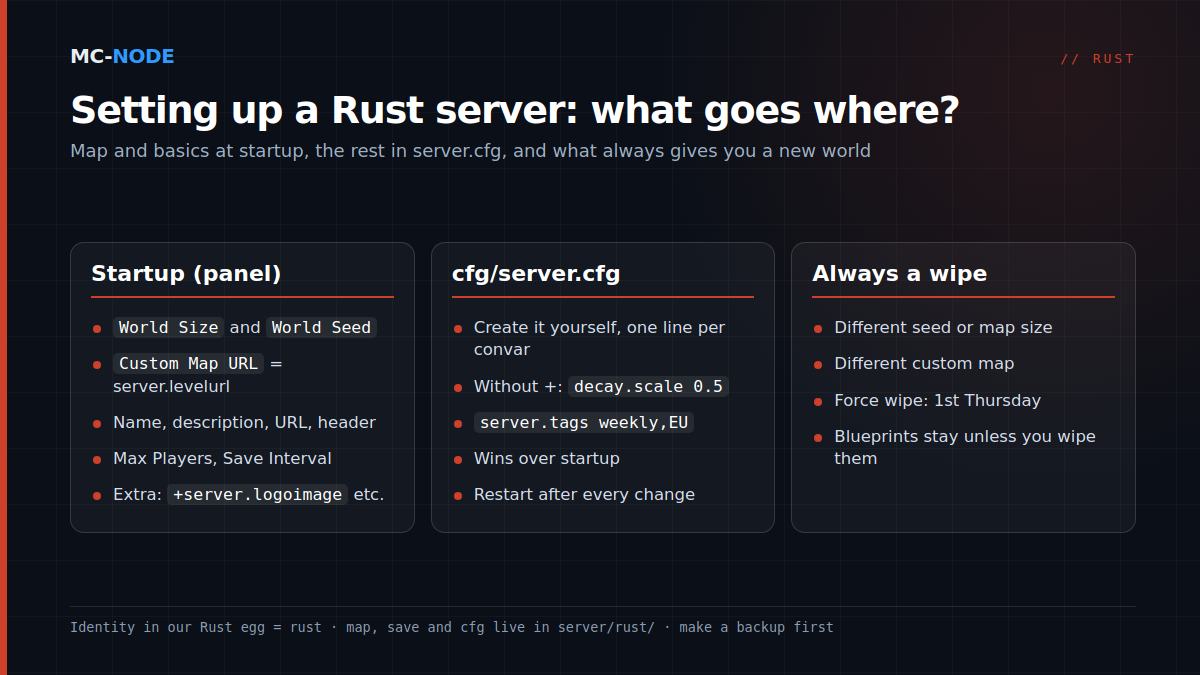
You set up a Rust server in two places. The map and the basics (seed, map size, custom map, name, description and maximum number of players) are passed as startup parameters when the server boots; in our game panel, those are the fields in the Startup tab. Most other settings go in server/rust/cfg/server.cfg, a text file you create yourself. Remember two things: whatever is in server.cfg wins over startup, and a different seed, map size or custom map means a new world, so a wipe.
Where is server.cfg located?
Rust keeps everything that belongs to a server in server/<identity>/, where the identity is the internal name you set with +server.identity. In our Rust egg it is fixed to rust. That folder also holds the map (.map), the save (.sav) and the player databases. According to the Rust wiki on wiki.facepunch.com, which community members also write for, the server doesn't create server.cfg by itself. So open Bestanden (the file manager) in the panel, go to server/rust/cfg and create a new file called server.cfg. Each line is a convar, without a plus sign in front:
server.tags weekly,EU
decay.scale 0.5
hackablelockedcrate.requiredhackseconds 600
server.tags sets the tags players filter on in the server browser (one per group, so not monthly and weekly together). decay.scale is the decay multiplier (default 1), and the last line determines how long the hacked locked crate stays locked (default 900 seconds). The server reads the file on startup: restart after every change.
Rust server config: startup or server.cfg?
The wiki's rule of thumb: only the essentials on the startup line, everything else in server.cfg. If a setting appears in both places, the wiki says the value from server.cfg applies. In our panel the startup line is already built from variables; the panel handles ports and identity, and you fill in the rest yourself:
| Field in Startup | Convar | Note |
|---|---|---|
| Server Name | server.hostname | max. 40 characters, no " or $ |
| Description | server.description | text in the connection window |
| URL, Server Image | server.url, server.headerimage | website; image as a direct link |
| Max Players | server.maxplayers | 40 by default with us |
| World Size, World Seed | server.worldsize, server.seed | 1000-6000; seed 0 = automatic |
| Custom Map URL | server.levelurl | empty = procedural map |
| Save Interval | server.saveinterval | in seconds |
| Additional Arguments | anything extra you want | with + in front |
Don't put these settings in server.cfg as well, or one day you'll change the name in Startup and nothing will happen. To set your own logo for the server browser, add +server.logoimage "https://…/logo.png" to Additional Arguments (the wiki recommends 256 × 256 pixels).
Save Interval is set to 60 seconds by default with us; according to the Carbon project's convar list, Rust itself uses 600. Saving often limits what you lose in a crash, but every save costs processing time. If you regularly notice short stutters on a full map, try 300, for example.
Map size and seed together determine your map
A procedural map is generated from the seed (0 up to and including 2147483647) and the worldsize (1000 to 6000). The same combination gives you the same map on the same Rust version; change either one and you get a completely different map. If World Seed is set to 0 in our panel, the panel picks a random seed once during installation and stores it in seed.txt. You only get a new one with Regen Server (see below); if you enter a number yourself, that number applies.
Size costs memory. The Rust wiki lists 12 GB of free memory as a rough system requirement, more for a 6000 map. The guideline for World Size in our panel: 8 GB for 3000, 12 GB for 3500 to 4000, 16 GB or more from 4500. Our Rust packages range from Explorer (8 GB, €12.00 per month) to Chief (16 GB, €24.00). Bigger isn't automatically better: with twenty players on a large map, you'll rarely run into each other. According to the wiki, above-ground trains only appear from 4250.
Preview seeds on RustMaps.com
RustMaps.com is a community site (not run by Facepunch) that looks up and generates maps: enter a seed and size and you see the map with all its monuments, plus heatmaps of animals, ores and other resources. Basic use is free; extra features are paid. Above all, check whether the monuments your players come for are on it, such as Launch Site or Outpost. Found one? Enter the seed and size in Startup.
A new seed or map size always means a wipe
On disk, a procedural map is named proceduralmap.<size>.<seed>…map, and the save gets the same name. Change the seed or size and there's no save for the new map, so the server starts with an empty world: bases and placed objects are gone. Blueprints remain, because they're stored in a separate file. Something similar happens at the monthly force wipe: the number just before the extension, the protocol version, goes up.
So only change seed and size on a wipe day, and make a backup first. Want to wipe player data too? Set Regen Server to 1 and reinstall the server via Instellingen (the settings page): the panel deletes the files listed in Files to remove and, with seed 0, picks a new seed. Set Regen Server back to 0 afterwards. For a blueprint wipe, add server/rust/player.blueprints.*.db to that list. Want to settle on a fixed rhythm? Read Rust wipes: picking the right schedule.
Running a custom map on your Rust server with server.levelurl
A custom map is a .map file made in a map editor. The server loads it with server.levelurl plus a web address; seed and worldsize no longer play a role. The wiki says to leave them out, and our panel does that for you as soon as Custom Map URL is filled in.
The URL has to be a direct download link: paste it into your browser and the download should start right away. A link to a Discord message or a regular share link from cloud storage won't work; according to the wiki, a public release on GitHub does.
What players see: on their first connection, their game downloads the map, not from your server but directly from that URL. If the link goes offline, players who don't have the map yet can no longer get in. If you change the map, give the file a new name, such as mymap-v2.map. Otherwise players with the old version load that old map and get an error like "World cache version mismatch" or "World File Outdated". A new name does mean a new save, so an empty world: that's why you update your map on a wipe day.
Common mistakes
- Changed the name, nothing happened. Is
server.hostnamealso in server.cfg? That one wins. - server.cfg in the wrong place, for example in the root folder instead of
server/rust/cfg/, or with plus signs in it. - No direct link in Custom Map URL. Then the server can't download the map and won't start properly.
- Custom map without sea. Without ocean all around, the server can hang while loading, because it can't create a route for the cargo ship. The wiki suggests adding sea, or
+baseboat.generate_paths false +cargoship.event_enabled falsein Additional Arguments. - Outdated custom map. Facepunch removes objects from the game now and then; a map that still references them will throw errors. Some map editors clean those up when you open the map and save it again.
When you don't need any of this
For a vanilla server with friends, you don't need to touch server.cfg: the fields in Startup are enough. A custom map isn't a must either; you have to keep it online, rename it with every change and fix it yourself when an update breaks something. Different gather rates, kits or teleports aren't set in server.cfg but with plugins: see Modding your Rust server with Oxide and Carbon.
A Rust server at MC-Node runs on our own hardware with NVMe storage in the Previder data centre in Hengelo, or on our game nodes in Frankfurt, Warsaw and Beauharnois, with DDoS protection and monthly cancellation.
Frequently asked questions
Where do I find my Rust server's server.cfg?
In server/<identity>/cfg/server.cfg; at MC-Node that's server/rust/cfg/server.cfg. The server doesn't create the file itself. Create it via Bestanden (the file manager) in the panel or via SFTP, and restart after every change.
Which map size should I choose for my Rust server?
That depends on your player count and your memory. The worldsize ranges from 1000 to 6000, and a smaller map needs less memory. The guideline in our panel: 8 GB for 3000, 12 GB for 3500 to 4000, 16 GB or more from 4500.
Does a new seed wipe my Rust server?
In practice, yes: the server starts with a new map and an empty world, because the save belongs to one specific combination of seed and size. Blueprints do remain. So only change the seed on a wipe day, and make a backup first.
How do I put a custom map on my Rust server?
Host the .map file somewhere with a direct download link and enter that link in server.levelurl (at MC-Node: Custom Map URL in Startup). Players download the map from that link, so it has to stay online. Give the file a new name every time you change it; the server then starts with a new save, so do it on a wipe day.