tModLoader server with Calamity: mods, versions and RAM
Anyone who wants more Terraria after a few vanilla playthroughs ends up at Calamity: dozens of new bosses, five extra difficulty levels and an endgame that goes far beyond the Moon Lord. For that you need tModLoader, and as soon as you want to play with friends, a tModLoader server. This article is about that last part: how the server fits together, which files you need to know and where it goes wrong in practice. It focuses on a rented Terraria server, but the files are exactly the same on a machine of your own.
First things first: tModLoader is its own version of Terraria
tModLoader is Re-Logic's official mod loader and sits in your Steam library as a separate, free program next to Terraria. Important to know in September 2026: tModLoader is based on Terraria 1.4.4, while the regular game has since moved on to 1.4.5. The 1.4.5 version of tModLoader is in development, but the stable version everyone plays is still 1.4.4. That has two consequences. Players have to connect through tModLoader, not through the normal game; and worlds from vanilla 1.4.5 won't load on a tModLoader server. So start your Calamity adventure with a new world.
The folder structure you need to know
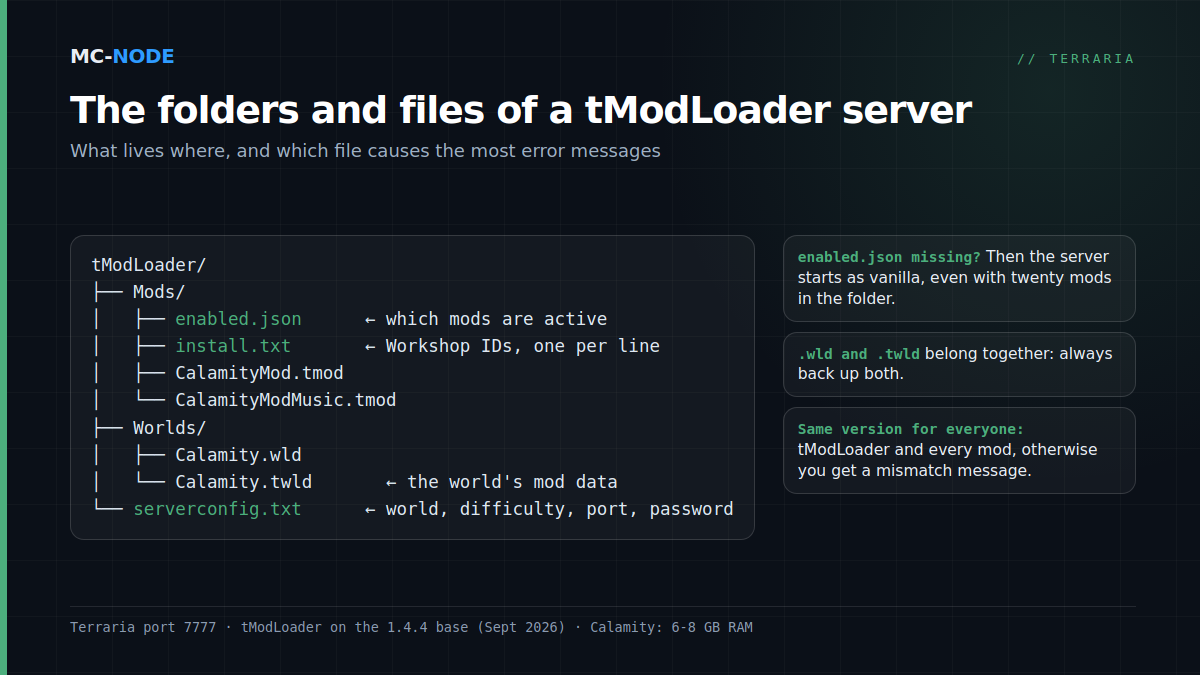
A tModLoader server has its own data folder containing a handful of files that decide everything:
Mods/— this is where the mods live, as.tmodfiles. Each mod is a single file.Mods/enabled.json— a list of the internal names of the mods the server should load. If this file is missing, the server starts as vanilla, even with twenty mods in the folder. This is the most common mistake.Mods/install.txt— the Steam Workshop IDs of your mods, one per line. tModLoader's management script uses this file to download the mods via SteamCMD.Worlds/— your worlds. A modded world consists of two files: the regular.wldand a.twldholding the mod data. Always back up both.serverconfig.txt— the start-up settings, so the server boots without asking questions.
The easiest way to get enabled.json and install.txt right: in tModLoader on your own PC, create a mod pack (Workshop → Mod Packs → Save Enabled as New Mod Pack). The folder of that mod pack contains exactly these two files, ready to copy to the server. Typing them yourself works too; enabled.json is nothing more than a JSON list of names such as CalamityMod.
serverconfig.txt: the lines that matter
world=Worlds/Calamity.wld
autocreate=3
worldname=Calamity
difficulty=1
maxplayers=8
port=7777
password=yourpassword
motd=Welcome, try not to die to Yharon
autocreate creates the world if it doesn't exist yet (1 = small, 2 = medium, 3 = large); difficulty is 0 for normal, 1 expert, 2 master and 3 journey. Calamity adds its own difficulties (Revengeance, Death) on top, but you switch those on in the game, not in this file. Generating a large world with Calamity takes a few minutes and temporarily needs more memory than actually playing does, so don't be alarmed by the first start.
Everyone on the same version, everyone with the same mods
This is the rule tModLoader servers fall over on. Every player has to run the same tModLoader version as the server and have exactly the same mod list enabled. One mod more or fewer, or Calamity 2.0.5.3 on the server and 2.0.5.2 on a player's PC, and you get a mismatch message instead of a game. Two things help:
- Set Steam updates for tModLoader to "only on launch" for everyone and agree a moment to update together. A server that updates itself automatically while the players are still on the old version is a classic Wednesday-night frustration.
- Let players adopt the server's mod list when they connect: tModLoader offers this on a mismatch and downloads missing mods itself. That only works if the mods are available on the Workshop, which is the case for Calamity and the usual add-ons.
Which mods to add (and which not to)
The standard set around Calamity is small: Calamity Mod, Calamity Mod Music (separate, because the music is big), and for convenience Recipe Browser, Boss Checklist and Magic Storage. Every mod you add costs memory and loading time, both on the server and for every player. Big content mods alongside Calamity, such as Thorium or Fargo's Souls, are fun, but they double the chance that something breaks after an update. For a first season: Calamity plus utility mods, nothing else.
How much RAM does a Calamity server need?
Terraria itself is light, but Calamity isn't. In practice we see this:
| Setup | Memory | Package at MC-Node |
|---|---|---|
| Vanilla or TShock, up to 8 players | 2 GB | Amateur, €3.00 |
| Calamity + music + utility mods, small group | 6 GB | Traveller, €9.00 |
| Calamity + Thorium or other big mods, large world | 8 GB | Explorer, €12.00 |
Memory use is determined mainly by the mods and the world size, and far less by the number of players. Also good to know: tModLoader runs almost everything on a single processor core, so one fast core helps more than many cores. All our game servers run on our own hardware with NVMe storage in Hengelo; you notice that most when saving a large modded world.
Setting it up on our server
- In the panel, choose the tModLoader variant of the Terraria server and start it once, so the folders get created.
- Upload your
.tmodfiles plusenabled.json(from your mod pack folder) toMods/via SFTP. - Edit
serverconfig.txt: world name, size, password and player count. - Restart and watch the console: the server lists the mods it has loaded. If you don't see them,
enabled.jsonis wrong. - Have your group connect via tModLoader → Multiplayer → Join via IP, using the address and port from the panel.
Back up Worlds/ before every mod update; a world that has been loaded by a newer Calamity version won't go back to the old one.