Valheim crossplay server: hosting PS5, Switch 2 and Xbox players with PC
On 9 September 2026 Valheim 1.0 was released, and at the same time the game came out for the first time on PlayStation 5 and Nintendo Switch 2, with full crossplay between PC, Xbox, PS5 and Switch 2. That changes who is in your group: suddenly your brother on the PS5 wants in, and so does your colleague on the Switch. What they can't do is host a server themselves that stays on all day, because Valheim's dedicated server is a PC program. So the server ends up with you, and it has to run in crossplay mode. Here's how that works, what it costs and what you give up.
What -crossplay actually does
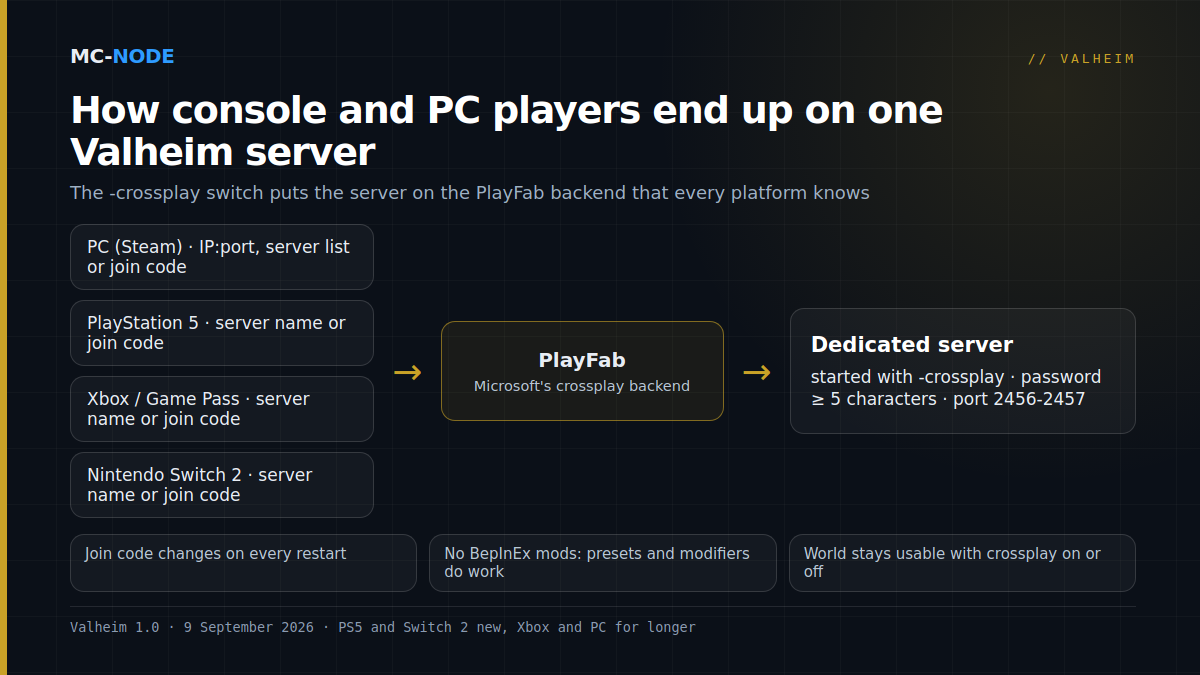
By default, a Valheim server talks over the Steam network. Only Steam players can connect then, via the IP address and port or via the server list. Start the server with the -crossplay parameter and it switches to PlayFab, Microsoft's multiplayer backend that is available on every platform. From that moment on, Xbox, PS5 and Switch 2 players can join, and Steam players remain just as welcome: they connect the same way as always, via IP and port or via the server list. A full start command looks like this:
valheim_server -nographics -batchmode -name "Our world" -port 2456 -world "Dedicated" -password "secret123" -public 1 -crossplayOn a rented Valheim server at MC-Node you don't have to type that line yourself: you switch on the crossplay option in the panel, and it adds the parameter to the start command. The password has to be at least five characters, otherwise the server refuses to start. The world itself doesn't change because of the switch; you can turn crossplay on and off without losing anything.
How console players find your server
A PS5 or Switch 2 player can't type in an IP address. They have two routes:
- Searching by name. In the game they choose Join Game and search for the server name from
-name. That only works if the server is listed with-public 1. So pick a unique name; "Valheim server" gives hundreds of hits. - The join code. A crossplay server gets a code of a few digits from PlayFab. It appears in the server log at start-up, and connected players see it in the game menu. With that code plus the password anyone can join, even if the server isn't public. Note: the code changes on every restart, so don't put it in your Discord bio but in a channel you update after a restart.
Steam players keep the fastest route: adding the address and port from the panel to the Steam server list, or connecting directly via IP.
What you give up: mods and a bit of latency
It's important to know this before you switch over. BepInEx mods and crossplay don't mix. BepInEx hooks into the Steam network layer, and with -crossplay that layer is gone; the mods simply don't load. Console players can't install mods anyway, so a server-side trick won't help either. A crossplay server is a vanilla server. What does work are the built-in world modifiers: -preset hard or -preset casual for a whole set, or individual options such as -modifier raids none and -setkey nomap. For most groups that covers the "we want it a bit different" feeling just fine. If you do want modded Valheim, that stays a Steam-only world.
The second point is the connection. Through PlayFab, traffic goes via a relay instead of straight to your server. You notice that as a slightly higher ping and sometimes a less stable connection than players of a Steam server are used to. There is little you can do about it except put the server close to your players: our Valheim servers run on our own hardware in Hengelo, and with Dutch, Belgian and German players that is a fine starting point.
How much server do you need?
Valheim is frugal with memory but leans on one processor core. A 1.0 world with the Deep North is bigger than before and the server keeps track of more, so budget more generously than the classic 2 GB:
| Group | Advice | Package |
|---|---|---|
| 2 to 4 players, new world | 2 GB | Amateur, €3.00 per month |
| 5 to 8 players, explored world | 4 GB | Beginner, €6.00 per month |
| The full 10 players, big bases | 6 GB | Traveller, €9.00 per month |
Everything can be cancelled monthly, so start small and scale up as the bases grow; with Valheim that is the real load factor, not the number of players.
Step by step
- Order or open your Valheim server and, in the panel, set the server name, the password (at least five characters) and switch on crossplay.
- Decide whether the server should be public. Public means findable by name; not public means join code or IP.
- Start the server and read the join code from the log. Share it with your console friends, along with the password.
- Have a Steam player and a console player connect at the same time and walk around together for a minute. If that works, everything works.
- Back up the world before you try mods again at some point later: that requires a detour via a second, Steam-only world.
Common mistakes
- Forgetting that the join code changes. After every restart (including after an update) the old code is worthless. Put the new code in Discord or teach your group to search by name.
- Password too short or the same as the server name. The server won't start then; the log tells you so politely.
- Leaving mods in place. A server with BepInEx in the folder does start in crossplay mode, but without the mods; players see "something different" from what they expected and think the server is broken. Remove BepInEx or set up a separate server.
- Console player without the right account. Crossplay on console requires the player to be signed in to their platform's account; on Switch 2 and PS5 also with an active online subscription, as with any online game.
How the basics of a Valheim server work, with ports, backups and the difference from hosting from within the game, is in our complete guide. What 1.0 and the Deep North mean for your existing world is in Valheim 1.0 and the Deep North update.