How much RAM does your Valheim server need? Plans by group size
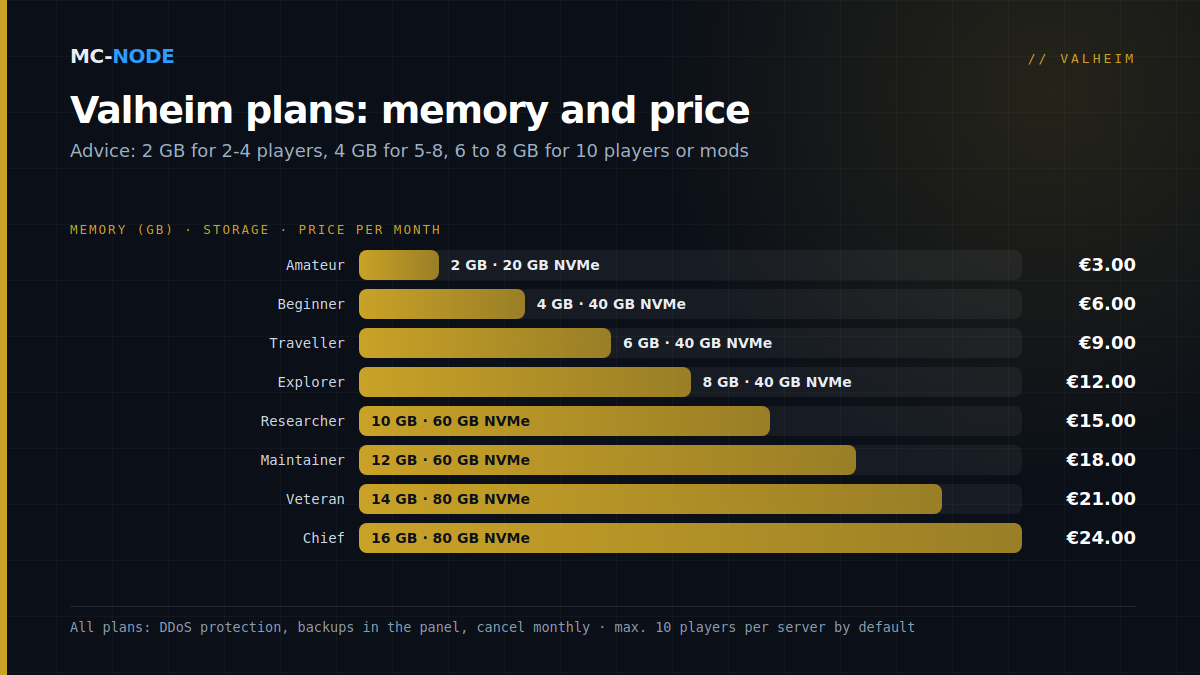
For 2 to 4 players on a new world without mods, 2 GB of RAM is enough to get started; with us, that's the Amateur plan at €3.00 per month. If you play with 5 to 8 players or on a world that's already been explored quite a bit, go for 4 GB (Beginner, €6.00). For a full server with ten players, big bases or mods, choose 6 to 8 GB. To be upfront about it: Iron Gate doesn't publish a memory requirement for the dedicated server. This advice is a cautious estimate, and below you can read what it's based on.
Valheim dedicated server requirements: no official RAM figure
The system requirements on the Steam page are about the game on your own PC: 8 GB of RAM minimum, 16 GB recommended. For the dedicated server, Iron Gate doesn't give a figure, not even in the official manual. If you're looking for a number, you end up with the community.
Two community sources do point in a direction, and they don't agree. The Valheim Wiki gives an unofficial rule of thumb of at least 2 GB, with 4 GB or more recommended; according to the wiki, a fresh world uses around 1.8 to 2.4 GB, plus 100 to 300 MB for each area where players are active. The documentation of a widely used open-source Docker image for Valheim is more cautious. In February 2021, the server there used around 2.8 GB without any players, and a single thread did most of the work. Its makers advise at least 4 GB and two cores, and recommend 8 GB with four fast cores. That measurement predates Mistlands, Ashlands and 1.0. So treat both as a guide, not as gospel.
What makes a Valheim server heavier
The number of players counts, but it's capped: Valheim is a game for 1 to 10 players, however much memory you have. Beyond that, what's in your world counts:
- An explored and built-up world. Every explored area and every building piece ends up in your world file, and the server has to keep track of all of it and save it. A world that's been running for months is therefore usually heavier than a fresh one.
- Big bases. Iron Gate itself writes in the 1.0 FAQ that the optimisations in 1.0 don't make large builds much faster.
- Terrain editing. Digging and raising the ground still caused problems in the first weeks of 1.0: patch 1.0.14 fixed a bug where terrain modifications in multiplayer could lead to performance and portal problems, and patch 1.0.15 fixed a bug with duplicated terrain that dragged performance down.
- Mods. BepInEx mods run in the same server process and therefore count towards your memory limit.
RAM per group: our advice
| Your situation | Plan | RAM | Per month |
|---|---|---|---|
| 2 to 4 players, new world without mods | Amateur | 2 GB | €3.00 |
| 5 to 8 players, or a world that's already been explored quite a bit | Beginner | 4 GB | €6.00 |
| Full server with 10 players and big bases | Traveller | 6 GB | €9.00 |
| Mods via BepInEx, or a world that's been running for months | Explorer | 8 GB | €12.00 |
Why these thresholds? Amateur's 2 GB is the minimum the wiki mentions: enough to start with a small group, but with little headroom. If the world or the group grows, Beginner is the first step up; those 4 GB are the wiki's recommended value and the minimum in the Docker documentation. Explorer's 8 GB matches what that documentation recommends.
Researcher through Chief (10 to 16 GB) are there for anyone who wants room to spare, for example for a heavy mod list. For a single Valheim server without mods, we haven't found any evidence that you need that much.
What Valheim 1.0 changed
1.0 (9 September 2026) brought a new save system. A world is no longer a .db and .fwl pair but a folder in which the world is saved in pieces (chunks). According to the patch notes, this way the game writes less data per save, which helps performance and makes a save more resilient to interruptions. Iron Gate also optimised the network traffic for terrain editing, and world generation became much faster.
What 1.0 didn't do: make a big world small. The Deep North adds a whole biome to explore and build on, and your world grows along with it. Also keep your server up to date: 1.0.14 and 1.0.15 fixed terrain bugs that affected performance, and a bigger plan won't help against those. In our Valheim template, Auto Update is on by default, so a restart fetches the latest version.
Mods and memory
There's no rule of thumb for mods: how much memory a mod uses varies from mod to mod. Add them one at a time and check the memory usage after each one. Also keep crossplay in mind: console players can't use mods, so in practice a modded server is a PC server. How BepInEx works is explained in Valheim mods on your server.
When more RAM won't help
- More than ten players. That's not possible by default, however much memory you have.
- Low fps at your base. That mostly comes down to the player's PC. Since 1.0, the game has a Draw Distance setting: according to Iron Gate, a shorter simulation distance improves performance.
- A busy main thread. If one thread does most of the work, extra memory won't make that thread any faster.
- Seams or duplicated terrain. Those were bugs in 1.0 that have been fixed with patches; updating is the solution here.
Signs that it's time to upgrade
In the game panel, the Console tab shows live graphs of memory and CPU usage. Check them on a busy evening. If you're consistently hitting your limit, or if the server freezes or drops out when everyone is online, a bigger plan is the logical next step. If you stay well below half, you could even go one plan smaller.
You upgrade in the client area via Upgrade on your service; the steps are in How do I upgrade or downgrade my product? To be safe, make a backup of your world first.
All Valheim plans at a glance
| Plan | RAM | NVMe storage | Per month |
|---|---|---|---|
| Amateur | 2 GB | 20 GB | €3.00 |
| Beginner | 4 GB | 40 GB | €6.00 |
| Traveller | 6 GB | 40 GB | €9.00 |
| Explorer | 8 GB | 40 GB | €12.00 |
| Researcher | 10 GB | 60 GB | €15.00 |
| Maintainer | 12 GB | 60 GB | €18.00 |
| Veteran | 14 GB | 80 GB | €21.00 |
| Chief | 16 GB | 80 GB | €24.00 |
All Valheim plans run on NVMe storage, with DDoS protection and a Pterodactyl game panel with console, file manager, backups and startup variables. They can be cancelled monthly, so you can start small and upgrade later. Everything you can configure in that panel is covered in our complete guide.
Frequently asked questions
How much RAM does a Valheim server need?
Iron Gate doesn't give an official figure. The Valheim Wiki gives an unofficial rule of thumb of at least 2 GB, with 4 GB or more recommended. For 2 to 4 players on a new world, 2 GB is enough to get started; with more players or a well-explored world, choose 4 GB, and for a full server or mods, 6 to 8 GB.
What are the system requirements for a Valheim dedicated server?
Iron Gate only publishes requirements for the game itself: 8 GB of RAM minimum on your PC, 16 GB recommended. There are no official requirements for the dedicated server. The Valheim Wiki unofficially states at least 2 GB, with 4 GB or more recommended; a widely used open-source Docker image advises at least two cores and 4 GB, and recommends four fast cores with 8 GB.
Will more RAM fix lag on my Valheim server?
Only if the server is hitting its memory limit; you can see that in the panel's memory graph. Low fps at a big base comes down to the player's PC, and bugs such as duplicated terrain are fixed by updating the server.
How many players can join a Valheim server?
Ten at most by default. Iron Gate describes Valheim 1.0 as a game for 1 to 10 players, and that doesn't change with a bigger plan or more memory.