How do I disable the "Content from this website is being blocked" notification?
If you have a Windows Server installation and try to use Internet Explorer, you'll no doubt get a message asking you to allow the domain for every website you try to open. That's obviously very annoying. In this article we explain how to turn this notification off.
-
Connect via Remote Desktop. If you don't know how, we explain it in this knowledge base article.
-
In Server Manager, go to the "Local Server" section (1)
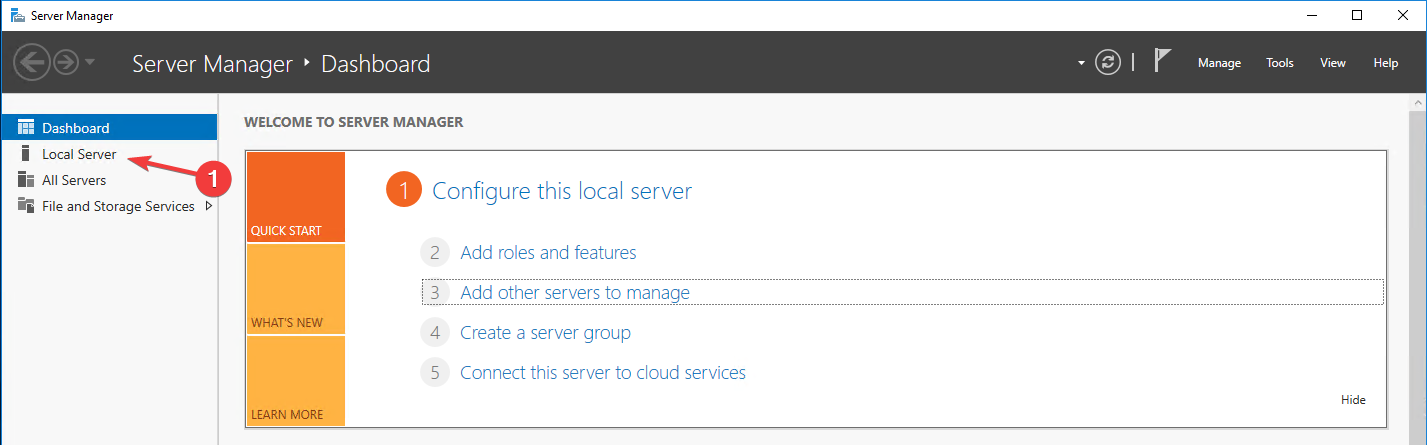
- Then click "IE Enhanced Security Configuration" (1)

- Set both options to "Off".
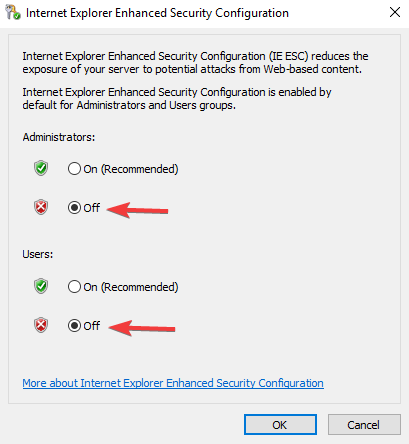
- Then click "OK" and restart your VPS.
| With this article you should have been able to turn off this security notification! If you still haven't managed to, our team is happy to help: Contact us
Stuck? Our team is happy to help.Open a ticket →
More in this category
How can I become a partner of MC-Node?To partner with MC-Node you need a minimum reach (Discord: 1000 members, FiveM: 50, Minecraft: 50-75 players) and a cleaHow do I find my IP address?Log in to the VPS panel, click "Manage" next to your VPS, and you'll find the IP address of your VPS right away. Step-byHow do I move my server to MC-Node?Move your game server to MC-Node step by step: download files from your old host, upload via SFTP, transfer settings andHow fast do we respond to your questions?During office hours we aim to respond within 1 hour; outside office hours within 6 hours, depending on the issue. Learn