Assetto Corsa server mods: how to add cars and tracks
You add mods to your Assetto Corsa server in three steps: you upload the server files of the cars and tracks to content/cars and content/tracks, you put their folder names in cfg/server_cfg.ini (CARS=, TRACK= and CONFIG_TRACK=) and you create enough slots in cfg/entry_list.ini. The quickest way to add cars to an Assetto Corsa server is the Pack button in Content Manager, which gathers exactly those files for you. One hard rule: every player needs exactly the same version of the mods, or they won't get in.
Sessions and ping are covered in Assetto Corsa server hosting.
The server only needs a few files per mod
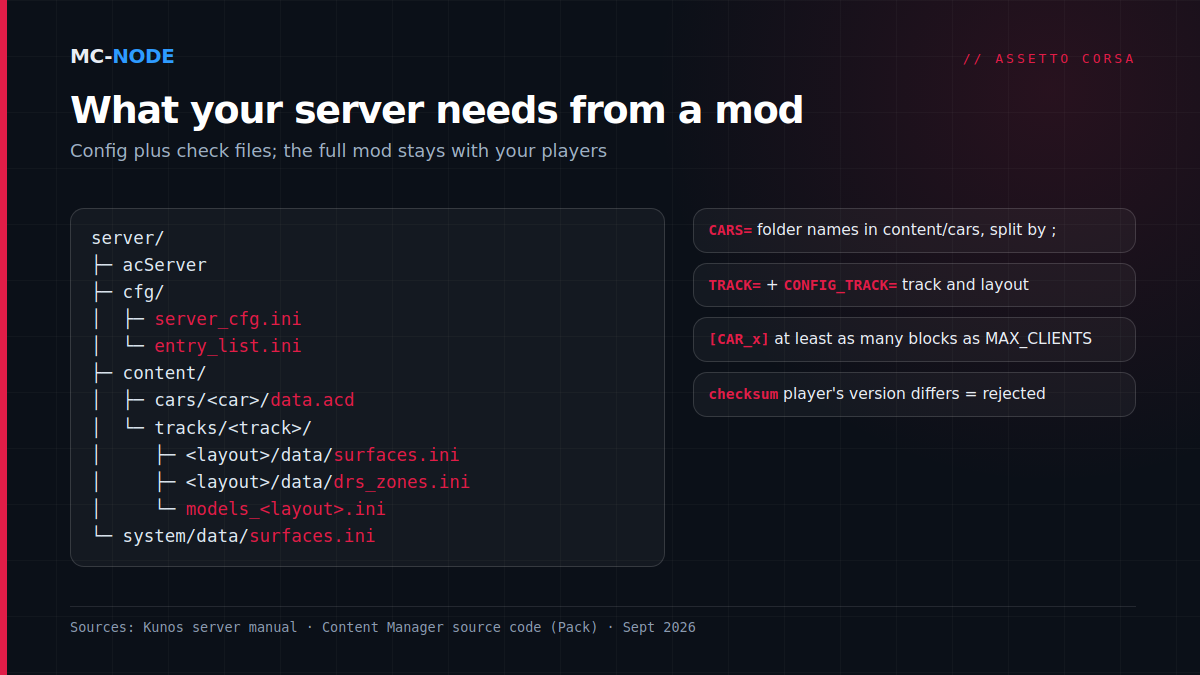
An Assetto Corsa server doesn't render anything and doesn't load any 3D models. It runs the sessions and checks whether each player's cars and track match the server's. The Content Manager source code shows what the Pack function bundles for the server, and per mod that isn't much:
- per car:
content/cars/<car>/data.acd, the car's packeddatafolder; - per track:
surfaces.inianddrs_zones.inifrom the layout'sdatafolder, plusmodels_<layout>.ini(ormodels.inifor a track without layouts); - once:
system/data/surfaces.ini.
Those files are used for the check, the checksum. Your players need the complete mod with models and textures, the server doesn't. Folder names are strict, though. Our servers run the Linux version of acServer, and on Linux Ferrari_458 is a different folder from ferrari_458.
Adding cars: CARS=, TRACK= and CONFIG_TRACK= in server_cfg.ini
In cfg/server_cfg.ini, the [SERVER] block defines which content the server uses. With the track from the Kunos server manual and a mod car of your own, it looks like this:
[SERVER]
CARS=ferrari_458_gt2;my_mod_car
TRACK=vallelunga
CONFIG_TRACK=extended_circuit
MAX_CLIENTS=15CARS=: the folder names fromcontent/cars, separated by a semicolon. To add a mod car, append its folder name at the end.TRACK=: the folder name of the track incontent/tracks.CONFIG_TRACK=: the layout, i.e. the name of the subfolder you see undercontent/tracks/<track>/uiin your own game. If the track has no layouts, Content Manager leaves this line empty.MAX_CLIENTS=: the number of players. According to Kunos, it must not exceed the track's number of pit boxes.
If you ticked "Require CSP to join" in Content Manager, the program writes something like TRACK=csp/…/../vallelunga. That's intentional: leave it as it is.
entry_list.ini: one block per grid slot
The server only creates slots for the cars in cfg/entry_list.ini. Each block is called [CAR_0], [CAR_1] and so on:
[CAR_0]
MODEL=ferrari_458_gt2
SKIN=black_matte
GUID=
BALLAST=0

[CAR_1]
MODEL=my_mod_car
SKIN=name_of_a_skin_folder
GUID=
BALLAST=0MODEL=must be one of the cars fromCARS=.SKIN=is the name of a folder incontent/cars/<car>/skinsof your own game.- You need at least as many blocks as
MAX_CLIENTS: for 15 players, that's[CAR_0]up to and including[CAR_14]. - A Steam64 ID after
GUID=ties a slot to a fixed driver.BALLAST(extra kilos) andRESTRICTOR(0 to 100) are what you use to balance the cars.
Pack in Content Manager: the fastest route
Content Manager (acstuff.ru) builds both files and picks up the check files from your own installation. The Lite version is free, but acstuff.ru lists server management among the features in development, which you unlock there with an app key after a donation; in Lite it may therefore be limited. You enable the Server menu item in the settings under Appearance, at Links.
- Create a preset under Server, pick the track and cars on the Main tab and fill the slots on Entry list.
- In the menu next to Pack, choose Options (Ctrl+Shift+P), turn off Include executable (
acServeris already on your server) and click Pack. Target Windows gives you a.zip, Linux a.tar.gz. - Make a backup in the panel first, upload the archive to the root folder via the file manager or SFTP with WinSCP or FileZilla and extract it in the file manager (Unarchive), so that
cfg,contentandsystemend up in the right place. - Restart the server.
If a mod car has a loose data folder instead of data.acd, Content Manager warns you with "Data is not encrypted": without packed data, players can modify the car. If you let it pack the data, give that new data.acd to your players as well, otherwise their files no longer match.
On every start, our panel rewrites the server name, the password, the admin password and the ports in server_cfg.ini from the startup variables. Whatever Content Manager puts there gets overwritten; you change those settings in the panel.
Players need exactly the same mods
According to Kunos, a car or track mismatch gets you kicked from the server: either the player needs to update their game, or the server hasn't been updated. So give everyone the same download and pack again as soon as you update a mod.
Content Manager can fetch missing content on its own. In your preset, tick the extra details on the Details tab, choose the mode "Via ID in name (recommended)", set Share mode to Download URL for each car and track and enter the link at Download from. Content Manager then adds a code starting with x: after the server name, and players with Content Manager get a button in the server list to install the missing content. With us, the name comes from the Server Name startup variable, so copy the full name including that code from the packed server_cfg.ini into that variable. Also use the same server and admin password in your preset as in the panel, otherwise Content Manager may flag a correct password as wrong. The other mode, the AC Server Wrapper, is a separate program with its own port and isn't part of our standard egg. Players without Content Manager install the mods by hand.
Ports: 9600 and 8081 at Kunos, assigned with us
By default the server uses port 9600 for TCP and UDP and port 8081 for HTTP, the lobby port. At MC-Node your server gets two assigned ports: a main port for TCP and UDP and a second one for HTTP (the "HTTP-poort" variable, Dutch for "HTTP port"). The panel fills them in on every start, so changing them in the file is pointless.
Common mistakes
- "The mod won't install." Often it sits one folder too deep after extracting, such as
content/content/cars, or a capital letter differs from what's inCARS=. - Checksum or mismatch error. A player has a different version, the server still has an old
data.acd, or you had the data packed and players still have the old one. One version for everyone: pack again, upload, restart. - Turning off the check. Content Manager has the option "Disable integrity verification (not recommended)". According to the tooltip, players can then modify their cars and tracks for an unfair advantage; use it for testing at most.
- Too few slots. Fewer
[CAR_x]blocks thanMAX_CLIENTS, aMODELthat isn't inCARS=, or more players than pit boxes. - The server itself won't install. Our egg installs via SteamCMD. If the install log says "No subscription" or "Login Failure", enter a Steam account that owns Assetto Corsa in the startup variables, with the Steam Guard code if needed, and reinstall.
Finally, choose your own admin password in the startup variables. Kunos calls it mandatory; with /admin <password> in the chat you can then kick players, and /next_session skips a session.
When you don't need this
If you only race with the Kunos base content that everyone already has, nobody needs to download anything and the version problem hardly comes into play; packing is still the easiest route to a correct configuration. Don't have a server yet? An Assetto Corsa server at MC-Node starts at €3.00 per month for the Amateur package with 2 GB RAM and 20 GB NVMe. You choose the Netherlands, Germany, Poland or North America (Canada), DDoS protection is included and you can cancel monthly.
Frequently asked questions
How do I add cars to an Assetto Corsa server?
Put the car's folder name after CARS= in cfg/server_cfg.ini, separated by a semicolon, and create blocks in cfg/entry_list.ini with MODEL= set to that folder name. Also upload content/cars/<car>/data.acd for the checksum and restart the server. The Pack button in Content Manager does all of this in one go.
Why does a checksum error get me kicked from an Assetto Corsa server?
Your version of the car or track differs from what the server has, for example a different data.acd or surfaces.ini. Install the same version as the server, or have the admin pack again if the mod has been updated. Kunos names both causes in the server manual.
Which ports does an Assetto Corsa server use?
By default port 9600 for TCP and UDP and port 8081 for HTTP, the lobby port. If you run several servers on one machine, each server needs its own ports; with a hosted server the panel usually assigns them for you.
Do I need to put the whole mod on my Assetto Corsa server?
No. The server only needs data.acd per car and a few files per track, such as surfaces.ini, drs_zones.ini and models_<layout>.ini. Only your players need the full mod with models and textures.