BeamMP server setup: AuthKey, mods, port and players
For a BeamMP server, you get an AuthKey from the BeamMP Keymaster, enter it in ServerConfig.toml along with the name, port and map, put your mods as zip files in Resources/Client and start the server. Players connect via the server list or with Direct Connect using your IP and port (30814 by default). The server itself is lightweight: your players' PCs decide how many cars can be on the road.
BeamMP is the multiplayer mod for BeamNG.drive
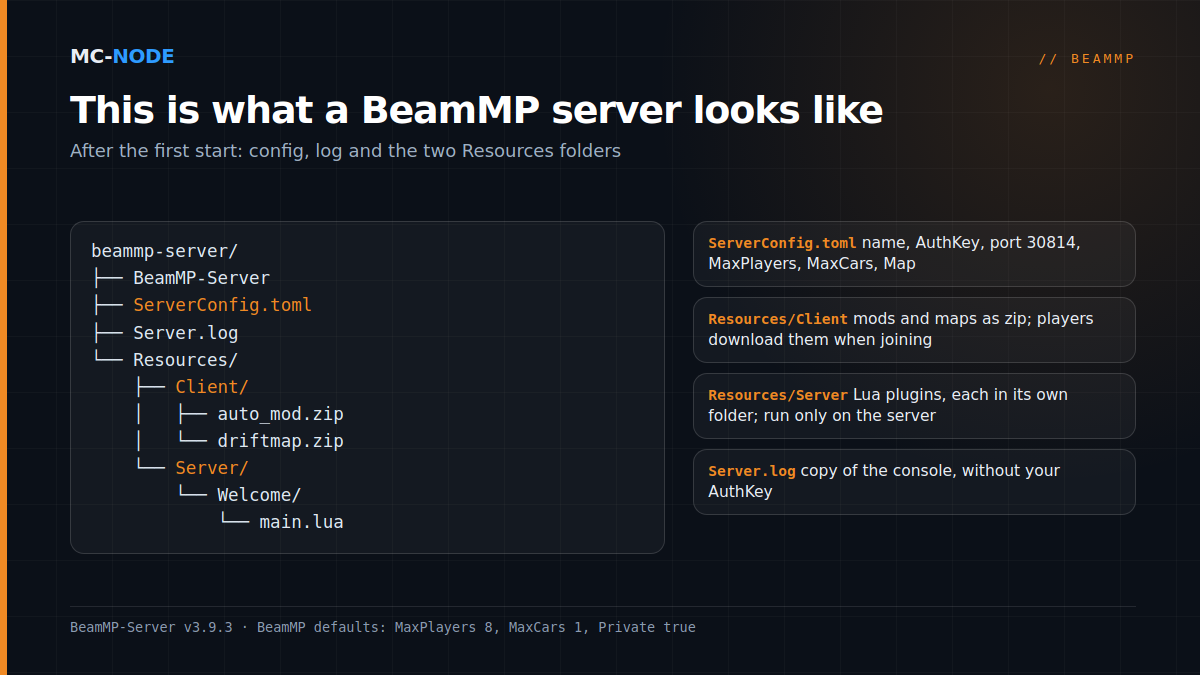
BeamMP adds multiplayer to the driving simulator BeamNG.drive. Every player installs the BeamMP Launcher and needs their own up-to-date, legal copy of the game. On top of that there's BeamMP-Server, a separate open-source program for Windows and Linux that all players communicate through; the latest version right now is v3.9.3, from May 2026. After the first start, the BeamMP server folder looks like this:
Step 1: get an AuthKey from the Keymaster
Every server needs an AuthKey, even a private one. If the field is empty, the server reports No AuthKey specified and shuts down after ten seconds.
- Log in to the BeamMP Keymaster (keymaster.beammp.com) with your Discord account.
- Click Keys on the left and the green + at the top right.
- Enter a name; that's only the name of the key, not the one shown in the server list.
- Copy the key: 36 characters in the format
xxxxxxxx-xxxx-xxxx-xxxx-xxxxxxxxxxxx.
Treat the key like a password. You only get a limited number of keys, and one key works on one running server at a time.
Step 2: ServerConfig.toml, the fields that matter
These are the default values of the current version, with only the name, description and key filled in:
[General]
Name = "Friday Night Drift"
Description = "Freeroam and drift with friends"
AuthKey = "your-36-character-key"
Port = 30814
Private = true
MaxPlayers = 8
MaxCars = 1
Map = "/levels/gridmap_v2/info.json"
Tags = "Freeroam"
AllowGuests = true
LogChat = true
ResourceFolder = "Resources"Port: 30814 by default, over TCP and UDP. Any port between 1024 and 65535 will do, as long as no other program is using it.Private:truekeeps your server out of the public list,falseputs it in.MaxPlayersandMaxCars: the maximum number of players, and cars per player. If someone spawns more, the server removes them straight away.Map: the path to the map, always/levels/<name>/info.json.AllowGuests: whether guests (players who don't log in) can join.
Hosted server at MC-Node? Then you fill in the name, description, AuthKey, Private, MaxPlayers, MaxCars and Map on the Startup tab of the game panel. The panel writes those values to ServerConfig.toml on every start; anything you change by hand in those lines is gone again after a restart. The port also comes from the panel and isn't necessarily 30814. By default, Private is set to false (public) there and Max Players to 6. Tags and AllowGuests you can simply change via Files. The first start is covered in the knowledge base: How do I start a BeamMP server?
Step 3: mods and maps go in Resources/Client as zip files
Everything in Resources/Client is sent automatically to players who join. The server only loads files ending in .zip, so don't unpack anything.
- Vehicle mod: drop the zip in and restart.
- Standard map: nothing to install, just change
Map, for example to/levels/west_coast_usa/info.jsonor/levels/italy/info.json. - Map mod: put the zip in
Resources/Client, open it without unpacking and look in thelevelsfolder. If the subfolder there is calledmydriftmap, the path becomes/levels/mydriftmap/info.json.
If the map won't load, open it in singleplayer, press ~ and type print(getMissionFilename()) to get the exact path. Large zips are easier to upload via SFTP than through the browser.
Step 4: Lua server plugins go in Resources/Server
Whatever is in Resources/Server runs only on the server. Each plugin gets its own subfolder; the server loads all the .lua files in it on startup, in alphabetical order. The language is Lua 5.3. A minimal example, Resources/Server/Welcome/main.lua:
function Welcome(player_id)
    MP.SendChatMessage(player_id, "Welcome! No crashing in the pits.")
end
MP.RegisterEvent("onPlayerJoining", "Welcome")
onPlayerJoining fires as soon as a player has loaded all mods; with -1 as the player ID you send a message to everyone. If you edit a .lua file directly in the plugin folder, the server reloads it by itself.
Step 5: private or public, and how players find you
With Private = true you're not in the list, but anyone with your IP address and port can connect via the Direct Connect tab. The current config has no server password; if you really want to lock things down, a Lua plugin can use onPlayerAuth to let in known names only.
With Private = false the server registers with the list and you'll see Authenticated! in the console. Players search for you by name; if they can't find you, they need to switch off their filters and set the map to "Any". You can stand out with formatting codes in the name, such as ^l for bold and ^4 for red, and with tags like Drift or Racing. There are language tags for English and German, among others.
Common BeamMP server errors and what they mean
No AuthKey specified: the field is empty and the server stops. Fill in the key (at MC-Node via Startup).AuthKey specified is the wrong length: a warning that the key isn't 36 characters long, usually because of a copy-paste mistake.Backend REFUSED the auth key: on a public server, the BeamMP backend rejects the key and gives the reason after it. Check whether the same key is already running on another server; otherwise, create a new one.- Players get 10060 or 10061 in the launcher: at home that's port forwarding, the firewall or CGNAT; with a hosted server it's usually a wrong IP address or port.
- A "done" or "start" message when joining after adding new mods: probably a broken or incompatible mod. Remove mods one at a time.
- Problems for just one player: local mods are interfering with the server's. Have that player disable everything except
multiplayerbeammp.
How many players and cars? Your players' PCs decide
BeamMP lists 50 MiB of memory, a processor above 1 GHz and 5 to 10 Mb/s of upload as the server minimum. The heavy lifting happens on the players' side: their PC also simulates everyone else's cars. According to the BeamMP FAQ, the game is mainly CPU-bound with lots of people, with a rule of thumb of one car per CPU thread. So multiply MaxPlayers × MaxCars: 8 players with 2 cars each makes 16 cars, which by that rule of thumb is too many for a processor with 8 threads. Start with 1 car per player; the "Use simplified vehicles when available" option helps players with older PCs.
On the server side, the smallest package is almost always enough. A BeamMP server at MC-Node starts with Amateur (2 GB RAM, 20 GB NVMe) for €3.00 per month; the range goes up to Chief (16 GB) for €24.00. You'd go bigger for storage if you collect a lot of map mods, not because BeamMP needs more memory. What does count is upload and ping: new players download all the mods, and the positions of every car go back and forth constantly. Pick the location closest to your group: Hengelo, Frankfurt, Warsaw or Beauharnois (Canada). DDoS protection is included and you can cancel monthly. More on lag in Ping, tick rate and server location.
When you don't need a rented server
If you only play now and then with two or three friends, just run BeamMP-Server yourself: on Windows it's a single BeamMP-Server.exe, and for Linux there are builds for Debian and Ubuntu. That costs nothing, but comes with these downsides:
- You have to forward port 30814 over TCP and UDP in your router and firewall. Behind CGNAT or on 4G/5G, that won't work.
- The server only works over IPv4.
- You connect yourself via Direct Connect on
127.0.0.1, not via the server list. - Your friends get your home IP address, and every mod download goes through your upload.
- When your PC is off, the server is gone.
A rented server pays off as soon as your group grows, you want a public server that's always on, or you'd rather not open up your home connection.
Frequently asked questions
Which port does a BeamMP server use?
Port 30814 by default, over TCP and UDP. In ServerConfig.toml you can pick any free port between 1024 and 65535. On a hosted server, the panel decides the port.
Do I need an AuthKey for a private BeamMP server?
Yes. Without an AuthKey the server won't start: it reports 'No AuthKey specified' and shuts down. You get the key from the BeamMP Keymaster with your Discord account, and one key works on one running server at a time.
How do I add a custom map to my BeamMP server?
Put the map's zip in Resources/Client without unpacking it. Check the levels folder inside the zip to see what the map folder is called, and set Map to /levels/<name>/info.json. Players download the map automatically when they join.
How many players can a BeamMP server handle?
The server itself needs very little; the limit lies with the players' PCs, which simulate all the cars. BeamMP's rule of thumb is one car per CPU thread. By default, BeamMP sets MaxPlayers to 8 and MaxCars to 1.