Factorio dedicated server setup: headless, mods, Space Age, saves
You run a Factorio server with the free headless version of the game: factorio --start-server save.zip hosts your save, day and night, without your own PC having to stay on. Know three things up front: everyone needs exactly the same version and mods, a new map on the headless server is a Space Age map by default, and your UPS depends more on the processor than on lots of RAM. Below is the setup step by step, with 2.0.77 (stable) and 2.1.20 (experimental) as of 28 September 2026.
Headless dedicated server or hosting from the game?
Hosting from the menu (Multiplayer, then Host new game or Host saved game) is the quickest: friends connect via Steam or your IP address. But the world only exists while you're playing, and at home UDP port 34197 has to be open. Factorio uses UDP exclusively.
A dedicated server with the headless version (Linux, without graphics) loads a save directly, has no character of its own, pauses when nobody is online and saves when it shuts down. Since Friday Facts #446 (18 September), there's also a headless build for ARM64 Linux, so even a Raspberry Pi can host, although for now that build only exists for experimental 2.1. If you play at different times, or want others to be able to carry on when you're offline, a dedicated server is the logical choice. If you only ever play together on fixed evenings, hosting from the game is enough.
Versions: everyone on exactly the same one
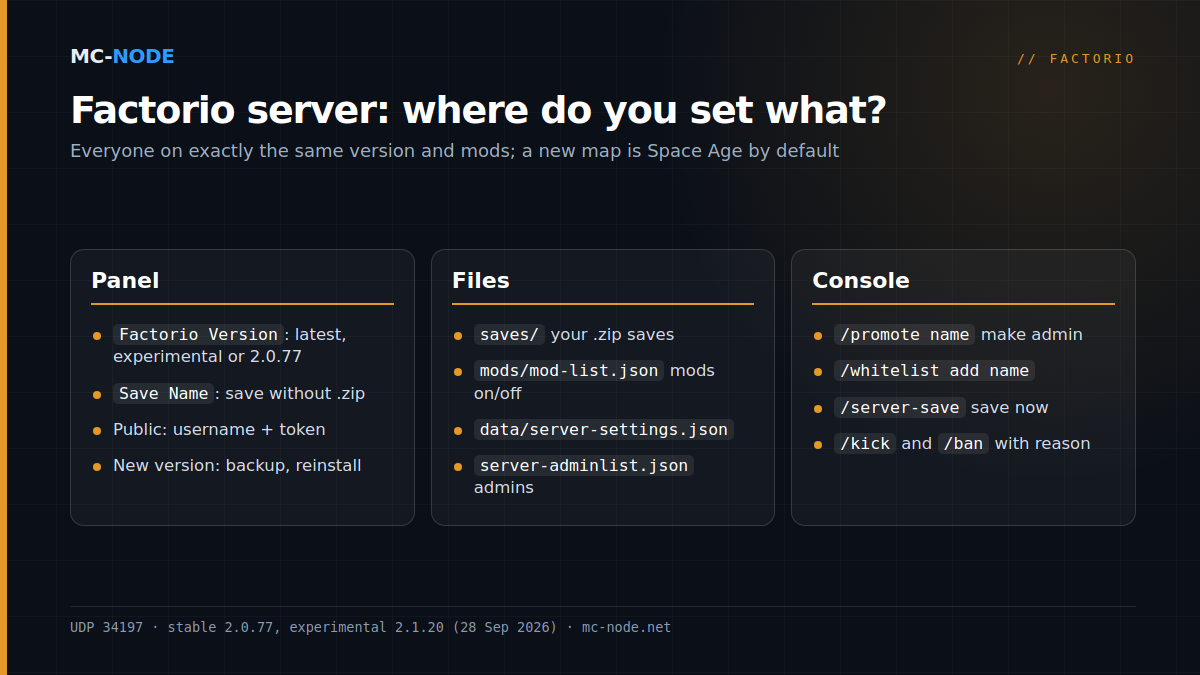
According to the wiki, all players and the server must have exactly the same version and mods. If someone is on the experimental branch in Steam (currently 2.1), the server has to be on experimental too. In our panel, you choose the version with the Factorio Version startup variable: latest (stable, default), experimental, or a fixed number such as 2.0.77. The server fetches that version during installation; simply restarting doesn't update it. So make a backup first and then reinstall, as described in Updating a Factorio server and managing savegames.
Space Age is on by default on a new map
Space Age is a paid expansion that consists of mods. The headless server already has them on board: space-age, quality and elevated-rails sit in the data/ folder. In our test with 2.0.77, the server enabled all of them in mods/mod-list.json when it created a new map. On our servers, the installation creates the first save automatically, so that one is a Space Age map too. Because everyone needs exactly the same mods and those mods belong to the paid expansion, everyone who plays along then needs Space Age as well.
Want to play without the expansion? In mods/mod-list.json, set the three mods to "enabled": false, choose a new name under Save Name and restart. If that save doesn't exist yet, the server creates it with only base.
Uploading your own save
Saves are ordinary .zip files. On your PC they're in the saves folder of %appdata%\Factorio (Windows), ~/.factorio (Linux) or ~/Library/Application Support/factorio (macOS). Using the file manager or SFTP, upload the zip to saves/, set Save Name to the file name without .zip and restart. That field only accepts letters, numbers, dashes and underscores, so rename My factory.zip to my-factory.zip first. If your save uses mods or Space Age, they need to be enabled on the server too. If you're self-hosting, you start the same save like this:
./bin/x64/factorio --start-server ./saves/my-factory.zip \
  --server-settings ./data/server-settings.json
server-settings.json: the settings that matter
The example data/server-settings.example.json from the headless package shows all the keys; on our servers it has already been turned into data/server-settings.json during installation. The most important ones, with their default values:
visibility:publicputs your server in the public list; that requires your factorio.com username and atoken.require_user_verification(true): only players with a valid factorio.com account.max_players(0= unlimited). Admins can still join a full server.autosave_interval(10 minutes) andautosave_slots(5).auto_pause(true): the world stands still when there are no players.allow_commands(admins-only): who may use Lua commands.
On our servers, the panel fills in part of this file on every start: name, description, maximum number of players, autosave, AFK kick, public visibility, username and token. If you change any of those in the file itself, it gets overwritten on a restart; so change them via the startup variables. Keys such as auto_pause and allow_commands, on the other hand, you edit in the file itself.
Adding mods
Mods are zip files named modname_version.zip. Put them in mods/, check in mods/mod-list.json that they're set to true and restart. Players need the same mods in the same version. Add them one at a time and make a backup first, so you can go back if something breaks.
Admins and commands
You make someone an admin with /promote name in the panel's console. The server records that in server-adminlist.json, in the same folder as factorio-current.log; you can also create that file yourself as a list: ["name1", "name2"]. Useful commands after that:
/kick name reason,/ban name reasonand/unban name/whitelist add name: only players on the list get in; an empty list lets everyone in/server-save: save now, handy before a restart/adminsand/players: who's an admin, who's online
Performance: UPS, processor and what RAM does and doesn't do
Factorio runs 60 updates per second, one tick every 16.7 milliseconds. If your factory gets too heavy, that UPS drops and the game slows down for everyone. Two things to know:
- Everyone does the maths. Factorio works in lockstep: every player simulates the entire world and only the actions go over the network. So a bigger server won't fix one player's slow PC.
- Not everything runs in parallel. Some parts are spread across multiple threads, but not all of them: according to Friday Facts #421, the electric network, for example, runs on a single thread, because more threads didn't make it any faster. So extra cores only go so far in rescuing a heavy factory.
Memory is rarely the problem. In our tests with 2.0.77, a fresh map without players used around 200 MB (base only) and 350 to 370 MB (Space Age). That grows as you build and explore more, but the entry-level Amateur (2 GB, €3.00) plan is plenty for a new factory. Beginner (4 GB, €6.00) gives breathing room for a large Space Age base or a hefty mod list. When not to upgrade: if your UPS drops because the factory itself has become too heavy, more RAM won't help.
All Factorio plans come with NVMe storage and DDoS protection, can be cancelled monthly and run in Hengelo, Frankfurt, Warsaw or Beauharnois; choose the location closest to your players. No server yet? See starting a Factorio server.
Frequently asked questions
Which port does a Factorio server use?
UDP port 34197 by default; Factorio only uses UDP. On a hosted server, you connect with the IP address and port the panel shows, because that's the port the server is given with --port.
Do all players need the same Factorio version?
Yes. The server and all players need exactly the same version and the same mods. If someone plays on the experimental branch, put the server on experimental as well, or move that player back to stable.
Can I play my single-player save on a Factorio server?
Yes. Upload the .zip from your saves folder to the saves folder on the server and start the server with that save; in our panel, set the Save Name variable to the file name without .zip. If the save uses mods or Space Age, they need to be enabled on the server too.
How much RAM does a Factorio server need?
Not much to begin with: in our tests, a fresh map on the headless server 2.0.77 used around 200 MB, or 350 to 370 MB with Space Age. It grows with your factory, but 2 GB is plenty for a new factory. For speed (UPS), the processor is what matters most.