How many players can a FiveM server handle? Slots, RAM and OneSync
"How many players can I fit on it?" is the first question with every FiveM server, and the answer in the shop (Small: 1 to 10, Large: up to 40) is guidance, not a hard limit. What your server can really handle depends on three things that have nothing to do with the slot count: how many scripts are running, how fast your database responds and how hard a single processor core can work. This article explains how those factors interact, what OneSync and the Cfx.re licence allow, and how to tell when it's time for a bigger package.
The slots: sv_maxclients and OneSync
You set the number of slots in server.cfg with sv_maxclients. Up to 32 players that simply works. Above that, OneSync has to be on: FiveM's synchronisation layer that decides which entities each player gets to see. With set onesync on you use OneSync Infinity, which no longer sends players, vehicles and objects outside a radius of around 424 units to your client and is therefore the foundation of every server above 32.
sv_maxclients 48
set onesync on
Then the rule many admins only discover when things go wrong: OneSync is free up to 48 slots. If you want more, your server's licence key has to be linked to an Element Club subscription from Cfx.re (Argentum or higher). Set sv_maxclients to 64 without that subscription and your server won't register properly and disappears from the server list. For almost all roleplay servers 48 is plenty; the big servers with a hundred-plus players pay for that subscription on top. The knowledge base explains how to enable OneSync and how to change the maximum number of players.
Why players aren't the biggest factor
FXServer runs its logic largely on one thread. Each player costs a little, but each script costs something on every tick, regardless of whether two or forty people are online. A server with 200 resources and 10 players is heavier than a server with 60 resources and 30 players. Then there's the database: frameworks like ESX and QBCore store something on every action, and one slow query blocks the whole server. That's why our packages list a script recommendation next to the player recommendation, and in practice that second number is more often the reason to upgrade.
The packages side by side
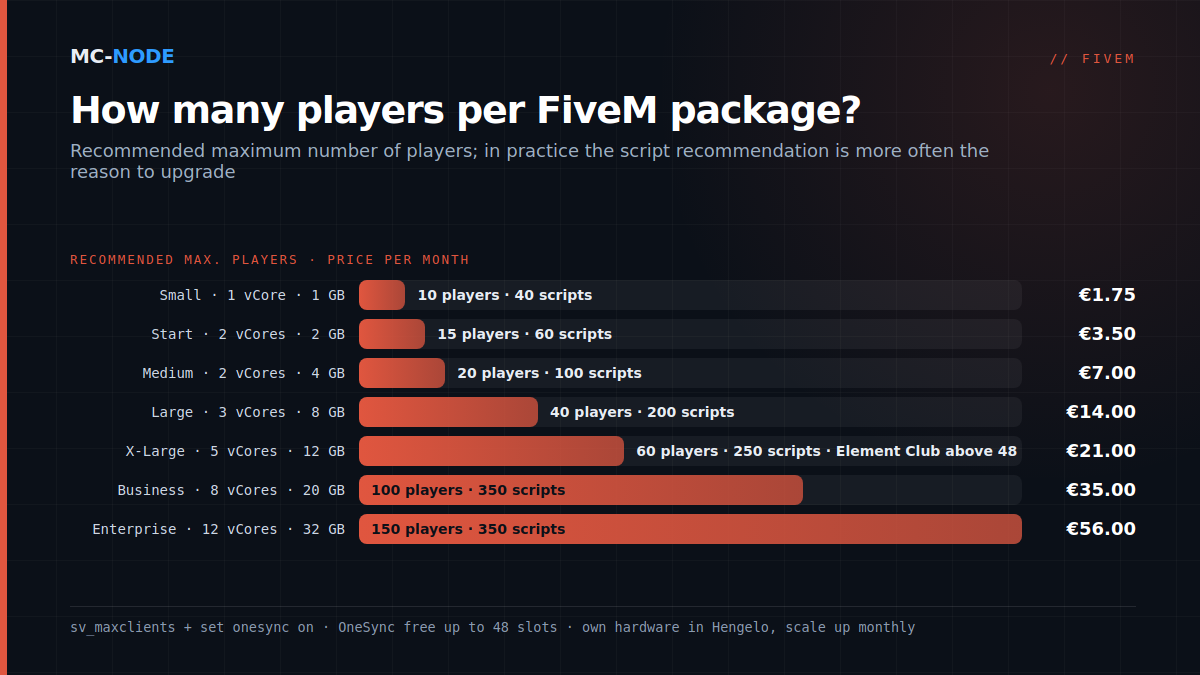
| Package | Recommended players | Recommended scripts | vCores / RAM | Per month |
|---|---|---|---|---|
| Small | 1 – 10 | 40 | 1 / 1 GB | €1.75 |
| Start | 1 – 15 | 60 | 2 / 2 GB | €3.50 |
| Medium | 1 – 20 | 100 | 2 / 4 GB | €7.00 |
| Large | 1 – 40 | 200 | 3 / 8 GB | €14.00 |
| X-Large | 1 – 60 | 250 | 5 / 12 GB | €21.00 |
| Business | 1 – 100 | 350 | 8 / 20 GB | €35.00 |
| Enterprise | 1 – 150 | 350 | 12 / 32 GB | €56.00 |
The recommendations assume an average roleplay server: a framework, a handful of MLOs, custom cars and the usual jobs. A vanilla server without a framework easily manages twenty players on Start; a server with thirty MLOs and three hundred cars is already close to the ceiling on Medium with ten people. All packages run on our own hardware with NVMe storage in Hengelo, with FiveM-specific DDoS protection, and can be scaled up monthly without reinstalling.
Where the memory goes
A bare FXServer with txAdmin uses a few hundred MB. After that, usage grows with the resources, not with the players: a framework with inventory, jobs and phone sits around 1.5 to 2 GB, and every big MLO or car pack adds hundreds of MB on top because the server keeps the streaming files in memory. A database on the same server (oxmysql with MariaDB) needs another 300 to 500 MB. So count on 2 GB as the base for a framework server, plus whatever content you add, and only then the number of players as a small item. That makes Small and Start the packages for vanilla or a light framework; Medium is the entry point for a real roleplay server.
How to tell you're at the limit
- Hitch warnings in the console: the server didn't finish a tick in time. Now and then is normal, every minute is not.
- txAdmin's resource monitor shows for each resource how much time it costs per tick. One script above a few milliseconds is suspect; a bigger package won't fix that, a better script will.
- CPU at 100% on one core while the other cores do nothing: that is FXServer's thread being full. More vCores only help so much; less work per tick always helps.
- Memory structurally above 85%: here a bigger package does help, immediately.
- Slow database: players "hang" at the inventory or when logging in. Look at the queries first, then at the hardware.
How to tell those causes apart is covered in detail in fixing FiveM server lag.
An honest rule of thumb
- Count your resources. Under 60: Start. Up to 100: Medium. Up to 200: Large.
- Look at your content. Lots of MLOs and car packs: one package up.
- Only then look at the number of players you expect, and keep a 30% margin for your peak evening.
- Set
sv_maxclientsto what your server can handle, not to the maximum of your package. A full server that stutters costs you more players than a queue does.
Start small: you can upgrade any month and it takes a few minutes, whereas a package that is too big costs money for months for cores that do nothing. What's in server.cfg, and which lines actually matter, is in server.cfg explained; with a brand-new server you start at I've bought a FiveM server, what now?.