How to make a Garry's Mod DarkRP server: jobs, addons, 64-bit
You make a DarkRP server in four steps: set the gamemode to darkrp, load DarkRP and your addons via a Workshop collection, put your own jobs and settings in the darkrpmodification addon (never in DarkRP itself) and make yourself admin with FAdmin. Below you'll find each step with the real file names, plus what the 64-bit update to Garry's Mod from September 2026 does and doesn't mean for your server.
What you need
DarkRP is FPtje's roleplay gamemode, built on sandbox: players choose a job, earn a salary and buy things via the F4 menu. Besides a Garry's Mod server (Steam app 4020), you need:
- A GSLT (Game Server Login Token). The Facepunch wiki calls it mandatory; without a token, your server drops down the server list. You create it on Steam's game server account page with App ID
4000, one per server. In our panel you paste it into the Steam Account Token startup variable. - A Workshop collection, public or unlisted. The server can't read a private collection.
- The darkrpmodification addon from GitHub, for everything you customise yourself.
When is it not worth it? If you just want to build and mess around with a few friends, sandbox is less work. DarkRP only pays off if you want to enforce rules and have time to moderate.
Step 1: gamemode, map and Workshop collection
According to the README, you install DarkRP via git or via the Workshop (ID 248302805). The easiest way: add DarkRP to your collection. Then fill in these startup variables in the panel:
- Gamemode:
darkrp, the name of the gamemode folder. - Workshop-collectie (Workshop collection): the ID of your collection. The start command passes it as
+host_workshop_collection; the server downloads the collection on every start, including nested collections. - Map: the file name of an RP map without
.bsp. If the map is in your collection, the name is usually in the Workshop description.
Players get the map and DarkRP automatically if they come from the server's collection. Other addons with content, such as models or sounds, you make available with resource.AddWorkshop("ID") in a Lua file; on our servers, garrysmod/lua/autorun/server/workshop.lua is already there for this. Use individual addon IDs there, not a collection ID, and skip addons that only contain Lua: those are sent to players via a different system. An upcoming update adds another option: individual Workshop IDs in cfg/srcds_workshop_ids.txt. As of late September, that feature is only in the dev branch, not in the regular server version. More about addons in the knowledge base: Installing Workshop addons and gamemodes.
Step 2: darkrpmodification, never the core
The most important rule is spelled out in the README: "don't touch DarkRP's core files". Whatever you change in gamemodes/darkrp/ is lost with the next DarkRP update. That's what darkrpmodification is for: download the zip from GitHub and put its contents in a folder of its own under garrysmod/addons/, via the file manager or SFTP. That folder contains only text files:
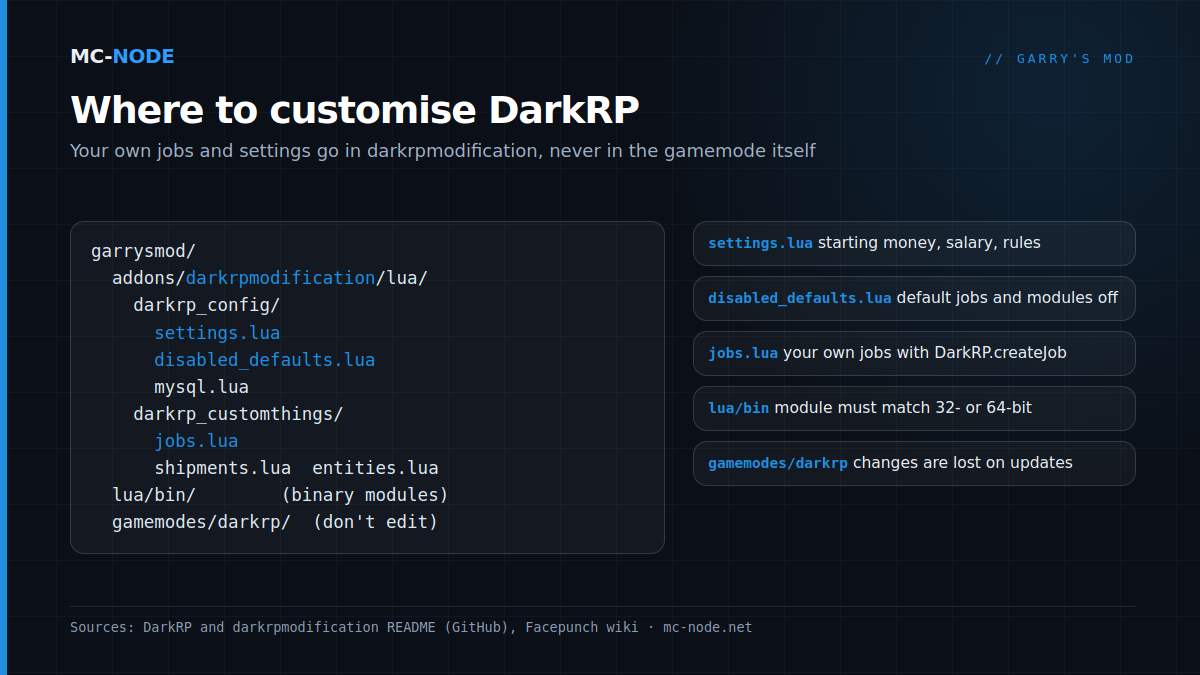
lua/darkrp_config/:settings.lua(the main settings),disabled_defaults.lua,mysql.luaandlicenseweapons.lua.lua/darkrp_customthings/:jobs.lua,shipments.lua,entities.luaand files for agendas, ammo, door groups, group chats and vehicles.lua/darkrp_language/for translations andlua/darkrp_modules/for your own modules.
Step 3: your own jobs, shipments and entities
A job is one block in jobs.lua, in the same format as DarkRP's default jobs:
TEAM_MECHANIC = DarkRP.createJob("Mechanic", {
    color = Color(230, 140, 20, 255),
    model = {"models/player/Group01/Male_02.mdl"},
    description = [[Repairs cars in the garage.]],
    weapons = {},
    command = "mechanic",
    max = 2,
    salary = GAMEMODE.Config.normalsalary,
    admin = 0,
    vote = false,
    hasLicense = false,
    category = "Citizens",
})
If you want to change a default job, such as the police, first disable it in disabled_defaults.lua and then copy it to jobs.lua. You do the same with weapons and shipments (shipments.lua) and with entities such as the money printer (entities.lua). Restart after every change and check the console: a forgotten comma causes a Lua error there, and your job then won't show up in the F4 menu.
Step 4: settings and modules
settings.lua contains all the dials for the economy and the rules, with their default values, such as GM.Config.startingmoney = 500 and GM.Config.normalsalary = 45. Only change what you really want to be different. In disabled_defaults.lua you switch whole modules on or off: true means off, false means on. Hunger (hungermod) and the AFK module are off by default; if you want players to have to eat, set hungermod to false.
Making yourself admin with FAdmin
DarkRP has its own admin system, FAdmin, which is enabled by default. To make yourself superadmin, join the server, then go to the panel's console and type fadmin setroot YourName; after that, the commands also work in chat, with a / in front. If you'd rather use a different admin system, disable the fadmin module in disabled_defaults.lua, so you don't end up with two systems running side by side.
Database: SQLite is enough
By default, DarkRP stores money and data in the built-in SQLite database garrysmod/sv.db. For a single server that's fine. You only need MySQL (in mysql.lua, with the MySQLOO module) if several servers need to share the same data, and that's also where the 64-bit question comes in.
64-bit: what the September update does and doesn't mean
On 16 September, Facepunch released 64-bit versions of the client, the dedicated server and Hammer. According to the patch notes, this is about Windows; the reason is a lower chance of crashes caused by a full 32-bit address space on heavy servers with lots of addons. For Linux, the wiki still lists 64-bit as part of the x86-64 beta branch. On our panel, the server starts with srcds_run from the default branch.
For regular Lua addons this makes no difference. It only matters for binary modules in garrysmod/lua/bin/, such as MySQLOO: they must match your server's architecture. A 32-bit Linux server loads gmsv_name_linux.dll, a 64-bit Linux server gmsv_name_linux64.dll. Not sure which you have? Type lua_run print(jit.os, jit.arch) in the console: x86 is 32-bit, x64 is 64-bit. Then download the module that matches and test it first, before you let your players on.
Slots, RAM and plan
You set the number of slots in the panel with Max Players (default 32, maximum 128) and the tickrate with Tickrate (default 66). For memory there's an honest limit: a 32-bit server process can address at most 4 GB of memory. So more RAM than that won't help a single 32-bit server.
- Amateur (2 GB, €3.00): sandbox or a small DarkRP test.
- Beginner (4 GB, €6.00): a DarkRP server with a normal collection.
- Traveller (6 GB, €9.00): headroom for a heavy collection that's pushing those 4 GB.
If you choose a bigger plan, it's mainly for the storage: from Researcher (10 GB, €15.00) upwards you get 60 GB of NVMe instead of 40 GB. For a single 32-bit server, more RAM does little.
All Garry's Mod plans come with NVMe storage and DDoS protection, can be cancelled monthly and run in Hengelo, Frankfurt, Warsaw or Beauharnois. No server yet? See starting a Garry's Mod server.
Frequently asked questions
How do I make a DarkRP server?
Set the gamemode to darkrp, load DarkRP (Workshop ID 248302805) and your addons via a public or unlisted Workshop collection, and add a GSLT to your launch parameters. Your own jobs and settings go in the darkrpmodification addon in garrysmod/addons, never in DarkRP's own files.
Where do I edit DarkRP jobs?
In lua/darkrp_customthings/jobs.lua of the darkrpmodification addon, with DarkRP.createJob. To change a default job, first disable it in lua/darkrp_config/disabled_defaults.lua and then copy it to jobs.lua.
Do I need a GSLT for a Garry's Mod server?
Yes. The Facepunch wiki calls the Game Server Login Token mandatory; servers without a token drop a long way down the server list. You create it on Steam with App ID 4000, one per server, and pass it with +sv_setsteamaccount.
Does my addon work on the 64-bit version of Garry's Mod?
Regular Lua addons work on both 32-bit and 64-bit. Only binary modules in garrysmod/lua/bin have to match the architecture: _linux.dll for 32-bit Linux, _linux64.dll for 64-bit. Run lua_run print(jit.os, jit.arch) in the console to see which one your server is running.