Minecraft Java vs Bedrock: differences and which server you need
Minecraft Java and Minecraft Bedrock are two versions of the same game: the same blocks and the same updates, but each with its own network protocol, so they don't play together out of the box. Java only runs on PC (Windows, macOS and Linux) and is the edition of mods and big plugin servers. Bedrock runs on Xbox, PlayStation, Switch, phone, tablet and Windows, and all those devices play together. So which server you need depends on what your friends play on: if everyone's on PC, a Java server; if there's a console or phone in the mix, a Bedrock server or a Java server with Geyser.
That choice is about to matter to a lot more people. On 27 October, Mojang is releasing Minecraft for the Nintendo Switch 2, with a digital upgrade path for anyone who already owns the game on the original Switch. That version is Bedrock too.
Minecraft Java vs Bedrock in short: one game, two codebases
Mojang develops the two editions side by side and releases new content at the same time. The latest drop, Wilderness Bound, came out on 15 September 2026 as Java 26.3 and as Bedrock 26.50. What you build and come across is therefore largely the same. The differences are underneath: a separate network protocol, separate server software, a different way of extending the game and small differences in how the game does its calculations. As a result, a Java player can't get onto a Bedrock server and vice versa, unless the server runs a translator.
On PC you don't have to choose: Minecraft: Java & Bedrock Edition for PC includes both editions. On Mac and Linux only Java runs, and if you have "Minecraft for Windows", you're playing Bedrock.
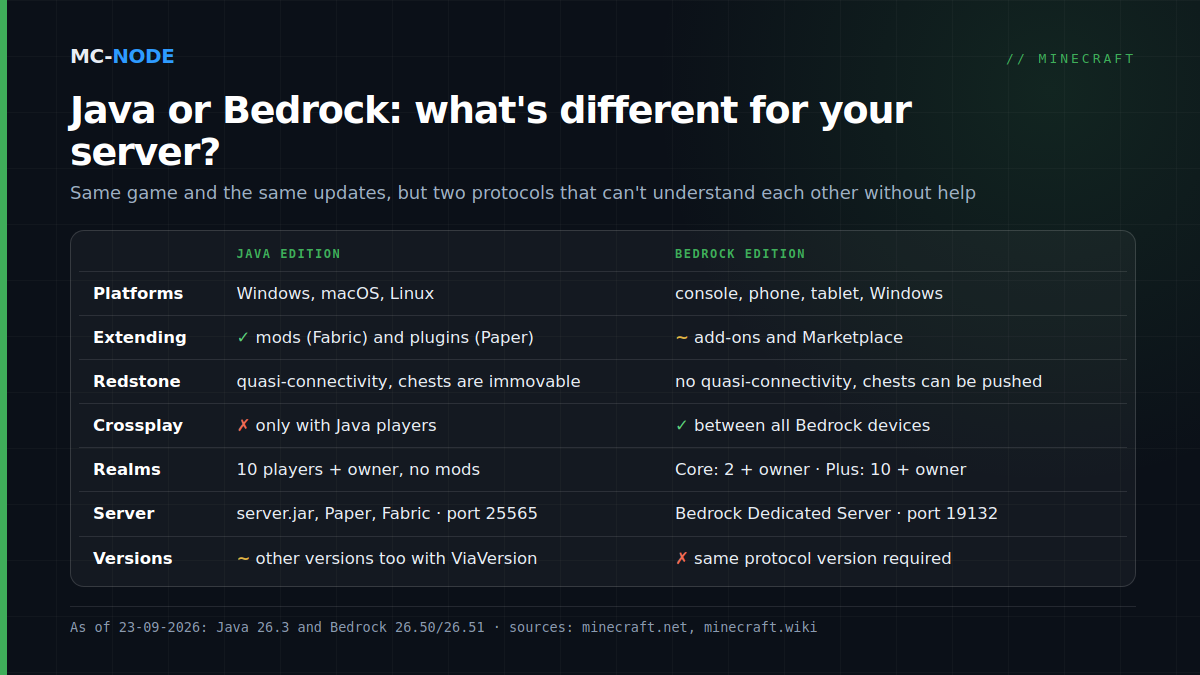
Java and Bedrock side by side
| Java Edition | Bedrock Edition | |
|---|---|---|
| Platforms | Windows, macOS, Linux | Xbox, PlayStation, Switch (from 27 October also native on Switch 2), Android, iOS, Windows |
| Purchase | On PC in the Java & Bedrock Edition for PC bundle | On Windows in the same bundle; on console and phone in that platform's store |
| Extending | Mods (for example via Fabric) and plugins (via Paper) | Add-ons (behavior packs and resource packs) and the Marketplace; no Java mods |
| Redstone | Quasi-connectivity; pistons don't push chests, furnaces or hoppers | No quasi-connectivity; pistons do push chests, with a fixed start delay of 2 ticks |
| Combat | Attack cooldown: clicking before the attack has charged does less damage | No attack cooldown |
| Crossplay | Only with other Java players | Between all Bedrock devices |
| Realms | Java Realms: 10 players plus the owner, no mods or plugins | Realms Core: 2 players plus the owner; Realms Plus: 10 plus the owner |
| Server software | Official server.jar, Paper, Fabric; default port 25565 | Bedrock Dedicated Server; default port 19132 |
| Versions | Other client versions can join with ViaVersion | Server and player must have the same protocol version |
The redstone differences look like details, but you'll notice them as soon as you copy a farm from YouTube: a design that relies on quasi-connectivity or on immovable chests often won't work on the other edition. So always check which edition a tutorial was made for.
Which server do you need?
Everyone plays on PC: get a Java server
If your whole group plays on a PC or Mac, Java is the logical choice. You get the widest choice of server software: Paper for plugins such as EssentialsX and LuckPerms, Fabric or another mod loader for modpacks. Which one suits you is covered in Paper, Spigot, Purpur or vanilla. A Java server at MC-Node starts at €0.50 per month.
Someone on console or phone is joining: Bedrock, or Java with Geyser
As soon as someone plays on Xbox, PlayStation, Switch or phone, you have two routes:
- A Bedrock server if (almost) everyone plays Bedrock. You run the official Bedrock Dedicated Server and extend it with add-ons. PC players join with the Bedrock version on Windows. A Bedrock server costs from €2.50 per month with us.
- A Java server with Geyser and Floodgate if the core of your group plays Java or you want plugins. Geyser translates Bedrock traffic to Java; Floodgate lets Bedrock players in without a paid Java account. How to set that up is explained in Java and Bedrock together on one server. One caveat: this doesn't work on a server with heavy content mods, because the Bedrock client doesn't know those new blocks and items.
Console players can't type in a server address
On Xbox, PlayStation and Switch you can't add your own server in Minecraft; you only see the featured servers, Realms and your friends' worlds. So console players can only reach your server through a workaround, such as a custom DNS setting (BedrockConnect) or a separate account that puts your server in their friends list (MCXboxBroadcast). Both methods are explained per console in How to join a Minecraft server on PS5, Xbox and Switch. The Switch 2 announcement says nothing about this; for now, assume the same workaround will be needed there.
Versions: server and player have to match
The situation on 23 September 2026:
- Java 26.3, released on 15 September 2026. The server runs on Java 25; see which Java version your server needs.
- Bedrock 26.50 (15 September) and hotfix 26.51 (15 or 16 September, depending on the platform). Both use protocol version 2193 and so play together; the Switch didn't get the hotfix and stays on 26.50. The matching Bedrock Dedicated Server is 1.26.51.1.
The rule is the same for both editions: a player and a server with the same protocol version fit together; otherwise the player can't get in. Java has a way around that. With ViaVersion, players on a newer version can join an older server, and with ViaBackwards (on top of ViaVersion), players on an older version can join a newer server. The official Bedrock server has no such plugins: there, you set the server to the same version as your players.
If you run Geyser, both rules apply. Geyser currently supports Bedrock 26.30 up to and including 26.51 and presents itself to the Java side as a 26.2 client. If your Java server is already on 26.3, you need ViaVersion and ViaBackwards, or you wait until Geyser updates. What else 26.3 means for your server is covered in Minecraft 26.3 and your server.
Put 27 October in your calendar: according to the schedule, Bedrock 26.60 comes out that day, together with the Switch 2 version, and server and players have to match again. On a Bedrock server, you choose the version in our panel with the Bedrock Version startup variable; it's applied when you reinstall, and your worlds stay where they are. Which version your server is running now is explained in which Minecraft version is my server running? How the previous Bedrock update played out, and what to do if players are locked out, is covered in Bedrock 26.50 and 26.51.
When you don't need your own server
Let's be honest: for a small group, Realms is often enough. Realms is Mojang's own server service, which you start from within the game. There's nothing to install, console players get in without a DNS workaround, and a Realm always runs the latest version, so you're never behind your players.
The limits are strict, though. A Java Realm allows ten players besides the owner, and no mods or plugins. On Bedrock, Realms Core allows two besides the owner and Realms Plus ten. Java players can't join a Bedrock Realm and vice versa, so for a mixed group Realms is out. And if two or three of you are sitting in front of the same console, you don't even need that: Bedrock on console has split-screen for up to four players on one screen.
Your own server makes sense as soon as you expect more than ten players at once, want plugins or mods, want Java and Bedrock players to play together, or want to decide for yourself when to update. The full trade-off is in Minecraft Realms or your own server.
Both server types at MC-Node
At MC-Node you can run either: a Java server from €0.50 per month or a Bedrock server from €2.50. They run on our own hardware with NVMe storage in the Previder data centre in Hengelo, with DDoS protection included, and you manage them through a game panel with console, file manager, backups and startup variables. Everything can be cancelled monthly.
Frequently asked questions
Can I play on a Java server with Bedrock?
Only if the Java server runs Geyser. Geyser translates Bedrock traffic to Java, and with Floodgate added you don't need a paid Java account as a Bedrock player. Without Geyser it isn't possible, because the two editions use different network protocols.
Do I get Java or Bedrock when I buy Minecraft for PC?
Both: Minecraft: Java & Bedrock Edition for PC includes both editions. On Windows you can launch either one; on Mac and Linux only Java runs. If you have 'Minecraft for Windows', that's the Bedrock version.
Which Minecraft version is coming to the Nintendo Switch 2?
Bedrock Edition. The native Switch 2 version comes out on 27 October 2026, and anyone who already has Minecraft on the original Switch gets a digital upgrade path. So Switch 2 players play together with other Bedrock players, on Bedrock servers or on Java servers with Geyser.
Does my Minecraft version have to match the server's?
Yes, player and server must have the same protocol version. On a Java server you can stretch that with ViaVersion and ViaBackwards; on a Bedrock server you set the server version to match your players' version.