Valheim dedicated server settings: presets, modifiers, -setkey
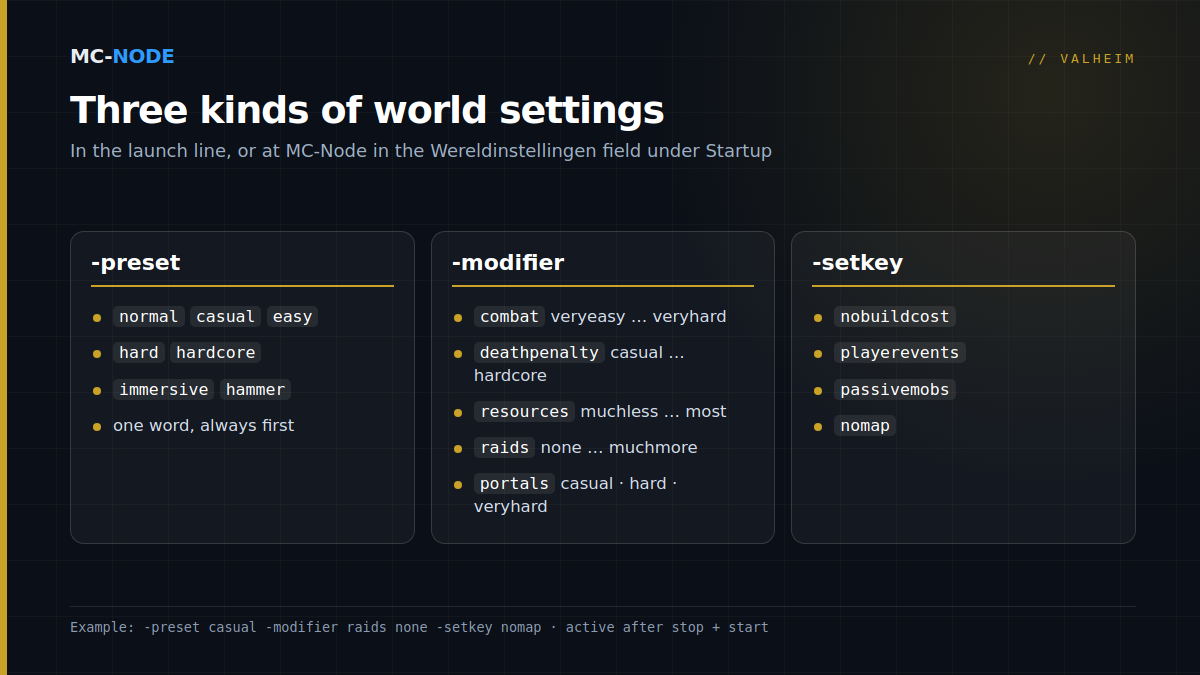
A Valheim server has no settings file: everything you configure is passed as a launch parameter. The basics are -name, -world, -password and -public. You set the difficulty and rules of your world with three parameters for the World Modifiers: -preset, -modifier and -setkey. These are built-in game options, not mods, so they also work on a crossplay server with Xbox, PS5 and Switch 2 players. At MC-Node you type them into the Wereldinstellingen (world settings) field under Startup; after a stop and start, they're active.
There's no config file: everything goes in the launch line
If you're coming from Minecraft or Project Zomboid, you'll go looking for a server.properties or an ini file. Valheim works differently. In Iron Gate's official manual, you edit the launch line in start_headless_server.bat (Windows) or start_server.sh (Linux), and every setting there is a parameter with a dash in front of it. On a hosted Linux server, that line looks roughly like this:
./valheim_server.x86_64 -nographics -batchmode -name "Viking Crew" -port 2456 -world "Dedicated" -password "skal2026" -public 1 -saveinterval 1800 -backups 4 -backupshort 7200 -backuplong 43200 -preset casual -modifier raids less -crossplayThe upshot: a change only takes effect after a restart. After every change, check the console to make sure the server starts up cleanly before you let your group log in.
The basic parameters and their defaults
| Parameter | What it does | Default |
|---|---|---|
-name | Name in the server list | – |
-world | Which world the server loads; if that name doesn't exist yet, it creates a new world | – |
-password | Password to join | – |
-public | 1 = visible in the server list, 0 = not listed, join via address or join code | 1 |
-port | Game port; the server also uses the port after it | 2456 |
-crossplay | Runs via PlayFab, so players on all platforms can join | not set |
-saveinterval | How often the world is saved, in seconds | 1800 (30 min) |
-backups | Number of automatic backups Valheim keeps by itself | 4 |
-backupshort / -backuplong | Time between the first backups and between the later ones, in seconds | 7200 / 43200 |
The password must be at least five characters long and can't appear in the server name; that's what the start script Iron Gate ships with the server says. With a password that's too short, the server won't start. On Linux, worlds and the lists of admins and bans are stored in .config/unity3d/IronGate/Valheim/ by default; -savedir moves that folder, but on a rented server you're best off leaving it alone.
Presets: one word for a whole difficulty level
World Modifiers arrived in August 2023 with the Hildir's Request update (patch 0.217.14). Since patch 0.217.22 from October 2023, you can also set them on a dedicated server. A preset moves a whole set of sliders in one go. The manual lists seven valid values: normal, casual, easy, hard, hardcore, immersive and hammer.
Exactly which sliders a preset moves isn't in the manual. The quickest way to find out: when you pick a world in the game, click World Modifiers, choose the preset and watch which settings change along with it. hammer is the building mode: building with the hammer costs no materials. In the 1.0 FAQ, Iron Gate writes that this mode counts as a temporary cheat and blocks certain achievements.
Individual world modifiers: five sliders with fixed values
With -modifier <type> <value> you set a single slider, and you can add several in a row. If you combine them with a preset, put the preset first: according to the manual, modifiers belong after the preset. The names and values below come from the official manual; the explanation of what they do comes from the Valheim Wiki.
- combat: veryeasy, easy, hard, veryhard. How much damage you and enemies deal; on veryhard, enemies deal double damage according to the wiki.
- deathpenalty: casual, veryeasy, easy, hard, hardcore. On casual you keep the gear you're wearing when you die; on hardcore you lose everything, including your skills.
- resources: muchless, less, more, muchmore, most. From 0.5 to 3 times the normal drops; fish, trophies and boss drops don't count.
- raids: none, muchless, less, more, muchmore. How often enemies attack your base.
- portals: casual (everything can go through a portal, including ore and metal), hard (no portals while a boss is active) and veryhard (no portals at all).
Normal is the default for every type. You don't type it: you simply leave that modifier out.
Setkeys: four switches
-setkey sets an on/off option. The manual lists four:
nobuildcost: build without materials. You still have to discover recipes.playerevents: raids depend on each player's own progress, not on which bosses have been defeated on the server. Handy when newcomers join a group that's already far along.passivemobs: enemies only attack after you've attacked them first.nomap: no map and no minimap.
On an existing world it works, with two caveats
You don't have to start over. Modifiers are stored with the world as so-called global keys, and since patch 0.217.22 admins can also view and change them in the F5 console with setworldpreset, setworldmodifier, setkey, removekey, resetworldkeys and listkeys. You become an admin via adminlist.txt in the folder mentioned above; restart the server after a change.
- After removing a setting, check that it's really gone. The keys live in the world, and Iron Gate doesn't describe what happens when you remove a line. So use
listkeysto see what's still active. If it's still there, start once with-resetmodifiers(also since 0.217.22) or useresetworldkeys. - Since 1.0, Valheim has achievements. Anyone in your group who collects achievements will notice when you turn on hammer. Talk it over beforehand.
Either way, make a backup of your world first; how to do that in the panel is explained in How do I make a backup?
Which combination suits your group?
| Group | In the Wereldinstellingen field | What you'll notice |
|---|---|---|
| Friends with little time to play | -modifier portals casual -modifier raids less | No more boat trips for ore, fewer interruptions |
| Newcomers in an advanced group | -modifier deathpenalty casual -setkey playerevents | Dying costs less, raids match your own progress |
| Builders and creative servers | -preset hammer | Building without materials, certain achievements blocked |
| Experienced group looking for a challenge | -modifier combat hard -setkey nomap | Stronger enemies and navigating without a map |
Start with one or two changes and play with them for an evening. A world that suddenly gets much easier or harder can quickly feel like a different game to your group.
How to set it in the MC-Node panel
- Make a backup of your server.
- Open your server on panel.mc-node.net and go to the Startup tab.
- Enter your line under Wereldinstellingen (world settings), for example
-preset casual -modifier raids none. The field accepts letters, numbers, spaces and dashes, up to 191 characters; you don't need quotation marks. - Stop the server and start it again.
- Log in as an admin and use
listkeysin the F5 console to check what's active.
The same tab has the other parameters as separate fields: Server Name, Server Password (5 to 20 characters), World Name, Public Server, Enable Crossplay (on by default in our Valheim template), the save interval and the three backup settings. The panel takes care of the port itself: you get a game port and the port after it. No server yet? A Valheim server at MC-Node starts at €3.00 per month, runs on NVMe storage with DDoS protection and can be cancelled monthly.
When you don't need any of this
If you just want the game the way Iron Gate intended it, leave Wereldinstellingen empty; that's normal. And if you're after something no modifier can do, such as new items or more than ten players, these parameters won't help. New content requires mods, and those don't work for console players; for that, read Valheim mods on your server with BepInEx. How crossplay works in more detail, join code and all, is covered in our crossplay article.
Frequently asked questions
Where can I find my Valheim server's config file?
There isn't one. A Valheim server gets all its settings as launch parameters, such as -name, -world, -password and -public. At MC-Node, these are fields in the Startup tab of the game panel, and you type world modifiers into the Wereldinstellingen (world settings) field.
Can I change world modifiers on an existing Valheim world?
Yes. Add -preset, -modifier or -setkey to the launch line and restart the server, or use setworldmodifier in the F5 console as an admin. The settings are saved with the world; to go back to the defaults, use -resetmodifiers or resetworldkeys. Make a backup first.
Do world modifiers work with crossplay?
Yes. World modifiers are built-in Valheim options, not mods, so players on Xbox, PS5 or Switch 2 don't need to install anything. Mods, on the other hand, don't work for console players.
Can I allow more than 10 players on my Valheim server?
Not with a setting. Iron Gate describes Valheim 1.0 as a game for 1 to 10 players, and the official list of launch parameters has no option for a higher maximum.