Windows VPS: licence, RDP and when Linux is the smarter choice
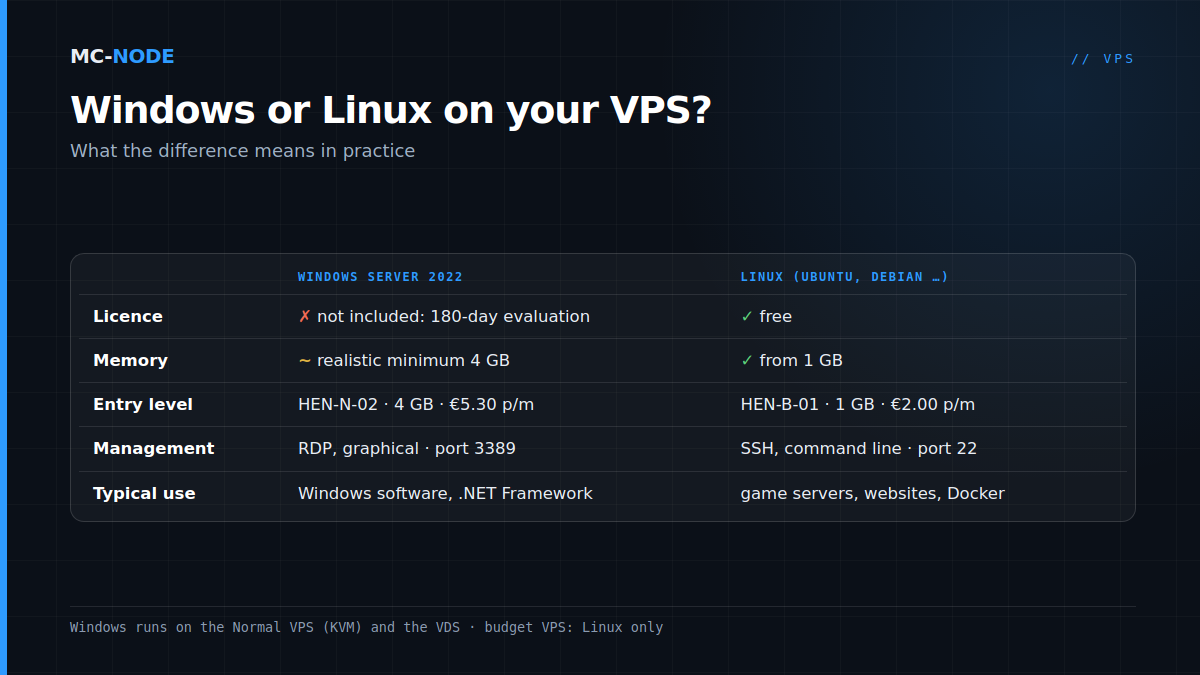
At MC-Node you get a Windows VPS on the Normal line: there you can choose Windows Server 2022 as the operating system, and from HEN-N-02 with 4 GB for €5.30 per month it runs comfortably. A Windows licence isn't included. Without your own key, Windows Server runs as a 180-day evaluation version, which you can extend a limited number of times; after that you activate a licence. You work on the server via Remote Desktop (RDP, port 3389). And to be honest: for game servers, websites and Docker, Linux is usually cheaper and simpler.
Windows runs on the Normal VPS and the VDS, not on budget
Our cheapest VPSes, the budget line from €2.00, are containers that share the host's kernel. Only Linux runs on those. Windows needs a full virtual machine, and you get one with the Normal VPS (KVM) and with the VDS. The reason is explained in KVM VPS explained.
The Normal line runs on AMD EPYC 7443P processors with DDR4 memory and NVMe storage, on our own hardware in the Previder data centre in Hengelo. If you want to switch operating systems later, you reinstall via the VPS panel (how to change your operating system); that does wipe everything on the VPS.
The licence: 180 days of evaluation, then your own key
No Windows licence comes with the VPS. Without a key, Windows Server 2022 runs as the evaluation edition, which according to Microsoft lasts 180 days. You can check whether you have an evaluation version in a command prompt as administrator: with the first command the edition name contains "Eval", with the second the output shows EVAL.
DISM /online /Get-CurrentEdition
slmgr.vbs /dlv
Extending with slmgr /rearm
With slmgr.vbs /rearm you reset the activation timers; restart the server afterwards. You can only do this a limited number of times. slmgr.vbs /dlv shows how many you have left under rearm count. The steps are in How do I activate my Windows licence?. Treat rearming as test time, not as a way to keep using Windows without a licence.
Don't let the period run out. Microsoft doesn't describe the exact behaviour after that in its documentation, but administrators report that an expired evaluation keeps shutting itself down.
Converting to a full version
With a product key you can convert the evaluation without reinstalling. First check which editions are available:
DISM /online /Get-TargetEditions
DISM /online /Set-Edition:ServerStandard /ProductKey:XXXXX-XXXXX-XXXXX-XXXXX-XXXXX /AcceptEula
Two pitfalls from Microsoft's documentation: a Datacenter evaluation can only be converted to Datacenter, not to Standard. And an evaluation with the desktop (Desktop Experience) never becomes a Core version. If the edition you want isn't in the /Get-TargetEditions list, you'll need a clean installation. So check that before you buy a key.
Buy a valid licence from an authorised reseller and ask them whether it's suitable for use on a rented virtual server; the terms differ per licence type. Good to know in 2026: mainstream support for Windows Server 2022 ends in October 2026, but security updates keep coming until October 2031.
Count on at least 4 GB of memory
For Windows Server 2022, Microsoft lists a minimum of 2 GB of memory for the version with the desktop (1 GB for Server Core) and 32 GB of disk space (an absolute minimum, according to Microsoft). Those are installation requirements, not working advice: for its successor, Windows Server 2025, Microsoft already recommends 4 GB for the desktop version. With an RDP session, a browser and your own program running, 2 GB leaves you very little headroom. Our advice:
- HEN-N-01 (2 vCores, 2 GB, 40 GB NVMe, €3.40): installs, but is too tight to work on comfortably.
- HEN-N-02 (2 vCores, 4 GB, 60 GB NVMe, €5.30): the starting point for one light application that runs 24/7.
- HEN-N-03 (4 vCores, 8 GB, 80 GB NVMe, €9.50): for a database or a few programs side by side.
- HEN-N-04 (4 vCores, 12 GB, 100 GB NVMe, €13.40) and up: for heavier software.
You can scale up later from the client area; everything can be cancelled monthly and DDoS protection is included in the price.
Connecting via Remote Desktop (RDP)
By default, RDP listens on port 3389 (TCP and UDP). You need your VPS's IP address and the login details from your client area.
- From Windows: type remote desktop or
mstscin the Start menu, enter the IP address and then your username and password. - From macOS, iPhone, iPad or Android: use Microsoft's Windows App. To connect to a standalone PC or server, you don't need to sign in to it with a Microsoft account.
On the first connection you'll get a warning that the identity of the server can't be verified. With a fresh server that's normal: check the IP address and continue. The steps are in How do I connect with Remote Desktop?.
Securing RDP: four measures for day one
An RDP port that's open to the entire internet attracts automated login attempts, and DDoS protection doesn't help against those:
- Use a long, unique password. According to Microsoft, the built-in Administrator account is exempt from the normal account lockout, so endless guessing isn't automatically slowed down.
- Keep Network Level Authentication (NLA) on. With NLA you authenticate before a session is set up. Microsoft recommends leaving it enabled.
- Install updates. Run Windows Update right after installation and every month after that.
Open RDP only to your own IP address. In PowerShell (as administrator):
Set-NetFirewallRule -Name RemoteDesktop-UserMode-In-* -RemoteAddress 203.0.113.25The name with * covers the default rules for RDP over TCP and UDP. Replace the example address with your own public IP. If your home IP changes now and then, specify several addresses or a range; if you lock yourself out, there's still the console in the VPS panel.
Changing the port number (registry value PortNumber) mainly cuts down the noise in your logs and doesn't replace any of these measures. If you do it, create a firewall rule for the new port first, or you'll lock yourself out.
When Linux is the smarter choice
For many popular uses, Windows is a detour:
- Game servers. According to its own documentation, Pterodactyl, the basis of our game panel, doesn't run its Wings service on Windows (see Pterodactyl on your own VPS). For a server for your group, a game server package is often cheaper and easier (VPS or game server).
- Websites. A web stack with nginx or Apache, PHP and MariaDB is at home on Linux, and web hosting is often simpler still (web hosting or VPS). An ASP.NET app on modern .NET runs on Linux too; only the old .NET Framework, for example with Web Forms, is tied to Windows.
- Docker. According to Microsoft, Linux containers can't run directly on Windows; that requires an extra virtualisation layer with Hyper-V. On a VPS, which is itself a virtual machine, that's a detour; on Linux you simply start a container with
docker run. - Price. A Discord bot or a small script on Linux fits on the €2.00 budget VPS with 1 GB. In practice, Windows needs at least the €5.30 package, plus a licence (see also what you get for €2 to €10).
When Windows is the right choice
Choose a Windows VPS if you run software that only exists for Windows and has to keep running 24/7: a Windows program with its own server component, an older business application on .NET Framework, or a tool you want to control from anywhere via RDP. It's also a tidy solution for a Windows test environment separate from your own PC, which you simply cancel again after a month.
When not to: if you're looking for a PC in the cloud to game or edit video on, because our VPS packages don't include a graphics card. And if you're only choosing Windows because you don't know Linux: a Linux VPS with a good guide is quicker to learn than you think, and saves you the licence.
Frequently asked questions
Does a Windows VPS from MC-Node include a Windows licence?
No. Without your own key, Windows Server 2022 runs as a 180-day evaluation version, which you can extend a limited number of times with slmgr /rearm. After that, you convert it to a full version with DISM /Set-Edition and a valid product key.
How much RAM does a Windows VPS need?
For Windows Server 2022 with the desktop, Microsoft lists 2 GB as the minimum, but that's an installation requirement. To work comfortably, 4 GB is the realistic lower limit; at MC-Node that's the HEN-N-02 for €5.30 per month.
How do I connect to my Windows VPS?
Via Remote Desktop (RDP), which uses port 3389 by default. On Windows you start mstsc; on macOS, iOS and Android you use Microsoft's Windows App. You enter your VPS's IP address and log in with the details from your client area.
What happens when the Windows Server evaluation period expires?
Then Windows is no longer activated. Microsoft doesn't document the exact behaviour after that, but administrators report that the server then keeps shutting itself down. Prevent that with slmgr /rearm while you still have rearms left, or convert the evaluation to a full version with your own product key.