How do I disable the "Content from the website is being blocked" notification?
If you have a Windows Server installation and you try to use Internet Explorer, you will undoubtedly get the message that you need to allow the domain for every website you try to open. That is of course very annoying. In this article we explain how to turn off this notification.
- Connect to your remote desktop. If you don't know how to do this, we explain it in this knowledge base article.
- In your Server Manager, go to the 'Local Server' section (1)
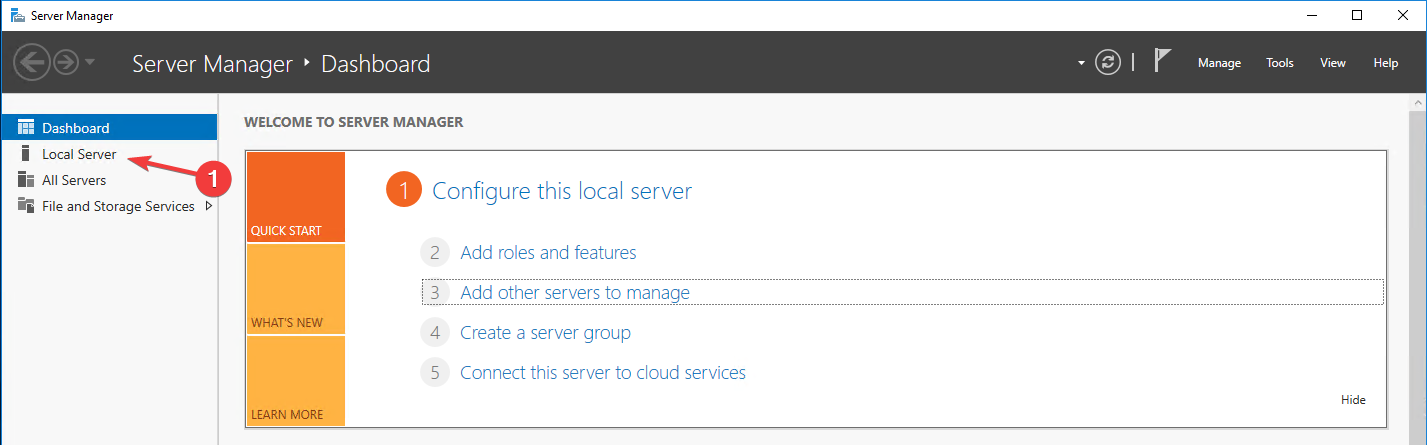
- Then click on "IE Enchanced Security Configuration" (1)

- Then set both options to "Off".
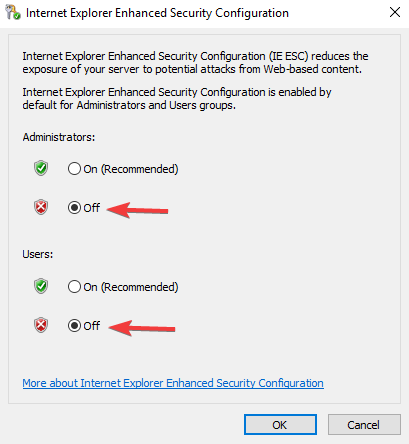
- Then click 'OK' and restart your VPS.
Ready to try it yourself?
View packages →Launch your server in 60 seconds on our own hardware.
Stuck? Our team is happy to help.Open a ticket →
More in this category
How do I activate my Windows license?Connect to your VPS via remote desktop, open cmd, run slmgr.vbs -rearm and restart the VPS to activate your Windows liceHow do I change my operating system?Changing the operating system on an OpenVZ VPS: go to the VPS panel, log in with the details from your mailbox, click yoHow do I change my root password?Go to the VPS Panel and log in with the credentials delivered to your mailbox. Click your VPS, click "Root/Admin PassworHow do I change the hostname of my VPS?Change the hostname of your VPS: log in to the VPS panel, select your VPS, click "Hostname", enter a new hostname and cl