How do I install 2FA on my VPS?
This tutorial is intended for experienced users of Linux systems!The credentials (IP address and root password) can be found in the email you received after ordering the VPS.
- Log in to the SSH of your VPS (This does not work with Windows VPSes, only with Ubuntu and CentOS VPSes.)
- Install the Google Authenticator package.
sudo apt install libpam-google-authenticator
- Install the Google Authenticator App on your phone
- Configure Google PAM in Ubuntu. Do this as follows.
- Run the following command to open the correct file
sudo nano /etc/pam.d/common-auth
- Add this line as shown in the screenshot.
auth required pam_google_authenticator.so
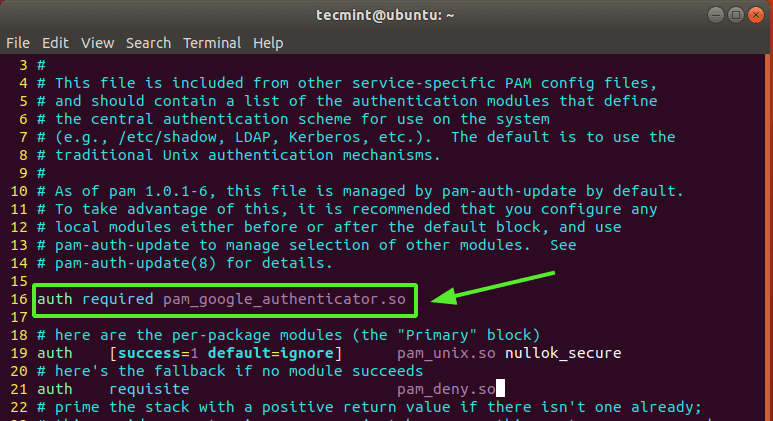
- Close the file by pressing Ctrl + x -> y -> enter.
- Run the command
google-authenticator
and follow the steps.
With this article you should have been able to set up 2FA on your VPS/dedicated server. If it still didn't work, our staff is ready to help you: Contact usReady to try it yourself?
View packages →Launch your server in 60 seconds on our own hardware.
Stuck? Our team is happy to help.Open a ticket →
More in this category
How do I activate my Windows license?Connect to your VPS via remote desktop, open cmd, run slmgr.vbs -rearm and restart the VPS to activate your Windows liceHow do I change my operating system?Changing the operating system on an OpenVZ VPS: go to the VPS panel, log in with the details from your mailbox, click yoHow do I change my root password?Go to the VPS Panel and log in with the credentials delivered to your mailbox. Click your VPS, click "Root/Admin PassworHow do I change the hostname of my VPS?Change the hostname of your VPS: log in to the VPS panel, select your VPS, click "Hostname", enter a new hostname and cl