Best Valheim mods 2026: which ones work on your 1.0 server?
The best Valheim mods for 1.0 right now are the ones their creators have updated since the release on 9 September 2026. Among the well-known names, that includes BepInExPack Valheim, Jotunn, Quick Stack Store Sort Trash Restock, Multi User Chest, Gizmo, PlanBuild and ServerSideMap; we checked each mod on Thunderstore on 30 September 2026. A date like that is no guarantee, though: Iron Gate offers no official mod support, so whether a mod works depends on its creator.
Why 1.0 puts your mod list to the test
Iron Gate says so itself in the 1.0 FAQ: it always takes time for mods to be updated, and without official mod support the studio can't guarantee that they'll work. There won't be a Steam Workshop, and there's no mod support on consoles. On top of that, the patches came thick and fast: on Steam, from 1.0.10 on 11 September to 1.0.16 on 25 September. Mods hook deep into the game's code, so every patch can break a few of them. A mod from before 9 September isn't necessarily broken, but it doesn't have a version for 1.0 yet.
How mods work on a Valheim server
Almost all Valheim mods run on BepInEx, a mod loader that loads alongside the game at startup. For Valheim you use BepInExPack Valheim by denikson: BepInEx 5, already set up for this game. Mods are .dll files in BepInEx/plugins, their settings appear in BepInEx/config after the first start, and whatever BepInEx does is logged in BepInEx/LogOutput.log. Since version 5.4.2351, loading ends there with a count of loaded, skipped and failed mods; if anything shows up under failed, you know where to look.
The key question for each mod: who needs to install it? There are three flavours, and the mod description tells you which one applies:
- Server and every player. Most mods that add items, building pieces or game rules. Multi User Chest even requires the same version everywhere, or the connection is dropped.
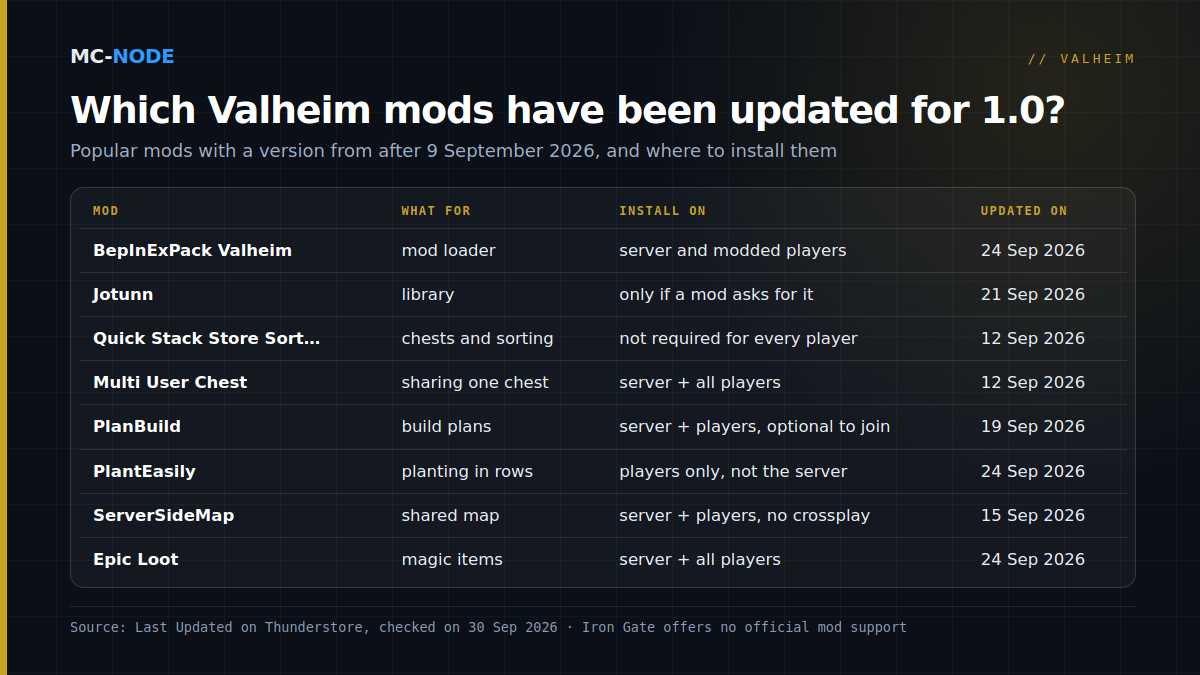
- Player only. PlantEasily states itself that it's a client-only mod that you should never put on a dedicated server.
- Server only. These exist, but they're the exception; there are none in this selection. Note: the Server-side label on Thunderstore doesn't mean "server only"; Multi User Chest has both labels.
How to tell on Thunderstore whether a mod is ready for 1.0
All the mods in this article are on Thunderstore. Here's how to check one:
- Last Updated. The side panel of the package page shows Latest version and Last Updated. If that date is before 9 September 2026, the mod hasn't been updated for 1.0 yet.
- Changelog. Open the Changelog tab and look for an explicit mention, such as "Updated for 1.0 release" (Quick Stack Store Sort Trash Restock 1.4.14), "Fixed for the v1.0.12 patch" (Pinnacle 1.17.0) or "Compiled against Valheim v1.0.15" (PlantEverything 1.21.3).
- Required. The mods this one depends on, usually BepInExPack and often Jotunn. Check those too.
The Deep North Update category is a handy filter, but it's no proof: creators pick that tag themselves, and BepInExPack Valheim doesn't have it even though it has been updated. A new date doesn't mean everything is finished either: for version 2.1.0, the creator of Extra Snap Points Made Easy writes that only preliminary testing on 1.0.12 has been done and that the new building pieces don't have their own snap points yet.
The best Valheim mods for 1.0, by category
Only popular mods with a version released after 9 September 2026 (as of 30 September 2026).
The basics: BepInEx and Jotunn
- BepInExPack Valheim (denikson), 5.4.2351, updated on 24 September 2026. The mod loader: without it, no mod loads at all.
- Jotunn (ValheimModding), 2.30.2, updated on 21 September 2026. A library for mod creators that adds nothing to the game on its own; according to Thunderstore, more than 6,000 other mods depend on it. Only install Jotunn if a mod lists it under Required.
Quality of life
- Quick Stack Store Sort Trash Restock (Goldenrevolver), 1.4.15, updated on 12 September 2026. Quick-stack into nearby chests, sort, restock and trash items. Not every player needs to have it.
- Multi User Chest (MSchmoecker), 0.6.2, updated on 12 September 2026. Several players in the same chest at the same time. Required on the server and for every player.
- AutomaticFuel (TastyChickenLegs), 1.5.3, updated on 29 September 2026. Automatically refuels torches, campfires, kilns and smelters from chests or off the ground. According to its creator, it also works when only the players have it; if it's on the server, the server decides the settings.
- Equipment and Quick Slots (RandyKnapp), 3.1.3, updated on 15 September 2026. Dedicated slots for your equipment plus up to six hotkey quick slots; doesn't need to be on the server.
Building
- Gizmo (ComfyMods), 1.16.0, updated on 14 September 2026 ("Fixed for v1.0 patch"). Rotate building pieces around the X and Z axes as well: by default you hold LeftShift or LeftAlt, and V resets that axis. Labelled client-side on Thunderstore.
- Extra Snap Points Made Easy (Searica), 2.1.0, updated on 15 September 2026. Extra snap points on most vanilla building pieces; see the caveat above.
- PlanBuild (MathiasDecrock), 0.19.1, updated on 19 September 2026. Plan a build without materials, add them later and share blueprints. Placing blueprints directly without materials is off by default on a server, except for admins. Players without PlanBuild can join, but won't see the planned pieces.
Map
- ServerSideMap (Mydayyy), 1.3.14, updated on 15 September 2026. The server stores the explored map and shares it with everyone; sharing pins is possible too, but off by default. Belongs on the server and with the players, and according to its creator it doesn't work with crossplay.
- Pinnacle (ComfyMods), 1.17.0, updated on 16 September 2026. Better pin management, with a hotkey that drops a pin at your position and coloured icons; players without the mod see the normal icon.
- Cartography Skill (Advize), 3.2.0, updated on 11 September 2026. A new skill that increases your exploration radius as you uncover more of the map.
Looking for more of a challenge? Epic Loot (RandyKnapp, 0.14.13, updated on 24 September 2026) adds magic items and enchanting, and belongs on the server and with all players.
Crossplay and mods: choose deliberately
Console players can't install mods: Iron Gate has confirmed there's no mod support on consoles. Any mod that every player needs therefore locks out PS5, Xbox and Switch 2 players. With a mixed group, you're best off keeping the world vanilla, or only picking mods whose creators say that players without the mod can join.
On our Valheim servers, Enable Crossplay is on by default. Some mods have been adapted for it (Jotunn and Quick Stack Store Sort Trash Restock mention crossplay fixes in their changelogs), but not all of them: according to its creator, ServerSideMap doesn't work with crossplay. If you only play with Steam players, set Enable Crossplay to 0.
Enabling mods at MC-Node
- Make a backup of your server.
- In the Startup tab, set the BepInEx (mods) variable to 1.
- Reinstall the server once. This fetches the latest BepInExPack Valheim from Thunderstore; your world, plugins and configs stay where they are.
- Put the mods in
BepInEx/pluginsvia Bestanden (the file manager) or SFTP, restart and checkBepInEx/LogOutput.logto see whether everything loads.
You pull in a new BepInExPack the same way. Players can install their side most easily with a mod manager such as r2modman, which lets you share a profile with mods and configs as a code. Everything about installing, updating and going back to vanilla is in Valheim mods on your server: BepInEx without the hassle. No server yet? In the Valheim store you can start from €3.00 per month. Mods count towards your memory, so leave some headroom; see how much RAM your Valheim server needs.
When you're better off without mods
- You only want different game rules. Fewer raids or taking everything through portals can be set with the built-in world modifiers, crossplay included; see Valheim server settings.
- Nobody wants to update after a patch. Every patch can break mods, and with mods that run a version check, the server and the players have to switch over at the same time. Start with two or three mods, not twenty.
Frequently asked questions
Do Valheim mods work on version 1.0?
Many popular mods have been updated by now, but Iron Gate offers no official mod support and guarantees nothing. Check on Thunderstore whether Last Updated is after 9 September 2026 and whether the changelog mentions 1.0.
What is BepInEx in Valheim?
BepInEx is the mod loader that almost all Valheim mods run on. For Valheim you use BepInExPack Valheim by denikson, which was updated to version 5.4.2351 on 24 September 2026. You put mods as .dll files in BepInEx/plugins, and BepInEx/LogOutput.log shows which mods have loaded.
Do players need the same mods as the server?
For most mods, yes, and often even the same version. There are also mods that only belong with the player, such as PlantEasily. The mod description on Thunderstore tells you what's needed.
Can PS5, Xbox or Switch 2 players join a modded Valheim server?
Console players can't install mods; according to Iron Gate, there's no mod support on consoles. Mods that every player needs therefore lock them out. For a mixed group, a vanilla world with world modifiers is the safest choice.