Enshrouded 1.0 dedicated server: wipe, backup and updating
Enshrouded leaves Early Access on Steam on 15 October 2026. Keen Games hasn't announced a world wipe (as of 28 September), but every character's skill tree will be reset to zero once again with 1.0. If you run a dedicated server, there are three things to do: back up your savegame before the update, update the server to the same version as the game after the release, and then check that your settings are still right. Below you'll find how each step works, and what's still unknown.
What changes on 15 October
Keen announced the date in June: Enshrouded "releases out of Early Access on Steam on October 15th". Keen hasn't given a time for Steam. The full changelog won't arrive until October, but part of the content is already in Keen's own posts:
- A new biome with a new enemy tier. The maximum player level goes up to 50, gear to level 55.
- Combat: new skills for mages and archers, new Eternal arrows and more variants of existing enemy groups, including heavy and elite enemies.
- Performance: Keen calls better performance, "including on lower and middle-range systems", one of the big jobs for 1.0.
- Price: since 8 September, the game costs €39.99.
Less is known about consoles. Keen showed the PS5 version at Gamescom, and the PlayStation Store also lists it for 15 October. Keen hasn't confirmed whether PS5 players can play on a PC server (crossplay). So don't count on it for your server yet.
Enshrouded 1.0 wipe or not: what's officially known
Keen hasn't announced a wipe (as of 28 September). On 23 September, though, the studio did write that every character's skill tree will be reset again with 1.0, "hopefully for the last time". So you'll be redistributing your points, and Keen recommends doing that before you leave your base.
That fits with how Keen has handled big updates before. With Update 8 in April, existing savegames stayed usable, but the skill tree was reset, existing gear was converted to an upgradeable version and non-Common loot armour was converted to Common. So an update can change your savegame without wiping it. That's why you make a backup beforehand.
If you'd rather start fresh on 1.0, you won't lose your character. According to Keen's FAQ, you can take your character to other servers, with gear, inventory, level and skills. Keen hasn't said whether the new biome will also appear in an existing world. Check the changelog on 15 October before you decide with your group.
Step 1: a backup before the update
Do this before 15 October, not on release day itself:
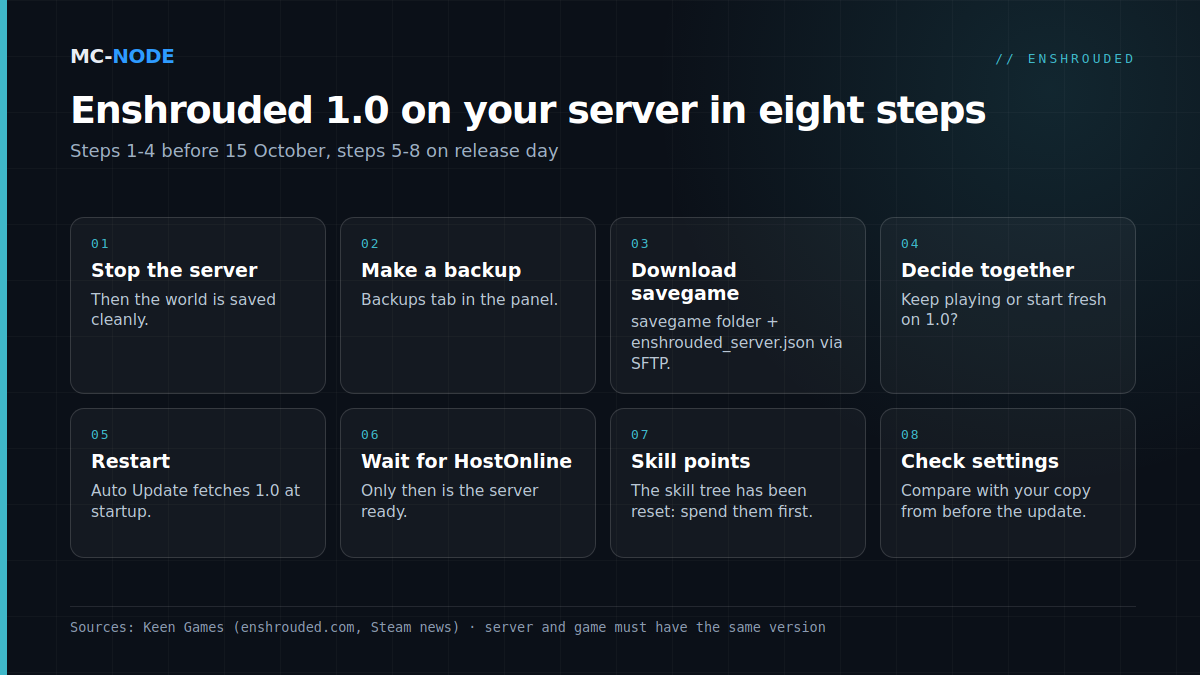
- Stop the server in the panel, so the world is saved cleanly.
- Make a full backup in the Backups tab. How that works is explained in making a backup.
- Download that backup to your own PC, see downloading a backup.
- Also download the
savegamefolder and theenshrouded_server.jsonfile via SFTP. With WinSCP or FileZilla you can do that in one go.
In savegame, each world has a fixed name: the first world is called 3ad85aea. Keen keeps ten numbered copies per world plus an -index file. Every few minutes and on shutdown, a new copy is added, overwriting the oldest one. The index file records under latest which copy is the active one. By changing that number (0 to 9), you restore an older copy. Keen recommends copying all the files first before you make a change like that.
Step 2: updating your dedicated server to 1.0
The dedicated server is a separate Steam app, "Enshrouded Dedicated Server" (app 2278520). It only exists for Windows; according to Keen, Linux support is "planned for later". That's why at MC-Node it runs via Proton in the game panel.
Important: the server and the game must have the same version. If the server is still on the old version, players on 1.0 can't connect. In our panel, the Auto Update startup variable is on by default. The server then fetches the latest version every time it starts. After the release, updating comes down to this:
- Stop the server and wait until it's completely off.
- Start it again and follow the Console tab.
- Wait for the line
'HostOnline' (up)!: then the server is ready and you can connect.
Still seeing the old version afterwards? Then the update probably isn't on Steam yet. Try again later. If it keeps going wrong, set the Validate variable to 1 for a single start: the server will then check its files via Steam. Set it back to 0 afterwards. Reinstalling is the last resort, and only with a fresh backup.
enshrouded_server.json after 1.0
Keen documents these fields, among others: name, saveDirectory (default ./savegame), queryPort (default 15637), slotCount (1 to 16 players), the voice and chat options, gameSettingsPreset (Default, Relaxed, Hard, Survival or Custom), the gameSettings block and the userGroups, each role with its own password.
One thing works differently in our panel than you might expect: the server name, the number of slots and the passwords of the Admin, Friend, Guest and Visitor groups are written into the file from the startup variables on every start, and the queryPort from your server's port. So change those in the Startup tab, not in the file. Everything else, such as gameSettings, you edit in Files while the server is stopped.
Whether 1.0 adds new settings, we'll only know at release. So don't blindly paste your old file back after the update. Compare it with your copy after the first start and only carry over your own values. What the existing settings do is explained in Enshrouded dedicated server: the settings that make the difference.
Performance and RAM: what Keen itself says
Keen is remarkably specific here. Without players, the server process uses about 4.4 GB of memory, each player adds up to 100 MB, and in total the server shouldn't go above 6 GB. The 16 GB of RAM in Keen's specifications applies to a complete server machine, not to the server process itself. For 16 players, Keen recommends an 8-core processor at 3.7 GHz; for 4 to 6 players, 6 cores at 3.2 GHz. So extra players mainly call for more processing power. The server files take up about 13 GB, a savegame between 1 and 100 MB.
For our Enshrouded plans, that means: start with Traveller (6 GB, €9.00), which matches Keen's figure of at most 6 GB for a full server. Explorer (8 GB, €12.00) gives extra headroom, for example for big bases. Everything runs on our own hardware with NVMe in Hengelo, or on our nodes in Frankfurt, Warsaw and Beauharnois. DDoS protection is included and you can cancel monthly. Whether 1.0 really runs lighter, we'll only see after the release.
When you don't need to do anything
If you play solo or in co-op without a dedicated server, Steam updates the game and you don't need this whole plan. A backup of your local savegame is still a good idea, though. And if your group has already decided to start a new world on 1.0, the backup is mostly a keepsake. You don't need a bigger plan just because it's 1.0: first see how your server behaves after the update.
In short: your checklist for 15 October
- Beforehand: make a backup in the panel, download the savegame and
enshrouded_server.json. - Agree with your group: keep playing or start fresh.
- On release day: stop the server, start it and wait for
'HostOnline' (up)!. - First login: spend your skill points before you leave the base.
- Check your settings against your copy; if someone can't connect because of a version mismatch, restart again later.
Frequently asked questions
Will there be a wipe with Enshrouded 1.0?
Keen Games hasn't announced a wipe (as of 28 September 2026). Every character's skill tree will be reset with 1.0, though, so everyone has to redistribute their points. To be on the safe side, make a backup of your savegame before 15 October.
When does Enshrouded 1.0 come out?
Enshrouded leaves Early Access on Steam on 15 October 2026. The PS5 version is also listed for 15 October in the PlayStation Store, but Keen hasn't confirmed whether PS5 players can join a PC server.
How do I update my Enshrouded server to 1.0?
Stop the server and start it again: with Auto Update on, it fetches the latest version at startup. The server and the game must be on the same version, otherwise players can't connect. If that doesn't work, set Validate to 1 for a single start to have the files checked via Steam.
How much RAM does an Enshrouded server need?
According to Keen, the server uses about 4.4 GB without players, plus up to 100 MB per player, with a total of 6 GB at most. That's why at MC-Node you start with Traveller (6 GB); Explorer (8 GB) gives extra headroom if you build big bases.