How much RAM does an Enshrouded server need? Our 1.0 measurements
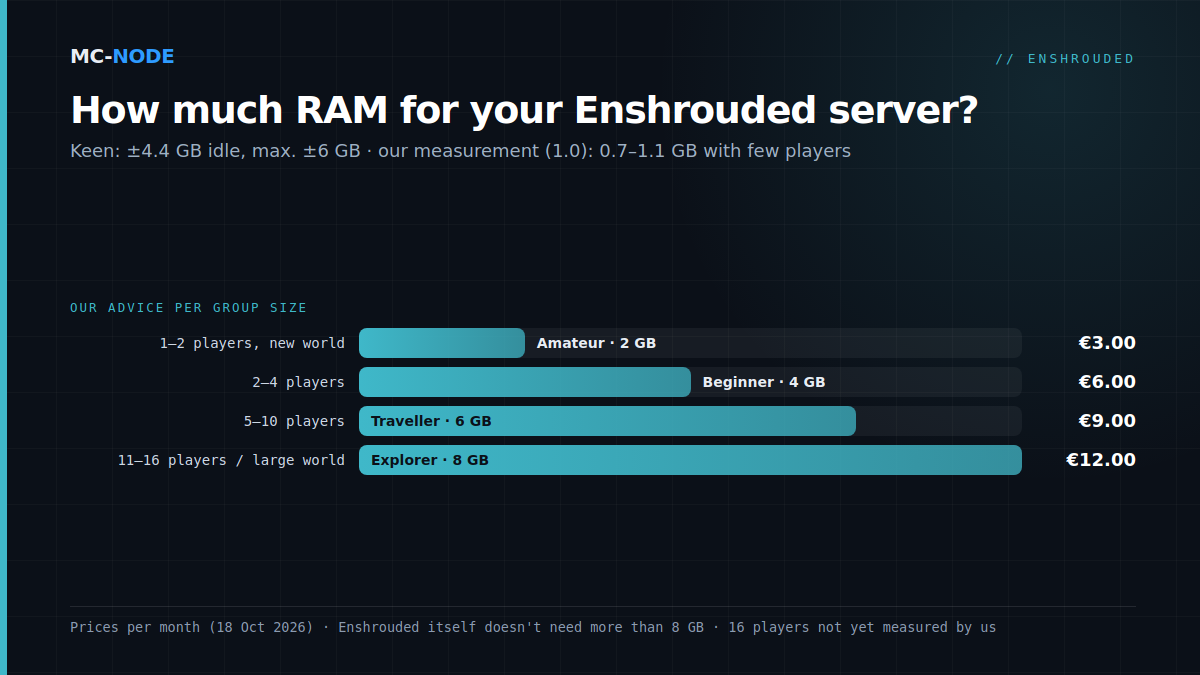
For an Enshrouded server, we recommend 2 GB of RAM for 1 or 2 players in a new world (with little headroom), 4 GB for 2 to 4 players, 6 GB for 5 to 10 players and 8 GB for 11 to 16 players or a large, heavily built-up world. Enshrouded itself doesn't need more than 8 GB, not even according to the figures from developer Keen Games. Those figures are quite a bit higher than what we measure under 1.0, though. Below, you can read how that works, and why the CPU ends up mattering more than memory.
Keen says 4.4 to 6 GB, we measure 0.7 to 1.1 GB
Keen is remarkably specific about memory. The Dedicated Server FAQ, updated on 15 October 2026, says:
- At idle, the server process uses about 4.4 GB of physical RAM.
- Each player adds up to 100 MB on top of that.
- In total, the server shouldn't go above about 6 GB.
Keen also recommends 16 GB of RAM for the computer the server runs on, both for 4 to 6 and for 16 players. That seems contradictory, but it's about two different things: the 16 GB is Keen's advice for the whole computer, while according to the same FAQ the server process itself stays below about 6 GB. For a hosted server, it's that last number that counts.
Our own measurements from 18 October 2026 come in a lot lower. An Enshrouded 1.0 server on our 2 GB plan runs at about 1.1 GB after 8 hours online with 2 players. Other 1.0 servers with no or few players sit between 0.7 and 1.1 GB. We measure the memory the server actually has in use inside its container.
One important caveat, though: usage grows with the number of players and with how much of the world is loaded or built. We haven't measured a full server with 16 players in a heavily built-up world yet. So we don't have our own number for that group, and we stick to Keen's ceiling of about 6 GB.
Why the figures are so far apart
We don't know for sure. Three things probably play a part:
- A different way of measuring. The dedicated server only exists for Windows. So Keen's figures are about Windows, while the servers we measured run the Windows server under Proton (GE-Proton 11) on Linux. Windows and Linux don't count memory the same way, so the numbers can't be compared one-to-one.
- Few players, shortly after release. Keen's 6 GB is an upper limit for the entire server process. Our measurements come from servers with few players, three days after the release of 1.0.
- 1.0 is more efficient. According to the 1.0 changelog, less memory is needed for communication between server and client, and the water simulation uses less memory. Keen doesn't say whether the figures in the FAQ were measured again for 1.0.
Our conclusion: Keen's number is the safe ceiling, and our measurements show that small groups can manage with less. That's why our advice ranges from 2 GB for a duo to 8 GB for a full server. With the latter, you're well above Keen's ceiling.
Which plan suits your group?
All Enshrouded server hosting plans run on AMD hardware with NVMe storage. DDoS protection is included, and you can cancel monthly. For the location, you choose the Netherlands, Germany (Frankfurt), Poland (Warsaw) or Canada (Beauharnois, listed in the store as "North America East"). Here's how to choose the memory:
- 1 or 2 players in a new world: Amateur, 2 GB, €3.00 per month. That works, because with two players we measured about 1.1 GB. The headroom is small, though. If you're going to build a lot or explore the whole map, usage grows with it.
- 2 to 4 players: Beginner, 4 GB, €6.00 per month. The most comfortable starting point for most groups of friends, with room for a world that grows.
- 5 to 10 players: Traveller, 6 GB, €9.00 per month. This matches Keen's upper limit of about 6 GB for the server process.
- 11 to 16 players, or a large, heavily built-up world: Explorer, 8 GB, €12.00 per month. That gives headroom above Keen's ceiling, for lots of bases and a busy server.
We also have bigger plans, from Researcher (10 GB, €15.00) to Chief (16 GB, €24.00). You don't need those for Enshrouded itself. According to Keen's own figures, the server process doesn't go above about 6 GB, and 16 players is the maximum. We'd rather tell you that honestly than have you pay for memory that sits unused.
The CPU matters more than the RAM
Put Keen's specifications side by side and something stands out. The memory advice stays the same, 16 GB for the machine, whether you play with 4 or with 16 players. What does change is the processor:
- 4 to 6 players: 6 cores and 12 threads, an Intel Core i7 at 3.2 GHz or a comparable AMD.
- 16 players: 8 cores and 16 threads, an Intel Core i7 at 3.7 GHz or a comparable AMD.
So according to Keen, an extra player costs at most 100 MB of memory, but does need noticeably more processing power. Keen itself writes that the hardware you need depends heavily on the number of players actively playing on the server. That was also a focus in 1.0: according to the changelog, Keen took measures to reduce the load on the CPU. Big fights are heavy too. Hotfix 1.0.0.2 from 16 October fixed a server crash during fights against a very large number of enemies.
So lag with lots of players is far from always a memory problem. Extra RAM only helps if the memory is actually full.
When should you scale up?
Scaling up to more RAM makes sense when two things happen at the same time:
- You notice lag in the game, such as delayed responses or players and enemies jumping around. Enshrouded also shows its own warnings about server performance. Keen adjusted those in 1.0, because they used to appear too quickly.
- Memory is hitting the limit. In the game panel, the console shows how much memory the server is using and what your limit is. If it keeps running up against your plan's maximum when things get busy, more RAM is the solution.
Noticing lag, but memory stays well below the limit? Then RAM isn't your bottleneck. Look at your settings first, such as the number of enemies (randomSpawnerAmount). What the main options do is explained in Enshrouded dedicated server: the settings that make the difference. Can't figure it out? Our support team is happy to help.
Don't start too big
You don't have to take the biggest plan up front. Start with the plan that suits your group and keep an eye on how memory behaves in the panel during your first few gaming evenings. If it does get tight, upgrade to a bigger plan in the client area; you only pay the difference for the rest of your billing period.
A regular group of four, for example, doesn't need 8 GB "just to be safe": that's far above what we measure and also above Keen's ceiling.
No server yet? How to make an Enshrouded server for 1.0 explains how to set up your server, and the guide how do I start an Enshrouded server walks you through the first steps in the panel. Everything that's new in 1.0 is in Enshrouded 1.0 is out. If your server was already running in Early Access, also read Enshrouded 1.0 and your server.
Frequently asked questions
How much RAM does an Enshrouded server use?
According to Keen Games, the server process uses about 4.4 GB at idle, plus up to 100 MB per player, with a maximum of about 6 GB. Our measurements under Enshrouded 1.0 come in lower: 0.7 to 1.1 GB on servers with few players. Usage grows with the number of players and with how much of the world is loaded or built.
Is 2 GB of RAM enough for an Enshrouded server?
For 1 or 2 players in a new world, yes, but with little headroom. We measured about 1.1 GB with 2 players after 8 hours online. If you play with more people or build a lot, choose 4 GB or more.
Do I need 16 GB of RAM for an Enshrouded server?
Not for a hosted server. Keen's 16 GB recommendation applies to the whole computer the server runs on. According to Keen, the server process itself stays below about 6 GB, and for 11 to 16 players we recommend 8 GB.
Which processor does an Enshrouded server need?
For 4 to 6 players, Keen recommends a processor with 6 cores and 12 threads at 3.2 GHz, and for 16 players 8 cores and 16 threads at 3.7 GHz. The memory advice stays the same, so with a big group the CPU matters more than the RAM. Lag without full memory isn't something more RAM will fix.