How to install Bedrock add-ons and packs on your server
Installing Bedrock add-ons on your server takes three steps: unpack the .mcaddon or .mcpack, put the behavior pack in behavior_packs/ and the resource pack in resource_packs/, and activate them in the world via world_behavior_packs.json and world_resource_packs.json, using the uuid and version from each pack's manifest.json. If the add-on uses Beta APIs, that experiment also has to be turned on in the world. Bedrock Dedicated Server has no install button. We tested the server side on version 1.26.52, the current server version on 30 September 2026.
Behavior pack or resource pack: what runs on a Bedrock Dedicated Server?
An add-on usually consists of two parts. The behavior pack contains the logic: mob behavior, recipes, loot tables, functions and scripts. That runs on the server. The resource pack contains what you see and hear: textures, models, animations and sounds. Players get it from the server when they join. A texture pack is simply a resource pack. In manifest.json you can tell them apart by the module type: data or script means a behavior pack, resources a resource pack.
A .mcpack contains one pack; a .mcaddon bundles several packs, as folders or as .mcpack files, as the community wiki wiki.bedrock.dev describes it. They're zip files with a different extension: rename them to .zip and any unzip tool will open them.
Step 1: unpack and read manifest.json
Unpack the add-on on your computer. Every folder with a manifest.json is one pack; if there's another .mcpack inside, unpack that too. For each pack, note down two values from the header block:
"header": {
  "name": "My add-on BP",
  "uuid": "0b6f7e2a-4c1d-4e5b-9a3f-2d8c7b6a5e41",
  "version": [1, 0, 0]
},
"modules": [
  { "type": "data", "uuid": "5c2e9d1b-7a3f-4b8e-a6d2-1f0e9c8b7a62", "version": [1, 0, 0] }
]
You do not need the uuid under modules here: according to Microsoft it has to be different from the pack uuid, and if you use it anyway, the pack won't load. If the behavior pack refers to a resource pack under dependencies, both of them need to go on the server.
Step 2: upload to behavior_packs/ and resource_packs/
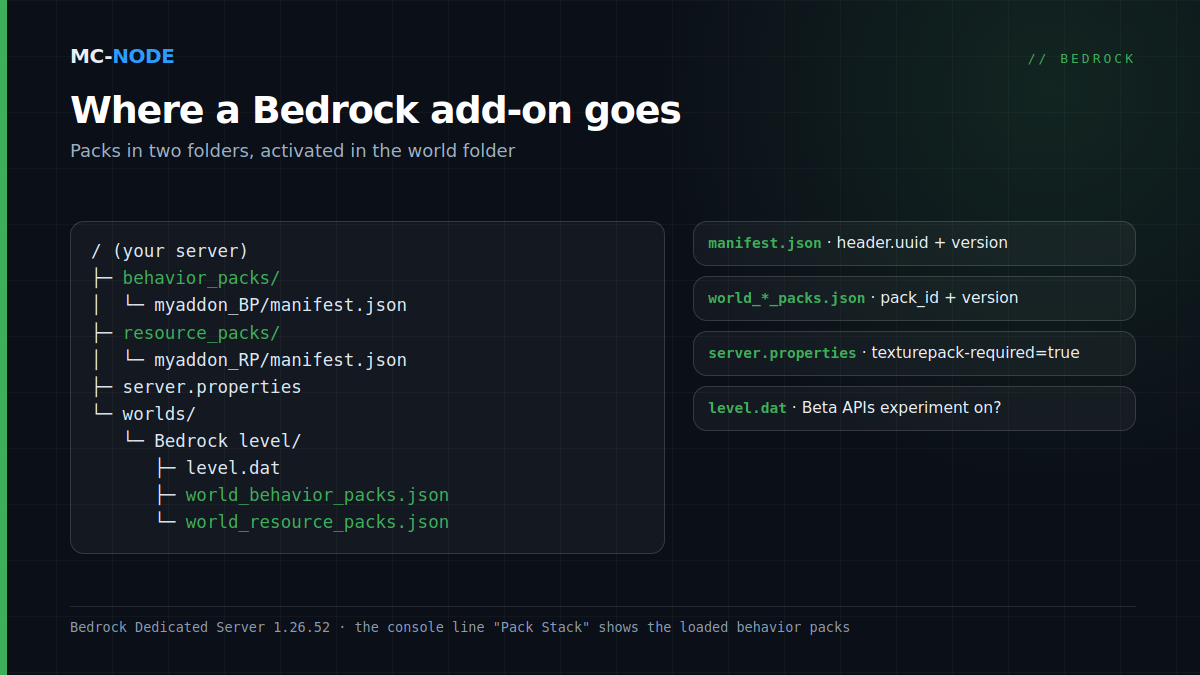
Stop the server in the panel and upload the unpacked folders: behavior packs to behavior_packs/, resource packs to resource_packs/, both in your server's root folder. For a handful of files the panel's file manager is fine; large add-ons are easier via SFTP (see connecting with WinSCP or FileZilla). Leave the default packs, such as vanilla, alone.
Packs in these root folders are available to every world; in worlds/<world>/behavior_packs/ they belong to that one world only.
Step 3: activate the packs in the world
Uploading alone isn't enough: the world needs to know which packs to load. That's set in two files in worlds/<level-name>/. The folder name is under level-name in server.properties; by default it's Bedrock level. In a fresh world these files don't exist yet, so create them yourself. world_behavior_packs.json:
[
  { "pack_id": "0b6f7e2a-4c1d-4e5b-9a3f-2d8c7b6a5e41", "version": [1, 0, 0] }
]
And world_resource_packs.json, with the uuid and version of the resource pack:
[
  { "pack_id": "9e4d3c2b-1a0f-4e9d-8c7b-6a5f4e3d2c13", "version": [1, 0, 0] }
]
More add-ons? Add extra lines to the same list, with commas between them but not after the last one. Copy the version exactly. In our test, the server ignored the pack if the first number was different (2.0.0 instead of 1.0.0) or if the JSON listed a lower version than the manifest. Start the server and check the console. A loaded behavior pack looks like this:
Pack Stack - [00] My add-on BP (id: 0b6f7e2a-..., version: 1.0.0) @ behavior_packs/myaddon_BPMaking resource packs mandatory with texturepack-required
With texturepack-required=true in server.properties you force players to use the world's resource packs; by default it's set to false. Turn it on if your add-on adds its own blocks, items or mobs, because what they look like is defined in the resource pack. You change this key in the file manager; our panel only sets keys such as gamemode and difficulty from the startup variables on every start.
Beta APIs and other experiments: turning them on in the world
Some add-ons use the beta version of the script API. You can spot this in the manifest by a dependency on @minecraft/server with a version ending in -beta. In that case the Beta APIs experiment has to be on in the world. If it's off, the console reports:
[Scripting] Plugin [My add-on BP - 1.0.0] - requesting dependency on beta APIs [@minecraft/server - 2.11.0-beta], but the Beta APIs experiment is not enabled.The server has no setting for this, so turn the experiment on locally:
- Stop the server, make a backup and download the
worlds/<level-name>/folder. - Zip the contents of that folder, rename the file to
.mcworldand open it on your PC; Minecraft imports the world. - In the World Settings, under Experiments, turn on Beta APIs. Minecraft then makes a copy with "Copy of" in front of the name; work in that copy.
- Export the copy as a
.mcworld, unpack it and use it to replace the contents of the world folder on the server. Check that bothworld_..._packs.jsonfiles are still in there; if not, put them back from your backup.
A new world you simply create locally with the experiment turned on. You can also skip the detour: the community wiki wiki.bedrock.dev describes how to use an NBT editor to set a byte gametest with value 1 in level.dat, inside the experiments compound. In our test that worked; the console then shows Experiment(s) active: gtst.
Keep in mind: according to Microsoft, a world with experiments can never become a regular world again, and beta features can change or disappear with a Bedrock update, breaking such an add-on until its creator updates it. If an add-on asks for @minecraft/server-net, you have to allow that module. Microsoft recommends doing that per script module, in config/<uuid-of-the-script-module>/permissions.json, and keeping config/default/permissions.json minimal. Handy to know: a reinstall via our panel (such as when switching versions) resets that default file and leaves your own folders, packs and world untouched.
Marketplace add-ons can't go on your own server
Anything you buy in the Marketplace can't be installed on a server of your own. Minecraft stores purchased content encrypted in a separate folder (premium_cache, according to the community wiki minecraft.wiki), so there's nothing to upload. Add-ons that creators offer themselves as a .mcaddon or .mcpack do work.
Testing: turn on the content log and read the console
Set content-log-console-output-enabled=true in server.properties; errors from the packs will then show up in the panel console too. These are the messages we saw in our test:
- Module uuid or wrong version: Configured pack (id: …) was not found and was ignored, followed by Pack Stack - None.
- A comma after the last line in
world_behavior_packs.json: no error message at all, just Pack Stack - None. If nothing loads and nothing complains, check the JSON. - A complete .mcaddon in behavior_packs/: Multiple manifests found at the same directory level, or, with .mcpack files inside, only was not found.
- Behavior pack in resource_packs/: Defaulting to resource pack, and the pack does nothing.
New version of an add-on? Replace the folder, update the version in the JSON and restart.
When you don't need an add-on
If all you want is to change a game rule, such as keeping your items when you die, a gamerule is enough: setting keepInventory takes one command and doesn't make your world experimental. An add-on is worth it for genuinely new things, such as custom mobs or proximity voice chat, but heavy add-ons ask more of the server than a texture pack. Our Bedrock servers run the official Bedrock Dedicated Server, from €2.50 per month (Apple, 2 GB); Cookey with 4 GB costs €5.00. Everything can be cancelled monthly.
Frequently asked questions
Can you use add-ons on a Bedrock server?
Yes. Bedrock Dedicated Server loads behavior and resource packs that you put in behavior_packs and resource_packs and activate in the world via world_behavior_packs.json and world_resource_packs.json. The only thing you can't install on your own server is purchased Marketplace content.
Why won't my add-on load on my Bedrock server?
Look for the Pack Stack line in the console. If it says None along with 'Configured pack ... was not found and was ignored', the uuid or version is wrong: copy uuid and version from the header block of manifest.json, not the uuid of the module. If there's no message at all, it's often a JSON error, such as a comma after the last line.
How do you turn on Beta APIs on a Bedrock Dedicated Server?
Not through the server itself. Turn on Beta APIs locally in the world settings and upload the world again, or use an NBT editor to set a byte gametest to 1 under experiments in level.dat. Make a backup first: a world with experiments can never become a regular world again.
Can you install Marketplace add-ons on your own server?
No. Purchased Marketplace content is stored encrypted, so you can't upload it as a pack. Add-ons that the creator offers as a .mcaddon or .mcpack do work.