Minecraft gamerules and admin commands: the complete overview
You set a gamerule with /gamerule <name> <value>: in chat if you're an operator, or without the slash in the server console. The keep inventory command, for example, is gamerule keep_inventory true. If you're following an older guide, watch out: since Java 1.21.11 (December 2025), all gamerules have new names in lowercase with underscores. keepInventory is now keep_inventory, doDaylightCycle is now advance_time and doFireTick no longer exists. On a 26.3 server, the old name only gets you the message Incorrect argument for command. Bedrock does still use the old names, in lowercase.
You set a gamerule in chat or in the console
In-game you type, for example, /gamerule mob_griefing false. You need to be an operator for that (here's how to make yourself OP). In the game panel, open the Console tab and type the same thing without the slash: gamerule mob_griefing false.
Leave out the value and you get the current setting: gamerule keep_inventory replies with Game rule keep_inventory is currently set to false. Since 26.1, an operator can also change the rules from the pause menu, under World Options, with a search bar.
Gamerules belong to the world, not to server.properties. On Java 26.x they're stored in the world folder under data/minecraft/game_rules.dat. So they survive a restart, but a new world starts over with the default values. You'll find a longer list in what gamerules are and how to set them.
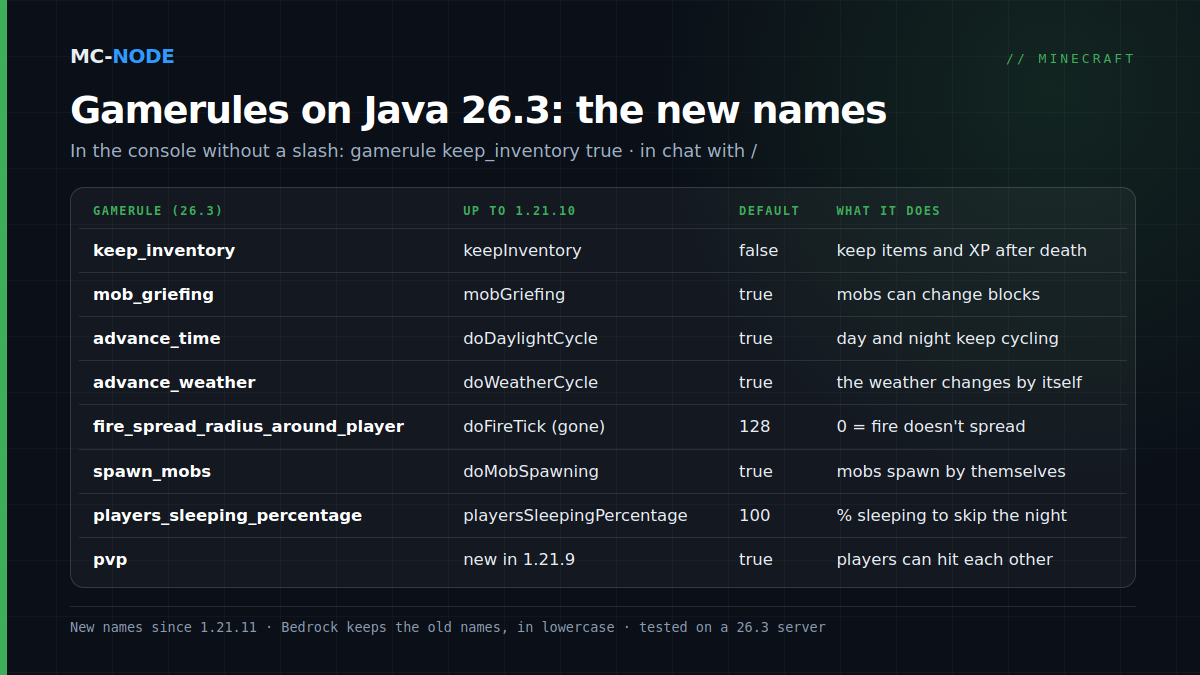
The Minecraft gamerules server admins actually use
We checked all the default values below on a clean 26.3 server.
| Gamerule (26.3) | Old name (up to 1.21.10) | Default | What it does |
|---|---|---|---|
keep_inventory | keepInventory | false | Players keep their items and XP when they die |
mob_griefing | mobGriefing | true | Creepers, endermen and other mobs can change blocks and pick up items |
advance_time | doDaylightCycle | true | The day-night cycle runs; false freezes time |
advance_weather | doWeatherCycle | true | The weather changes on its own |
fire_spread_radius_around_player | doFireTick (removed) | 128 | How far around a player fire spreads; 0 = nowhere, -1 = unlimited |
spawn_mobs | doMobSpawning | true | Mobs spawn naturally; spawners and spawn eggs keep working |
spawn_monsters | new in 1.21.9 | true | Hostile monsters only; replaced spawn-monsters in server.properties |
players_sleeping_percentage | playersSleepingPercentage | 100 | Percentage of players who have to sleep to skip the night; 0 = one sleeper is enough |
respawn_radius | spawnRadius | 10 | Radius around the world spawn where players without their own spawn point appear |
immediate_respawn | doImmediateRespawn | false | Respawn straight away, without the death screen |
show_death_messages | showDeathMessages | true | Death messages in chat |
show_advancement_messages | announceAdvancements | true | Earned advancements in chat |
natural_health_regeneration | naturalRegeneration | true | Health regenerates on its own when the hunger bar is full enough |
spawn_phantoms | doInsomnia | true | Phantoms can spawn at night |
pvp | new in 1.21.9 | true | Players can damage each other |
Two popular combinations. For a server with friends: keep_inventory true and players_sleeping_percentage 0. For a building server: mob_griefing false, advance_weather false, fire_spread_radius_around_player 0 and, after a time set noon, advance_time false. The step-by-step guides per topic are in the knowledge base: keepInventory, mob griefing, day or night, stopping the rain and advancement messages.
What 1.21.9, 1.21.11 and 26.3 changed
1.21.9 (September 2025) took four settings out of server.properties and turned them into gamerules, so you can change them while the server is running: pvp, enable-command-block, spawn-monsters and allow-nether. On 26.3 they're called pvp, command_blocks_work, spawn_monsters and allow_entering_nether_using_portals. So a pvp=false line in server.properties no longer does anything on newer versions.
1.21.11 (December 2025) gave all gamerules snake_case names. Some of them also got a completely new name (see the table). doFireTick and allowFireTicksAwayFromPlayer disappeared; fire_spread_radius_around_player took their place.
26.3 (15 September 2026) didn't rename anything, but it did change something you'll notice quickly: a fresh server.properties contains white-list=true. If players on a new 26.3 server see You are not white-listed on this server!, that's the reason. On Java, operators can always get in.
On 1.21.10 and older, the old names still apply. The knowledge base explains how to check which version your server is running.
The admin commands you need to run a server
The examples are console versions, tested on 26.3; in chat you put a / in front. From the console you always have to name a player for player commands: gamemode creative without a name gets you A player is required to run this command here.
| Command | Example | Good to know |
|---|---|---|
| op / deop | op PlayerName | Default op-permission-level=4: every command, including stop |
| gamemode | gamemode creative PlayerName | On Java only spelled out in full: survival, creative, adventure, spectator |
| whitelist | whitelist add PlayerName | Also on, off, list and remove |
| ban / pardon | ban PlayerName Griefing | The player gets to see the reason; ban-ip and pardon-ip for IP addresses |
| kick | kick PlayerName Cool off for a bit | Only drops the connection, not a ban |
| tp | tp PlayerName 0 100 0 | To another player: tp Player1 Player2 |
| give | give PlayerName diamond 5 | If the inventory is full, the rest drops on the ground |
| time | time set day | Also night, noon, midnight or a number of ticks |
| weather | weather clear 1d | Duration in ticks, or with s (seconds) or d (Minecraft days) |
| difficulty | difficulty hard | After a restart, the difficulty from server.properties applies again |
| setworldspawn | setworldspawn 0 64 0 | Where new players and players without their own spawn point appear |
| spawnpoint | spawnpoint PlayerName 0 64 0 | Personal spawn point for a single player |
| worldborder | worldborder set 5000 | 5000 blocks wide; per dimension since 1.21.9 |
| save-all | save-all flush | Writes everything to disk immediately, handy before a manual backup |
Step by step in the knowledge base: changing your gamemode, the whitelist, banning and unbanning, the difficulty and a world border. If you use EssentialsX, that plugin takes over gamemode, tp, give, time, weather, ban and kick, among others, with short aliases such as /gmc, /gms, /day and /sun. More on that in EssentialsX explained.
Java and Bedrock: same idea, different names
- Names. Bedrock keeps the old names, in lowercase:
keepinventory,mobgriefing,dodaylightcycle,doweathercycle,dofiretick,domobspawning,doinsomnia,playerssleepingpercentage,spawnradiusandpvp. Capitalisation doesn't matter when you type them. Advancement messages andspawn_monstersonly exist on Java. - Cheats. In-game, many Bedrock commands only work once cheats are enabled (
allow-cheats=truein server.properties,falseby default). A few gamerules, such aspvp,showdeathmessagesandplayerssleepingpercentage, work without them. From the server console, everything works. - Whitelist. On Bedrock it's called the allowlist (
allowlist add PlayerName;whitelistworks too). You switch it on and off withallow-listin server.properties, and operators have to be on the list as well. - Missing commands.
ban,pardon,worldborderandsave-allonly exist on Java. For backups, Bedrock hassave hold,save queryandsave resume. - Shorter gamemodes. Bedrock accepts
/gamemode cor/gamemode 1; Java only takes the full word.
When you're better off leaving a gamerule alone
On a survival server with experienced players, keep_inventory true takes the tension out of a trip through the Nether. mob_griefing false doesn't just stop creepers: villagers no longer harvest crops and piglins no longer pick up gold, so some farms grind to a halt. spawn_mobs false shuts down every farm that relies on natural spawns. If you only want to stop PvP or fire around spawn, a server-wide gamerule is too blunt a tool; with WorldGuard you set it per region (see turning off PvP and WorldEdit and WorldGuard).
And don't hand out OP to friends just so they can use one command. At the default level 4 they can do everything, including banning others and stopping the server. With LuckPerms you give only the permissions they need.
On a Minecraft server at MC-Node (from €0.50 per month) you type all these commands in the console of the game panel; Bedrock servers start at €2.50. Changing a lot of rules at once? Make a backup first: reverting a gamerule takes one command, rebuilding a blown-up spawn doesn't.
Frequently asked questions
What is the keep inventory command in Minecraft?
On Java 1.21.11 and newer (including 26.3), type /gamerule keep_inventory true, or the same without the slash in the server console. On older Java versions the rule is called keepInventory, and on Bedrock it's keepinventory. Players then keep their items and XP when they die.
Why doesn't /gamerule keepInventory work anymore?
Since Java 1.21.11 (December 2025), all gamerules have new names in lowercase with underscores. On 26.3, an old name like keepInventory or doDaylightCycle only gets you the message 'Incorrect argument for command'. Use the new name, such as keep_inventory or advance_time.
How do I turn off mob griefing with a command?
On Java 1.21.11 and newer, type gamerule mob_griefing false in the console, or with a slash in chat as an operator. On older Java versions the rule is called mobGriefing, on Bedrock mobgriefing. Creepers then stop blowing up blocks, but villagers also stop harvesting crops.
How do I change my gamemode on a Minecraft server?
Type /gamemode creative, survival, adventure or spectator in chat if you're an operator. In the server console you add a player name, for example gamemode creative PlayerName. On Bedrock you can keep it shorter, like /gamemode c or /gamemode 1.