Project Zomboid server not starting? Build 42 errors and fixes
If your Project Zomboid server won't start, or terminates again right away, the cause almost always lies in one of five places: Java memory, a mod that isn't ready for Build 42, a version mismatch between the server and players, a download that gets stuck or a corrupted save. The server log tells you which one. Below you'll find what to do for each symptom, based on the PZwiki and The Indie Stone's patch notes up to and including 42.21 (unstable, 23 September 2026).
Start with the log, not with what your players report
What players see tells you little; the server log tells you a lot more. A dedicated server writes to server-console.txt in the Zomboid folder, a co-op server you host from the main menu to coop-console.txt. Search for STACK TRACE: according to the wiki, that's how you'll find most errors, sometimes even with the name of the mod causing them.
In our game panel you can read the same thing live in the console. The server starts there with -cachedir=/home/container/.cache, so in the file manager, .cache is your Zomboid folder: it contains server-console.txt, your settings in Server/<servername>.ini and your world in Saves/Multiplayer/<servername>. The panel only switches the status to online once the console reports SERVER STARTED; if it stays on "starting", the answer is in the lines above that.
Server terminated right after starting: usually Java memory
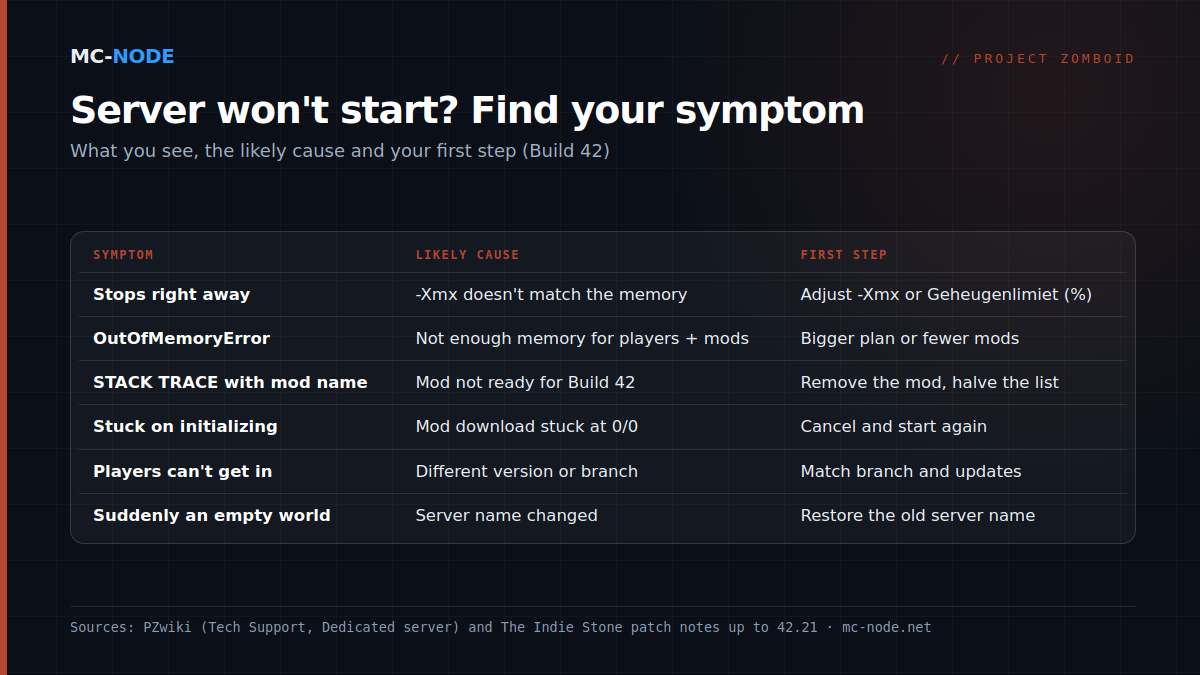
The server runs on Java and gets a fixed memory maximum via -Xmx: on Windows in StartServer64.bat, on Linux in ProjectZomboid64.json. According to the wiki, the Windows start file asks for 16 GB by default; if your machine has less, the server won't start. In that case, set -Xms and -Xmx to what you actually have.
The reverse happens too: the server starts, but stops after a while with java.lang.OutOfMemoryError in the log. The wiki's rule of thumb: at least 3 GB for the server plus about 0.5 GB per player, so 5 GB for four players, with mods on top of that. Also update to the current stable version: 42.20.3 (17 August) tackled several causes of a memory leak that could eventually lead to stuttering and crashes.
In our panel you don't need to edit any JSON. Among the startup variables you'll find Geheugenlimiet (%), the memory limit: with it, the start command sets -Xmx to a percentage of your plan (empty field = 75 percent). With 6 GB, that's 4.5 GB; the rest is left for Java itself and the system. Setting the percentage to the maximum only papers over a shortage.
Mods: the most common cause after an update
Since Build 42 went stable on 29 July 2026, the server only recognises mods with a Build 42 structure: a common/ folder or a version folder such as 42/. A pure Build 41 mod won't load. Also check that every mod is in both lists: the Workshop ID in WorkshopItems=, the Mod ID in Mods=. How that works is explained in Project Zomboid server mods.
Don't know which mod it is? Halve your list until you've found the culprit. Do that after making a backup: according to the wiki, items can disappear for good if you remove mods from a running world. How quickly a patch can break mods was shown by 42.20.4 (26 August): it removed loadstring and loadstream to close security holes, and mods that used them stopped working. In 42.21 (unstable) they're enabled again.
Stuck on "initializing" or on loading the map
- Co-op server stuck on "initializing" or "Downloaded x of y". According to the wiki, that's usually a mod stuck at 0/0 bytes; you'll see it at the bottom of
coop-console.txt. Cancel, start again and repeat until all mods are in. - Dedicated server stuck on "Getting server info" or not downloading mods. A known problem with the Dedicated Server tool from the Steam client; install via SteamCMD (app 380870) instead, as our panel already does.
- Map mods not loading, or only partly. Put
Muldraugh, KYlast inMap=. If it's at the front, the base map overwrites your mod maps. - Players stuck on "Loading Map". One cause of this was fixed in 42.20.3; get everyone onto the current stable version.
- Your self-hosted server seems to hang on its first start. It's asking for a password for the admin account. In our panel you set that with the Admin Password variable. It's set to
passwordby default, so change it straight away.
Version mismatch: Build 41, 42 and unstable mixed up
The server and players must be on the same version. The stable version is 42.20.4; since 23 September, 42.21 has been on the unstable branch. Build 41 saves don't work in Build 42 (that's what the legacy41 branch is for), and saves from the old unstable 42.19 don't work in 42.20 (for those there's the 42.19 branch). Anyone on a different branch from the server can't get in; in 42.21 (unstable), players get a message telling them so.
- Steam Auto Update is set to
0by default in our panel: the server then doesn't update itself when it restarts. Handy if you want to wait for your mods first, but after a patch it leaves you with a version mismatch with your players. Make a backup, set it to1and restart. - Steam Beta Branch picks the branch, for example
legacy41. Switching requires a reinstall; make a backup first.
Has your self-hosted server moved from Build 41 to 42, and does it stop with Assertion Failed: Illegal termination of worker thread? According to the wiki, steam_appid.txt should then contain only 108600, and you delete the old Zomboid folder after making a backup.
Ports: 16261 and 16262 UDP, or whatever the panel says
A dedicated server uses two UDP ports by default, 16261 and 16262. At home, both need to be open in your router and firewall. On a hosted server, the ports the panel assigns apply: the start command passes them with -port and -udpport, and those parameters override DefaultPort and UDPPort in the .ini file. So changing those two lines has no effect; you connect with the IP address and port shown at the top of the panel.
A corrupted save, or suddenly an empty world
Does the server suddenly start with an empty world and default settings? Then look at the server name first: it determines which .ini file and which save folder get loaded. If you change it (in our panel, the Server Name variable), the server starts a new world. The old one is still there alongside it in Saves/Multiplayer; set the name back and it loads again.
Is the world really corrupted, for example with the message "World Version is zero"? Then restore a backup. The server makes them itself too: BackupsOnStart and BackupsOnVersionChange are on by default, with BackupsCount=5. On top of that, you can make a full backup in the panel with one click, ideally before every mod or version change; see restoring a backup.
When more RAM does help, and when it doesn't
More memory solves one kind of problem: a Java heap that fills up. If you see OutOfMemoryError, or your group or mod list is growing, a bigger plan helps. With a mod that won't load, a version mismatch, a closed port or a corrupted save, extra RAM changes nothing.
All Project Zomboid plans come with NVMe storage and DDoS protection, can be cancelled monthly and run in Hengelo, Frankfurt, Warsaw or Beauharnois. With 75 percent for Java, you get:
- Amateur (2 GB, €3.00): below the wiki's minimum, for testing only.
- Beginner (4 GB, €6.00): 3 GB for Java, the base from the rule of thumb; tight once players join.
- Traveller (6 GB, €9.00): 4.5 GB, enough for three players without mods.
- Explorer (8 GB, €12.00): 6 GB, enough for six players without mods or four with a modest mod list.
- Maintainer (12 GB, €18.00) to Chief (16 GB, €24.00): large groups or heavy modpacks.
It's better to start one size smaller and upgrade when the log calls for it (see upgrading or downgrading). No server yet? Read starting a Project Zomboid server.
Frequently asked questions
Why does my Project Zomboid server stop right after starting?
Usually because of Java memory: -Xmx is set higher than what the machine has, or too low for your players and mods. Search server-console.txt for a memory error or a STACK TRACE; if it mentions a mod name, that mod probably isn't ready for Build 42.
Which ports does a Project Zomboid server use?
UDP 16261 and 16262 by default (DefaultPort and UDPPort in the .ini file). On a hosted server, the ports the panel assigns apply; they're passed with -port and -udpport and override the values in the .ini file.
Can I play a Build 41 world on a Build 42 server?
No. The Indie Stone states that Build 41 saves don't work in Build 42. If you want to keep your old world, put the server and all players on the legacy41 Steam branch.
How much RAM does a Project Zomboid server need?
The PZwiki counts at least 3 GB for the server plus about 0.5 GB per player, and more with mods. That puts four players without mods at 5 GB; add some room for the system on top of that.