Vintage Story server setup: mods, world settings and RAM
You set up a Vintage Story server with one file and a few commands. serverconfig.json holds the name, the port (42420 by default), the maximum number of players (16 by default) and an optional password. You choose the world with a play style preset and adjust it later with /worldconfig. Mods are .zip files in the Mods folder, and players download them automatically when they join. For memory, the official wiki works with 1 GB plus 300 MB per player: 2 GB for three players, 4 GB for around ten. The current stable version is 1.22.7.
A dedicated server is there for when you're not
You can also play together without a separate server: open your world and choose Open to LAN or Open to Internet. The latter tries to open a port on your router via UPnP; according to the developers, that works straight away in about 60 percent of cases. Otherwise you have to forward port 42420 (TCP and UDP) yourself. And the world is only reachable as long as your game is running.
A dedicated server runs independently of your PC: your friends keep building while you sleep, and you can fit in more players than a gaming PC can handle on the side. One nuance: PassTimeWhenEmpty is off by default, so without players the calendar stands still. If you want the seasons to keep turning while nobody is online, set it to true.
When not to: do you always play with just two or three people at a time, and does Open to Internet work for you? Then you don't need a server.
serverconfig.json: stop the server first, then edit
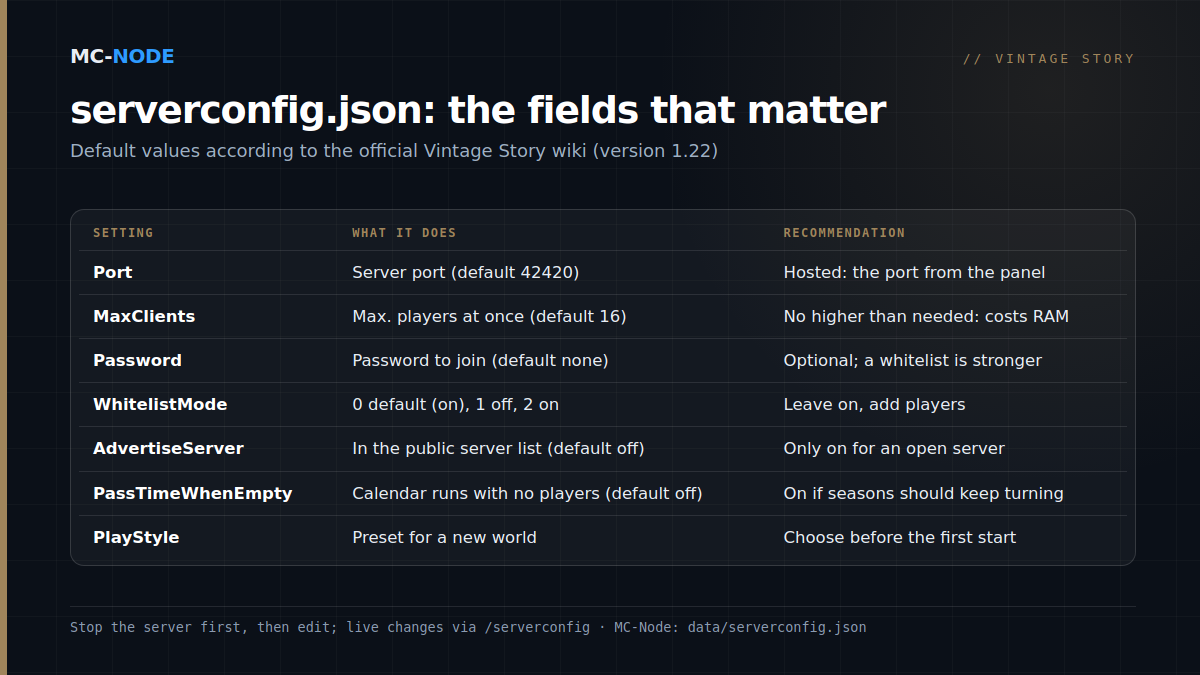
With us, the file is at data/serverconfig.json, via the Files tab in the panel. The wiki is clear about it: stop the server before you edit it, and changes only take effect after a restart. Not keen on JSON? Many fields can also be set live with /serverconfig in the console. The key fields, with their default values:
"ServerName": "Vintage Story Server",
"Port": 42420,
"MaxClients": 16,
"Password": null,
"AdvertiseServer": false,
"WhitelistMode": 0,
"PassTimeWhenEmpty": false,
"WorldConfig": {
  "SaveFileLocation": ".../Saves/default.vcdbs",
  "WorldName": "A new world",
  "PlayStyle": "surviveandbuild"
}- ServerName: 4 to 80 characters, required if you want to appear in the public server list.
- MaxClients: higher values cost more RAM and CPU.
- Password:
nullmeans no password. - AdvertiseServer: off by default since 1.20, so your server isn't in the public list.
- WhitelistMode: 0 = default, 1 = off, 2 = on. Since 1.20, default means on for a dedicated server. The classic reason friends can't get in.
- MapSizeX and MapSizeZ: width and length, 1,024,000 blocks by default;
MapSizeYis the height (256). - WorldConfig:
SaveFileLocationpoints to the world file (.vcdbs) that gets loaded or created at startup;WorldNameandPlayStyleonly apply to a new world.
Watch out on a hosted server: the startup line passes --port and --maxclients, and those override whatever is in the file. You get the port from the panel, and you change the number of players via the Max Clients startup variable.
Choose the play style before the first start
World settings in serverconfig.json only work as long as the world doesn't exist yet. There are five presets:
- Standard (
surviveandbuild): the normal survival experience, and not exactly beginner-friendly. - Exploration (
exploration): no temporal storms, you keep your inventory when you die and creatures only attack once you hit them. A good choice for new players. - Wilderness Survival (
wildernesssurvival): no map, collapsing soil and rock, and creatures that are 50 percent stronger. - Homo sapiens (
homosapiens): no lore and no temporal stability; you're the first human on the planet. - Creative Building (
creativebuilding): flat land, flying and unlimited blocks.
The easiest route according to the wiki: create the world in singleplayer via Customize, stop the server and upload the .vcdbs file to data/Saves. Rename it to default.vcdbs or point SaveFileLocation to it.
After that, you can change many settings live with /worldconfig name value (case-sensitive, restart afterwards). The best known ones:
temporalStorms: off, veryrare, rare, sometimes (default, roughly every 10 to 20 in-game days), often or veryoften.deathPunishment: drop (default) or keep.blockGravity: sandgravel (default) or sandgravelsoil, pluscaveInson or off for collapsing rock.creatureHostility: aggressive, passive or off.
Not everything can be changed afterwards: startingClimate, graceTimer, worldClimate, worldWidth and worldLength are fixed once the world has been created.
Mods: a .zip in the folder, everyone on the same version
The official source is the ModDB at mods.vintagestory.at; for each mod, check which game version it was made for. There are three kinds: content mods (JSON without C#: blocks, items, creatures), code mods (C#, for new systems) and theme packs (looks only). Each mod also states where it runs: Server, Client or Universal.
- Stop the server and put the .zip in
data/Mods. Don't unpack it. - Start the server again. You can also install from the console with
/moddb install modid. - Players accept the mod list when they join; the game then downloads the Server and Universal mods into a separate folder (
ModsByServer). Client mods are up to each player to install.
The pitfall is in the versions. The players' game version has to match the server's, and after a game update you update your mods as well. Make a backup before adding or removing mods: removing a mod can break blocks in your world.
Administration: making yourself admin and letting friends in
Type these in the panel console, or in chat as an admin:
/op YourName: make yourself admin (the same as/player YourName role admin)./player Friend whitelist on: put a player on the whitelist, yourself included./player Friend role suplayer: change a player's role./serverconfig password secret: set a password;/serverconfig nopasswordremoves it./serverconfig advertise 0: stay out of the public list./genbackup: a full copy of the world./stop: shut down cleanly.
The whitelist takes effect immediately, without a restart. New players get the role from DefaultRoleCode (suplayer by default). Set it to suvisitor if newcomers should only be able to look around and chat at first.
Version 1.22.7 and updating safely
As of 23 September 2026, 1.22.7 is the stable version. The wiki is strict about updating: delete the old installation files first, but never your data folder, or you'll get unpredictable behaviour. In our panel, the version branch (stable, unstable or pre) and the version (latest by default) are startup variables, so a reinstall pulls in the newest version. Make a backup beforehand, update your mods and have everyone play the same version. Noticing a brief stutter every five minutes? That's probably the autosave, which runs every 300 seconds by default.
How much RAM does a Vintage Story server need? The official calculation
The wiki gives a cautious estimate for a survival world where players spread out: 1 GB base plus 300 MB per player, four threads, and 1 GHz plus 100 MHz of clock speed per player. Count the players online at the same time, not the length of your whitelist:
| Online at once | By the calculation | Package |
|---|---|---|
| 1 to 3 | 1.3 to 1.9 GB | Amateur, 2 GB, €3.00 |
| 4 to 10 | 2.2 to 4.0 GB | Beginner, 4 GB, €6.00 |
| 11 to 16 | 4.3 to 5.8 GB | Traveller, 6 GB, €9.00 |
| 17 to 23 | 6.1 to 7.9 GB | Explorer, 8 GB, €12.00 |
Mods and view distance come on top of that. MaxChunkRadius (12 by default) determines how far out players can load, and a higher value costs more RAM. If you run a hefty mod list, go one package up. To be fair, the wiki itself calls the calculation conservative, and with some tuning you can get by with less. And if your server is hitting the limits of the processor rather than the memory, extra RAM won't help. With /stats you can see what the server is really using.
For bigger groups, the Vintage Story packages go up to Chief with 16 GB for €24.00 per month, with DDoS protection and monthly cancellation. Pick a location close to your players (Hengelo, Frankfurt, Warsaw or Beauharnois): according to the wiki, playing from another continent causes lag. Ordering and starting is covered in How do I start a Vintage Story server?, the day-to-day work in managing your server via the panel.
Frequently asked questions
Which port does a Vintage Story server use?
Port 42420 by default. At home you forward it for TCP and, since version 1.20, for UDP as well. On a hosted server you get the port from the panel.
How much RAM does a Vintage Story server need?
The official wiki works with 1 GB base plus 300 MB per player online at the same time. That's 2 GB for three players, 4 GB for about ten and 6 GB for sixteen. Mods and a longer view distance need more.
Why can't my friends join my Vintage Story server?
Usually because of the whitelist: since version 1.20 it's on by default on dedicated servers. Add each player with /player name whitelist on in the console. Also check that everyone is playing the same game version as the server.
How do I make myself admin on a Vintage Story server?
Type /op yourname in the server console; that's the same as /player yourname role admin. Without a console, put "StartupCommands": "/op yourname" in serverconfig.json and restart.