Valheim commands and devcommands on a dedicated server
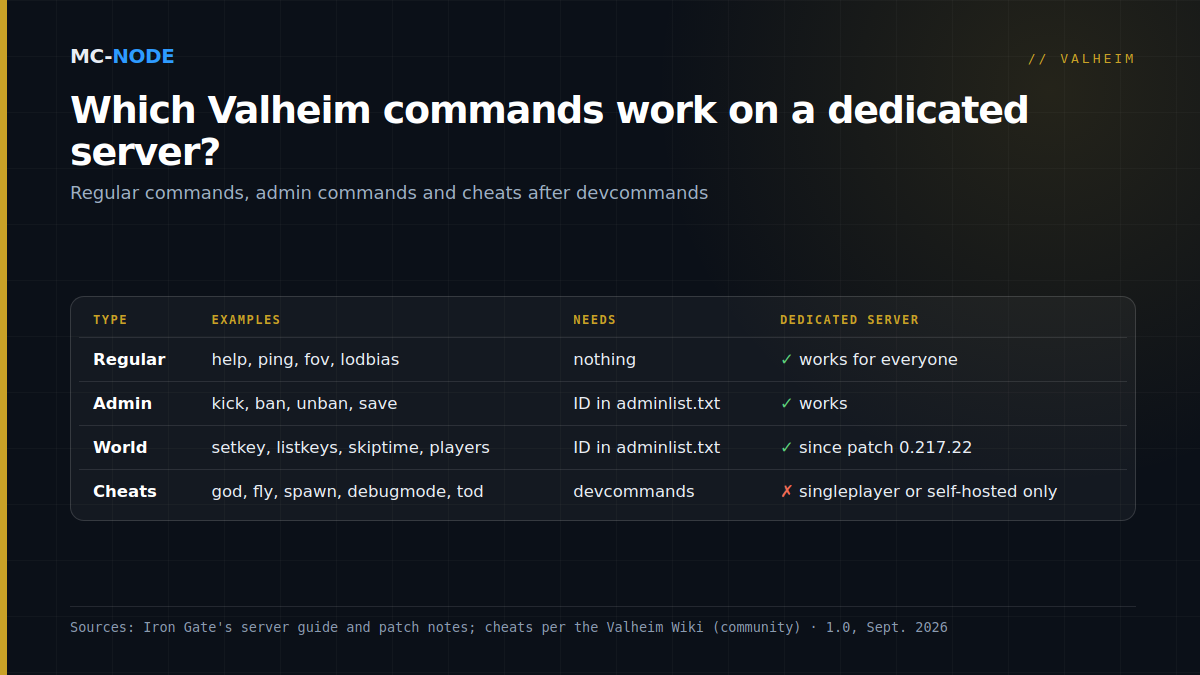
You type Valheim commands into the console, which you open in a world with F5 once you've enabled it in the settings or with the launch option -console. Cheats like god, fly and spawn only work after devcommands, and according to the community wiki only in singleplayer or in a world you host yourself from the game. On a dedicated server, admins from adminlist.txt can kick, ban and save, and since patch 0.217.22 they can also use world commands such as setkey, listkeys and skiptime. So Valheim devcommands on a dedicated server aren't something you can simply switch on.
Opening the console with F5
The console is off by default. Since patch 0.221.4 (September 2025), you enable it with an option in the Gameplay settings; the launch option -console also works and, according to the patch notes, takes priority over the setting. On Steam, you enter it under Properties, General tab, in the Launch Options field.
If nothing happens on a laptop, check whether Fn mode is on; Iron Gate itself names that as a possible cause. Note the difference with the Console in our game panel: it shows the server log, and whatever you type there never reaches Valheim. You type commands in the game.
Three kinds of commands
Regular commands work without devcommands and for everyone, according to the Valheim Wiki, a community wiki. Think help, ping, fov and lodbias. According to Iron Gate, resetknownitems, which wipes your character's known items and recipes, is explicitly not a cheat either.
Admin commands only work on a dedicated server if your Platform User ID is in adminlist.txt. How to set that up is explained in Valheim server admin: adminlist, bans and whitelist. The official server guide lists kick, ban, unban and banned. The patch notes add save, randomevent and stopevent, and patch 0.217.22 brought a whole set of world commands, including setworldmodifier, setkey, removekey, listkeys, players, sleep, skiptime and genloc.
Devcommands is the switch for cheats. Type devcommands and press Enter; according to Iron Gate, that's when most commands become usable. Typing it again turns them off. Until patch 0.148.6, this switch was called imacheater.
Valheim devcommands on a dedicated server: god and fly don't work
Iron Gate never says it in so many words, but the Valheim Wiki is adamant: cheat commands only work in singleplayer or in a world you host from the game itself, not on a dedicated server. According to the wiki, admin rights don't change that. That fits the patch notes: in 0.217.22, Iron Gate explicitly made a series of commands available to admins, and god, fly and spawn aren't among them.
Still want to cheat with your group? There are three routes:
- Host from the game yourself. Your PC is then the server and you, as the host, can use cheats, but the world is only online while your PC is on.
- Play the world locally for a while. Stop the server, download the world folder, edit it in singleplayer and upload it again; see Move your Valheim world to a dedicated server. The world does get a cheat flag in the process.
- A mod. The community mod Server Devcommands (by JereKuusela, on Thunderstore) enables devcommands for admins on the adminlist. It runs on BepInEx on your own PC; on the server it's optional, but needed for all features. At MC-Node, you enable BepInEx with the startup variable BepInEx (mods); see Valheim mods on your server. Console players can't use mods, so for an admin on Xbox, PS5 or Switch 2 this isn't a solution.
Useful commands and where they work
The explanations of the cheats come from the Valheim Wiki; what admins are allowed to do on a server comes from Iron Gate's patch notes.
| Command | What it does | Dedicated server |
|---|---|---|
god | You can't die: your health doesn't drop below 1 | No |
fly | Fly; Space is up, Ctrl is down | No |
debugmode | Hotkeys, such as Z to fly and B to build without materials | No |
spawn [name] [amount] [level] | Spawns items or creatures | No |
tod 0.5 | Sets the time to noon; 0 and 1 are midnight, -1 turns it off again | No |
env [name] / resetenv | Locks the weather, for example env Clear, and releases it | No |
exploremap / resetmap | Reveals the whole map or hides it again | No |
killall / killenemies | Kills enemies and tamed animals nearby (not players) / enemies only | No |
removedrops | Clears loose items off the ground | No |
raiseskill All 10 | Raises all skills; put a minus in front to lower them | No |
lodbias [1-7] | Draw distance for details | Yes, regular command |
save | Saves the world right away | Yes, for admins |
skiptime [seconds] / sleep | Skips time ahead (240 seconds by default) / on to the next day | Yes, for admins |
players [number] | Difficulty as if that many players were online; 0 resets it | Yes, for admins |
setkey, removekey, listkeys, resetkeys | Manage global keys, see below | Yes, for admins |
Global keys: what listkeys tells you
Valheim tracks a world's progress with so-called global keys. With listkeys you can see which ones are set in your world; according to patch 0.217.22, the command also shows the list on a dedicated server. According to the wiki, the boss keys, such as defeated_eikthyr, defeated_gdking (The Elder) and defeated_bonemass, determine which raids and spawns are active. World modifiers are stored as keys too. You're better off setting those with setworldmodifier or in the launch line; see Valheim dedicated server settings: presets, modifiers and -setkey.
Watch out for two similar-looking commands:
resetworldkeysresets the world modifiers to default (that's how Iron Gate describes it); according to the wiki, your progress stays intact.resetkeysremoves every single key, according to the wiki, so your boss progress too.
Only want to get rid of one key? Use removekey [name].
The risks of cheats in a shared world
Since 1.0, Valheim has achievements, and cheats cost you them. According to Iron Gate's 1.0 FAQ, most commands, such as spawn, put a permanent flag on your character and on your world save, after which you can no longer earn achievements. freefly is an exception, and the game asks you to confirm before applying that flag. Spawned items get a visible cheat mark. If a fellow player picks up such an item, they're temporarily excluded from achievements as well, until they've thrown away every flagged item. So in a shared world, one cheat can affect the rest of your group too.
Hotfix 1.0.12, initially on Steam only, did bring the devcommand yesiuseddevcommandsbutiwantmyachievementsanyway, which opts you back into achievements anyway; Iron Gate leaves it to your conscience. Patch 1.0.14 fixed a bug that sometimes wrongly flagged players as temporary cheaters; for wrongly flagged items, Iron Gate announced a fix with 1.0.15.
Two more pitfalls. According to the patch notes, genloc can take a while and make players disconnect. And never turn time back with skiptime: according to the wiki, spawns and growth then stop, and smelters can stall, until the old time is reached again. So make a backup before every change; how to restore it is explained in the knowledge base.
When you don't need the console
You don't need it just to play. An admin can also kick players via the player list in the pause menu, and you set the rules of your world, such as fewer raids or no build cost, in our panel in the startup variable Wereldinstellingen (world settings). No server yet? A Valheim server at MC-Node starts at €3.00 per month for the Amateur plan with 2 GB RAM. You get NVMe storage, DDoS protection and backups in the panel, and you can cancel monthly.
Frequently asked questions
How do I use devcommands on a Valheim dedicated server?
Not in the standard game: according to the community wiki, cheats like god, fly and spawn only work in singleplayer or a self-hosted world, even for admins. Admins in adminlist.txt can use kick, ban, save and world commands like setkey and skiptime on a dedicated server, though. For cheats on a server, there's the community mod Server Devcommands, PC only.
How do I open the console in Valheim?
Enable the console in the Gameplay settings or start the game with the launch option -console, then press F5 in a world. Type help for a list of commands and devcommands to turn on cheats. If F5 doesn't work on a laptop, check whether Fn mode is on.
Do I lose achievements if I use devcommands in Valheim?
Usually, yes. Since 1.0, most cheat commands, such as spawn, permanently flag your character and your world as cheated, and then you can no longer earn achievements; freefly is an exception. Hotfix 1.0.12 brought, first on Steam, a devcommand that opts you back into achievements anyway.
What's the difference between resetkeys and resetworldkeys in Valheim?
resetworldkeys only resets the world modifiers to default. According to the Valheim Wiki, resetkeys removes all global keys, including the keys that track which bosses have been defeated. So make a backup first.