VPS for AI agents: run OpenClaw, Claude Code and Codex 24/7
A VPS for AI agents doesn't need a lot of power. The language model runs at the AI provider, such as Anthropic or OpenAI; your VPS just keeps the agent running day and night. For OpenClaw, Hermes Agent, Claude Code or Codex, 2 to 4 vCores with 4 to 8 GB of RAM is enough. You don't need a GPU, but you do need KVM virtualisation.
At MC-Node, that's the Premium VPS with Ryzen 9: €8.30 a month with 4 GB of RAM or €15.30 with 8 GB, and you can cancel monthly. If you only want to try out OpenClaw or Hermes Agent, you can start from €5.00.
Why run an AI agent on a VPS?
OpenClaw and Hermes Agent are personal assistants that you control via Telegram, WhatsApp or Discord and that carry out tasks on their own. Claude Code and Codex are coding agents in your terminal that read code, execute commands and run tests. They only work while their process is running, and on a laptop that stops as soon as it goes to sleep.
- Always on. You can close your laptop; the agent finishes a job while you sleep. Claude Code's Remote Control, which lets you follow a session from your phone, also only works while the
claudeprocess is running, and only with a Claude subscription, not with an API key. - Separate from your own stuff. On your own PC, an agent can get at your documents, your browser and your passwords; on a separate server, only at what you put there. Anthropic calls a separate virtual machine with its own kernel the strongest form of isolation.
- Reachable. The VPS is on day and night, so messages via Telegram, Discord or WhatsApp and scheduled tasks keep running overnight too.
What runs on the VPS, and what runs at the AI provider?
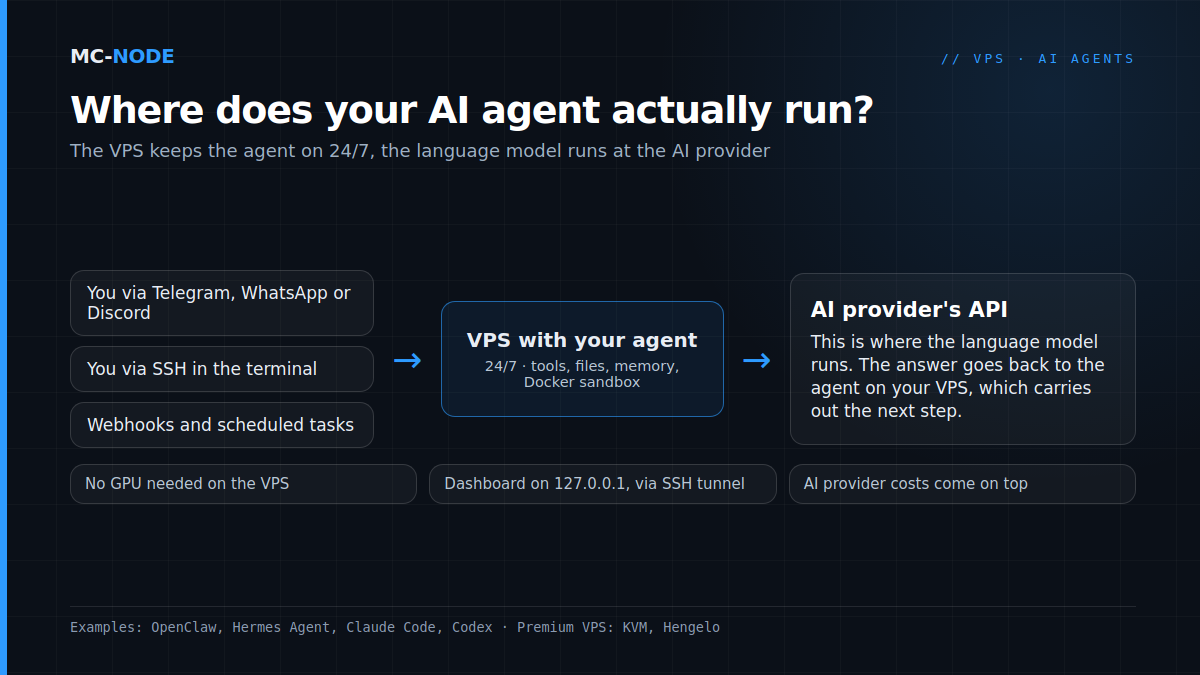
The thinking doesn't happen on your server. The agent sends your question, the context and any files to the AI provider's API, where the language model runs. With the answer, the agent on your VPS carries out the next step, such as running a command or sending a message.
So the VPS runs the agent program, its tools, possibly Docker and a browser, and its memory. That's light work, as long as there's no browser or build running alongside it. Keep in mind: your VPS is in Hengelo, on MC-Node's own hardware, but whatever the agent sends to the model goes to the AI provider. The provider bills you separately, often for more than the VPS costs.
Which VPS for AI agents do you need?
The official minimums are low: OpenClaw 1 GB of RAM (2 GB or more recommended), Hermes Agent 1 GB (2 GB with browser tools), Claude Code 4 GB and Codex 4 GB (8 GB recommended). But other things run alongside: Docker, git, a build.
| Use | Official (minimum/recommended) | Our advice at MC-Node | Per month |
|---|---|---|---|
| Testing: OpenClaw or Hermes Agent, one channel, no browser | 1 GB | 2 vCores, 2 GB, 40 GB NVMe | €5.00 |
| VPS for OpenClaw or Hermes Agent, daily use, with a Docker sandbox | 2 GB recommended | 2 vCores, 4 GB, 60 GB NVMe | €8.30 |
| Claude Code or Codex with builds and tests | 4 GB | 4 vCores, 8 GB, 80 GB NVMe | €15.30 |
| Multiple agents, or lots of browser automation | add up the minimums | 6 vCores, 16 GB, 120 GB NVMe | €28.00 |
| Heavy CPU work all day long | – | VDS: 4 dedicated cores, 16 GB, 320 GB NVMe | €56.00 |
Memory runs out before the CPU does. A headless browser, Docker and a few Node processes add up fast, and once memory is full, the Linux OOM killer terminates a process. Even the Claude Code installation can fail because of it; the documentation then recommends 2 GB of swap (fallocate -l 2G /swapfile && chmod 600 /swapfile && mkswap /swapfile && swapon /swapfile). Our rule of thumb: take double the official minimum. You can read more about cores in What is a vCPU (vCore)?.
Apart from the last row, these are Premium VPS plans: KVM, an AMD Ryzen 9 9950X*, DDR5 and NVMe in the Previder data centre in Hengelo, with DDoS protection. Prices are per month including VAT. If your agent grows, you upgrade in the client area and pay the difference. If an agent builds and tests all day, go for a VDS with dedicated cores: those cores are always yours, whereas vCores are shared with other VPSs on the node.
* or AMD Ryzen 9 7950X3D, depending on the node.
Why KVM, and not the cheapest VPS?
A VPS with KVM is a complete virtual machine with its own kernel. Docker works there, and so do the sandboxes agents use to restrict themselves: Claude Code and Codex use bubblewrap, OpenClaw and Hermes Agent use Docker.
With OpenVZ, you share the host's kernel, and you can't update it yourself. Docker only runs in such a container if the host's administrator enables a special setting, and whether bubblewrap works there is uncertain.
In all honesty: our Budget VPS, from €2.00, runs on OpenVZ. For a simple bot without Docker that can sometimes work, but modern agents need a recent Node.js, which officially expects a newer kernel than OpenVZ has. That's why we don't recommend it for OpenClaw, Hermes Agent, Claude Code or Codex. You can read what it is good for in Cheap VPS: what you really get.
Do you need a GPU for an AI agent?
No, as long as the model runs at the AI provider. Our VPS lines don't have a GPU either; we'd rather tell you that up front.
You can run a small local model on the CPU with Ollama, just a lot slower than on a GPU. A model of around 8 billion parameters is about 5 GB, but agents want a long context, at least 64,000 tokens according to Ollama, and that takes extra memory: for a local model plus an agent, count on 24 GB or more. OpenClaw also warns that small models are more susceptible to prompt injection.
A 70-billion-parameter model takes up 43 GB in weights alone. Larger open models only fit on a single GPU with 80 GB of memory, and the very largest need several. For those, you use an API or a GPU server.
Subscription or API key: what do you pay on top of the VPS?
The agent uses your account with the AI provider: your subscription, or an API key that you pay for per use. MC-Node doesn't sell AI subscriptions or API credit; those costs come on top of your VPS.
- Claude Code works with a paid Claude subscription or an API key from the Claude Console. The free plan doesn't qualify.
- Codex uses your ChatGPT account or an API key.
- OpenClaw and Hermes Agent are free and open source; you connect an API key or, where that's allowed, your subscription.
The rules for using subscriptions in third-party tools changed a few times in 2026, and the documentation sometimes contradicts itself (as of November 2026). So check your AI provider's current terms. For an agent that runs day and night, OpenClaw and OpenAI both recommend an API key. Do keep an eye on your usage, though: something that's on 24/7 can also run up costs 24/7. So set a spending limit with your AI provider.
How to install OpenClaw, Claude Code and Codex on a VPS and run them 24/7
Run the agent as its own user, not as root. OpenClaw calls root unsafe and unsupported, Hermes Agent says never as root, and Claude Code won't start its mode without permission prompts as root. Use Ubuntu 22.04 or newer; with the Premium VPS, you install the operating system in the VPS panel.
# as root: a user for the agent, with your SSH key
adduser agent
mkdir -p /home/agent/.ssh && cp ~/.ssh/authorized_keys /home/agent/.ssh/
chown -R agent:agent /home/agent/.ssh
loginctl enable-linger agent

# then log in via SSH as agent (not with su)
# OpenClaw (puts Node.js in ~/.openclaw, no sudo needed)
curl -fsSL --proto '=https' --tlsv1.2 https://openclaw.ai/install-cli.sh | bash

# Claude Code
curl -fsSL https://claude.ai/install.sh | bash

# Codex
curl -fsSL https://chatgpt.com/codex/install.sh | sh

# Hermes Agent
curl -fsSL https://hermes-agent.nousresearch.com/install.sh | bash
The agent itself doesn't need sudo; anything that requires root privileges, you do separately as root. Really do log in as agent via SSH, because with su the systemd service below won't work. Logging in without a browser: Claude Code shows a login URL (c copies it), you open it on your own computer and paste the code back. Codex has codex login --device-auth, still in beta; first enable device code login in ChatGPT's security settings.
To run around the clock, OpenClaw and Hermes Agent install a systemd service (openclaw onboard --install-daemon or hermes gateway install) that restarts after a crash or reboot. Thanks to enable-linger, that service keeps running when you log out. You start a coding agent in tmux: tmux new -s agent, then claude or codex; detach with Ctrl+B followed by D, and reattach with tmux attach -t agent. tmux survives a dropped SSH connection, but not a reboot.
How to set up your agent securely: checklist
An agent with shell access executes whatever a language model comes up with, and that model can be tricked. In 2026, researchers found tens of thousands of OpenClaw installations publicly reachable on the internet.
- SSH keys, and password login switched off; how to do that is in Secure your VPS: the first 30 minutes.
- A separate user without sudo for the agent.
- Firewall for SSH only:
ufw allow OpenSSH, thenufw enable(if SSH runs on a different port, allow that port instead). Telegram and Discord work over outgoing connections; only open a port if a channel comes in via webhooks (with Hermes Agent, for example Slack and WhatsApp), and then use HTTPS. - Dashboard local only. OpenClaw listens on
127.0.0.1:18789by default, the Hermes Agent dashboard on127.0.0.1:9119. Reach them through an SSH tunnel:ssh -N -L 18789:127.0.0.1:18789 agent@your-ip. Watch out with Docker: published container ports bypass ufw, so only publish them on 127.0.0.1. - Keys locked down in
~/.openclaw/.envor~/.hermes/.env, withchmod 600, and never in git. - Limit what the agent can do. Turn on sandboxing: in OpenClaw, Hermes Agent and Claude Code it's off by default, while Codex does start in a sandbox. Claude Code and Codex need
bubblewrapandsocatfor this; on Ubuntu 24.04, bubblewrap also needs an AppArmor profile, which is described in the docs of both. For a Docker sandbox, use rootless Docker or Podman and don't add the agent to thedockergroup: that's equivalent to root. Don't skip permission prompts with--dangerously-skip-permissionsor--yolo, except in a separate container or VM without keys, accounts or internet access; your agent VPS itself doesn't count as one. - Distrust third-party skills. In February 2026, 341 of 2,857 skills examined on ClawHub turned out to be malicious. Web pages, emails and documents can also contain hidden instructions: prompt injection.
- No personal accounts. Give the bot its own number or account, and don't connect your personal email, bank or password manager.
- Update and audit with
openclaw updateorhermes update, and runopenclaw security audit --deepafter every config change. - Snapshot and backup. Take a snapshot in the VPS panel before a big change, and regularly copy
~/.openclawor~/.hermesto another location yourself.
None of this makes an agent invulnerable, but it does limit the damage. The basics for every new server are in Secure your VPS: the first 30 minutes.
When don't you need a VPS?
- You only use the agent while you're sitting at your computer. Then just run Claude Code or Codex locally.
- You want to run a large language model yourself. For that you need a GPU, and our VPSs don't have one.
- You don't want to manage a server. A VPS is self-managed: you handle updates, the firewall and backups yourself. Our support team is happy to help you think it through.
- You already have a Mac mini or a low-power PC running at home all the time. That works too, but then the agent runs alongside your own devices, on your own connection.
Want AI agent hosting that runs 24/7, separate from your own PC and on hardware in the Netherlands? Then start with a Premium VPS with Ryzen 9 with 4 or 8 GB, and scale up as your agent grows.
Frequently asked questions
Which VPS do you need for an AI agent?
For most AI agents, a VPS with KVM virtualisation, 2 to 4 vCores and 4 to 8 GB of RAM is enough, because the language model runs at the AI provider. Claude Code and Codex officially require at least 4 GB of RAM. At MC-Node, the Premium VPS with 2 vCores and 4 GB for €8.30 a month fits the bill, or the one with 4 vCores and 8 GB for €15.30 a month; if you run several agents on one VPS, add up the memory.
Do you need a GPU for an AI agent on a VPS?
No, not if the language model runs at a provider such as Anthropic or OpenAI; the VPS then only runs the agent. You can run a small local model on the CPU with Ollama, but that's slower and takes a lot of memory. For large models you need a GPU, and MC-Node's VPSs don't have one.
How much RAM does an OpenClaw VPS need?
OpenClaw lists 1 GB of RAM as the absolute minimum and recommends 2 GB or more. Browser automation, Docker sandboxing and multiple channels need more. For daily use we recommend 4 GB, 8 GB if the agent also operates a browser, and 16 GB for multiple agents or lots of browser work.
Can I use my Claude or ChatGPT subscription instead of an API key?
Claude Code works with a paid Claude subscription and Codex with your ChatGPT account, and both also work with an API key. For third-party tools such as OpenClaw, the rules changed several times in 2026, so check your AI provider's current terms. For an agent that runs 24/7, an API key is the most predictable choice.
Is it safe to run OpenClaw on a VPS?
That depends on how you set it up; no agent is risk-free. Run it as its own user without root, keep the dashboard on 127.0.0.1 and reach it through an SSH tunnel, and only let SSH through the firewall. Turn on sandboxing, distrust third-party skills and don't connect any personal accounts.