FiveM server on your own VPS: Linux or Windows, txAdmin
You can run a FiveM server on a VPS on Linux or on Windows Server: FXServer exists for both and txAdmin is included by default. For a roleplay server up to 64 slots, count on 8 to 16 GB of memory, open port 30120 for TCP and UDP, and choose fast cores, because FXServer does most of its work on one thread.
FiveM server on your own VPS or ready-made?
Let's be honest first: for most servers, a ready-made FiveM server is the easiest route. You get txAdmin and a panel, without having to manage Linux, firewalls or updates yourself. What FiveM is and when you need your own server is covered in What is FiveM?
A VPS becomes interesting if you want more than just FXServer: your own MariaDB with full access, a website or Discord bot alongside your server, a separate test server, your own scripts and cron jobs, or simply root access to everything. Then you're the admin, though: updates, security and backups are up to you. Our support is happy to think along, but it's still your own machine. Want to combine FiveM with other servers? Then also read Multiple game servers on one VPS.
FiveM on Linux or on Windows Server?
FXServer runs on both. The differences in practice:
- Linux (Ubuntu, for example) costs nothing in licences and leaves more memory for your server. The FiveM documentation does call the Linux build a "courtesy port": Windows is the main platform, and the odd script or tool assumes Windows.
- Windows Server is handy if you prefer working with a desktop (via RDP) or use scripts that have only been tested on Windows. Windows itself uses more memory than Linux: for a Windows VPS we recommend at least 4 GB, and FiveM comes on top of that. The licence isn't included; without your own key, Windows Server runs as a 180-day evaluation version.
How you get Windows differs per line. With the KVM VPS and the VDS, you choose "Windows Server 2022 (Optimized + optional FiveM installation)" at checkout. With the Premium VPS, you don't choose an operating system at checkout; you install Windows yourself afterwards through the VPS panel. You connect with Remote Desktop; the licence steps are in How do I activate my Windows licence? The plans are listed under Windows VPS with FiveM option; weighing up Windows or Linux is covered in Windows VPS.
Which VPS and how much memory for FiveM?
Memory grows with your resources, not with your players: a framework like QBCore or ESX, MLOs, car packs and a database on the same VPS weigh more than the number of slots. Our advice for a server up to 64 slots is 8 to 16 GB. On top of that, speed per core counts: the faster FXServer's thread finishes its work, the more headroom there is before the server starts to stutter.
| Situation | Premium VPS | Per month |
|---|---|---|
| RP server on Linux, with MariaDB | 4 vCores, 8 GB | €15.30 |
| Lots of MLOs and cars | 4 vCores, 12 GB | €21.75 |
| Heading for 64 slots, or on Windows Server | 6 vCores, 16 GB | €28.00 |
The Premium VPS with Ryzen 9 runs on the AMD Ryzen 9 9950X* with DDR5 and NVMe. The boost of up to 5.7 GHz applies to one core, and that's exactly what FXServer asks for; why that matters more than the number of cores is explained in Ryzen vs EPYC for game servers. If you want cores that are yours alone, look at the VDS from €28.00 with 2 dedicated cores and 8 GB. How many players your server can handle depends mostly on your scripts; that's what How many players can a FiveM server handle? is about.
* or AMD Ryzen 9 7950X3D, depending on the node.
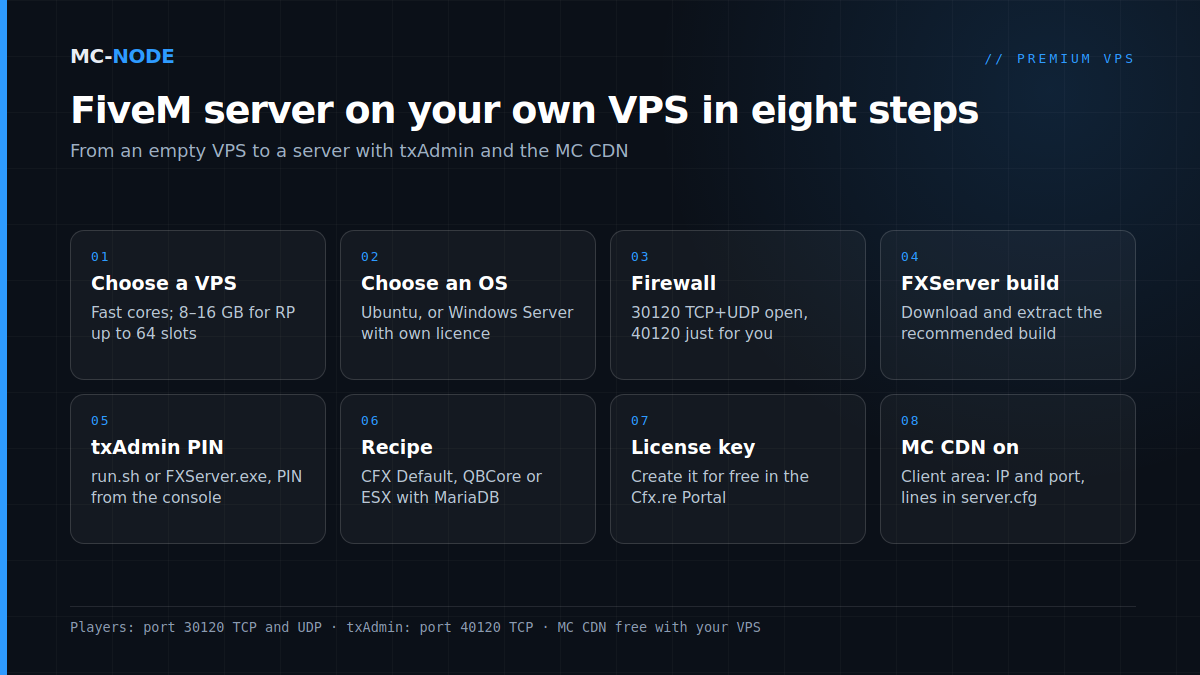
Installing FiveM on a Linux VPS with txAdmin
The broad outline on Ubuntu, under a separate user fivem and not as root:
sudo apt install -y xz-utils git tmux
sudo adduser --disabled-password --gecos "" fivem
sudo -iu fivem
mkdir -p ~/FXServer/server && cd ~/FXServer/server
wget <link to fx.tar.xz of the recommended Linux build>
tar xf fx.tar.xz
Copy the link from FiveM's download page (Server Download): choose Linux and the Recommended branch. Then start FXServer without a +exec argument; txAdmin starts along with it. In a tmux session it keeps running when you close SSH:
tmux new -s fivem
cd ~/FXServer/server && ./run.sh- The console shows an address on port 40120 and a PIN. Open the address in your browser and enter the PIN.
- Link your Cfx.re account; it becomes the master admin of txAdmin.
- Choose a recipe: CFX Default for a bare server, or a popular recipe such as QBCore or ESX. The latter ask for database details (see below) and install oxmysql along with them.
- Enter your license key. You create it for free in the Cfx.re Portal (formerly Keymaster); see Getting and setting up a FiveM license key.
- Start the server from the dashboard.
On Windows Server it works the same way: extract the build, start FXServer.exe without arguments and follow the same wizard. Without txAdmin, you start from your server-data folder with run.sh +exec server.cfg. More in Setting up txAdmin on your FiveM server and Installing QBCore with a txAdmin recipe.
Ports and firewall: 30120 open, 40120 closed
Players connect via port 30120, for TCP and UDP. txAdmin listens on port 40120 by default, on all network interfaces. That panel gives full control over your server, so don't open it to everyone:
sudo ufw allow OpenSSH
sudo ufw allow 30120/tcp
sudo ufw allow 30120/udp
sudo ufw allow from YOUR.IP.ADDRESS to any port 40120 proto tcp
sudo ufw enable
If your own IP address changes often, keep 40120 closed entirely and open txAdmin through an SSH tunnel: ssh -L 40120:localhost:40120 user@your-vps-ip, and then http://localhost:40120 in your browser. On Windows Server, create two rules for the game port in PowerShell:
New-NetFirewallRule -DisplayName "FiveM TCP" -Direction Inbound -Protocol TCP -LocalPort 30120 -Action Allow
New-NetFirewallRule -DisplayName "FiveM UDP" -Direction Inbound -Protocol UDP -LocalPort 30120 -Action Allow
SSH keys, fail2ban and RDP are covered in Secure your VPS: the first 30 minutes. DDoS protection is always on for every VPS; it absorbs attacks on the network, but it doesn't replace a firewall.
Database on the same VPS: MariaDB and oxmysql
QBCore and ESX store everything in a MySQL database, with oxmysql as the connector. On a VPS, you simply run MariaDB alongside FXServer:
sudo apt install -y mariadb-server
sudo mysql_secure_installation
sudo mariadb -e "CREATE DATABASE fivem CHARACTER SET utf8mb4;
CREATE USER 'fivem'@'localhost' IDENTIFIED BY 'a-long-password';
GRANT ALL PRIVILEGES ON fivem.* TO 'fivem'@'localhost';"
You enter those details in the recipe wizard (database name fivem), or yourself in server.cfg, before ensure oxmysql:
set mysql_connection_string "mysql://fivem:a-long-password@localhost/fivem?charset=utf8mb4"On Ubuntu, MariaDB only listens locally by default. Leave it that way and don't open port 3306. Slow queries and the right order in server.cfg are covered in MySQL for your FiveM server.
The free MC CDN for your resources
On every join, players download your server's resources: cars, MLOs, clothing. For a city with hundreds of MB of content, that asks a lot of your server, right at the busiest moment. With the MC CDN, free with your plan, players download those files via cdn.mc-node.net on Cloudflare's network, so your VPS doesn't have to serve them itself on every join. You switch it on in the client area under your VPS service: enter the IP address and port of your FiveM server, put the lines the panel shows into server.cfg and restart the server. That works on the Budget VPS, the KVM VPS and the Premium VPS. If your server keeps stuttering while the downloads go fine, check Fixing FiveM server lag.
Frequently asked questions
Can I run FiveM on a Linux VPS?
Yes. FXServer has a Linux build that you start with run.sh, and txAdmin is simply included. The FiveM documentation does call Linux a courtesy port next to the main platform, Windows, but for most servers it works fine. Linux costs nothing in licences and leaves more memory for your server.
How much memory does a FiveM server on a VPS need?
For a roleplay server up to 64 slots, we recommend 8 to 16 GB. Usage grows mainly with your scripts, MLOs and car packs, and a database on the same VPS counts too. If you run Windows Server, add a generous amount: for a Windows VPS we recommend at least 4 GB, and FiveM comes on top of that.
Which ports do I need to open for FiveM?
Port 30120, for both TCP and UDP: that's where players connect. txAdmin uses port 40120; only open it for your own IP address or use an SSH tunnel. Keep database port 3306 closed.
What does the MC CDN do for my FiveM server?
Players then download your server's resources via cdn.mc-node.net on Cloudflare's network, so your VPS doesn't have to serve them itself on every join. The MC CDN is free with your plan. You switch it on in the client area: enter the IP address and port, put the lines shown into server.cfg and restart the server.
Do I need a Windows licence for a FiveM server?
Only if you use Windows Server. The licence isn't included with the VPS; without your own key, Windows Server runs as a 180-day evaluation version. On Linux you don't need a Windows licence. You do always need the free license key from Cfx.re, on every operating system.