Multiple game servers on one VPS: RAM, cores and ports

Yes, you can run multiple game servers on one VPS, as long as you sort out three things: enough memory (add up the minimum for each server, plus about 1 GB for the operating system), enough fast cores for the heavy main threads, and a separate port for each server. Minecraft, Valheim and a Discord bot fit together on a Premium VPS with 4 vCores and 12 GB.
Multiple game servers on one VPS? Yes, if you add up the memory
On a VPS, your game servers share the hardware you rent. Each server takes its own chunk of memory, and it doesn't hand that back to its neighbours on its own. That's why every plan starts with adding up, not guessing. These are the minimums we also use in the store and in our advisor:
- Minecraft (vanilla, Paper or Spigot): from 4 GB; with mods from 8 GB; large modpacks such as All the Mods, RLCraft or Pixelmon from 12 GB.
- Valheim: from 4 GB, plus 1 to 2 GB extra from 5 players.
- FiveM up to 64 slots: 8 to 16 GB.
- Rust and ARK: from 12 GB. Palworld: 12 to 16 GB.
Then there's the operating system. A bare Ubuntu server uses little by itself, but with SSH, logs, a firewall and possibly Docker or a database on top, about 1 GB is a safe allowance. If you don't keep that room free, Linux reaches for the OOM killer when memory runs short. It usually stops the process that uses the most memory, and that's almost always one of your game servers.
Worked example: Minecraft, Valheim and a Discord bot
Say you want a Paper server for your group of friends, a Valheim world for four players and a small Discord bot that reports who's online.
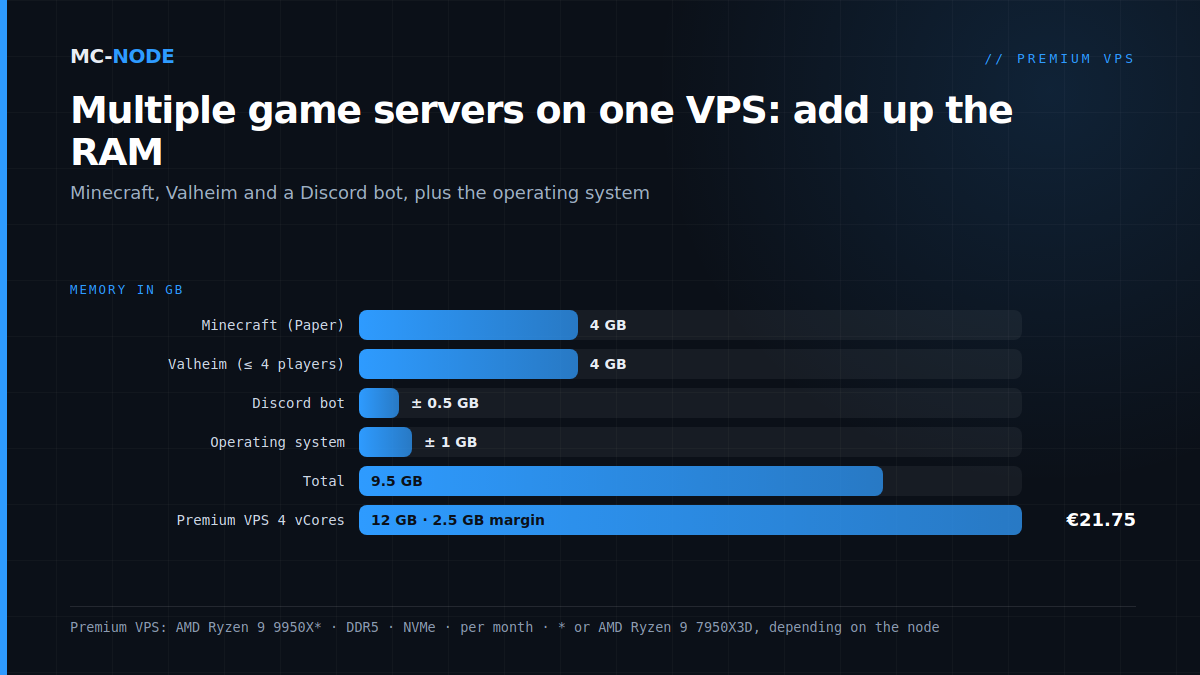
| Component | Memory |
|---|---|
| Minecraft (Paper) | 4 GB |
| Valheim (up to 4 players) | 4 GB |
| Discord bot | ± 0.5 GB |
| Operating system | ± 1 GB |
| Total | 9.5 GB |
With 9.5 GB, you end up on the Premium VPS with 4 vCores and 12 GB for €21.75 per month. The 2.5 GB margin absorbs peaks and leaves room for a fifth and sixth Valheim player. If you want to add a second Minecraft server or a modpack later, go straight for 6 vCores and 16 GB for €28.00. Within the same line you can also upgrade later in the client area; you then pay the difference for the rest of your billing period.
Why the Premium VPS with Ryzen 9 and not the cheaper KVM VPS? Both have enough memory, but Minecraft and Valheim do their heaviest work on one main thread. That runs faster on the AMD Ryzen 9 9950X* (up to 5.7 GHz boost on one core, with DDR5) than on the EPYC 7443P of the KVM VPS (up to 4.0 GHz). The difference is explained in Ryzen vs EPYC for game servers.
* or AMD Ryzen 9 7950X3D, depending on the node.
Splitting cores: two heavy main threads feel each other
Memory you can add up; CPU time your servers share. A vCore is usually one thread of a physical core, not a full core. With 4 vCores, Minecraft and Valheim can each use a thread of their own to the full, with room to spare for the bot, the system and Java's garbage collector. Put three or four busy servers on 4 vCores and they fight over the same threads, and at the busiest moment they all lag at once.
Stop one server from swallowing the rest by setting a ceiling per server:
- In Pterodactyl, you give each server a CPU limit as a percentage: 100 is one thread, 200 is two. A Discord bot set to 50 can never take more than half a thread.
- With systemd,
CPUQuota=does the same:CPUQuota=200%means at most two threads. WithMemoryMax=you add a hard memory limit, so that a memory leak in the bot doesn't drag your Minecraft server down with it.
If all vCores together are at 100 %, a plan with more vCores helps. If one thread is at 100 % while the rest do little, only a faster core or less work per tick helps; that's what TPS, MSPT and lag is about.
Ports and firewall: a separate port for each server
Two servers can't listen on the same port. If you run different games, that's usually not a problem, because each game has its own default port:
| Game | Default port |
|---|---|
| Minecraft Java | 25565 TCP |
| Valheim | 2456–2457 UDP (port and port+1) |
| FiveM | 30120 TCP and UDP |
| Palworld | 8211 UDP |
| Satisfactory | 7777 TCP and UDP, plus 8888 TCP |
| Discord bot | none: the bot makes an outgoing connection itself |
Two servers of the same game? Give the second one a different port, for example server-port=25566 in server.properties for a second Minecraft server. With Valheim you shift two ports, because the server also uses port+1. Then only open what players really need:
sudo ufw allow OpenSSH
sudo ufw allow 25565/tcp
sudo ufw allow 2456:2457/udp
sudo ufw enable
Always allow OpenSSH first, or you'll lock yourself out. A pitfall with Pterodactyl: Wings runs each server in a Docker container, and Docker opens container ports bypassing ufw. Docker itself states that it doesn't work together with ufw. So a port that's attached to a server as an allocation in Pterodactyl is reachable, even without a ufw rule. That's why you should only give servers the ports they need. The rest of the basic security is in Secure your VPS: the first 30 minutes.
Management: Pterodactyl or separate systemd services
Pterodactyl is a free game panel: each server gets a console in the browser, file management, its own limits and optionally co-admins. With the KVM VPS and the VDS you can choose "Ubuntu 22.04 with Pterodactyl" at checkout; on the Premium VPS you install it yourself on Ubuntu, using the manual installation from the knowledge base. Handy if you switch games often or let others help manage, but the panel and Docker cost memory and maintenance themselves too. More on that in Pterodactyl on your own VPS.
systemd is lighter: each server gets its own user, its own folder and its own service file, such as /etc/systemd/system/mc.service. What such a service looks like is shown in Installing a Minecraft server on a VPS, and for Steam games like Valheim in Game server on a VPS with SteamCMD. After that, one command shows whether everything is running:
systemctl is-active mc valheim bot
active
active
active
In the service, give Minecraft a bit less than the 4 GB you reserve, for example -Xmx3G: Java uses memory of its own besides the heap. You install Java itself with this guide. If a FiveM server joins later, read FiveM server on your own VPS first.
Backups: each world separately, and outside the VPS
With several servers on one machine, a good backup becomes more important: one wrong rm command or a full disk hits everything at once. Sort it out yourself, per server:
- Archive each world folder separately, with a cron job that runs at its own time for each server, so they don't load the disk at the same time.
- Only copy once the world has been saved. With Minecraft,
save-offbriefly pauses autosaving andsave-allwrites everything to disk; after the copy,save-onagain. - Regularly put the archives on another machine. A backup on the same VPS isn't a backup.
A worked-out schedule is in A backup strategy for your Minecraft server that really works.
When splitting is better
One VPS for everything is cheaper and easier to oversee, but not always smarter:
- One IP address for everything. DDoS protection is always on for every VPS, but if one server gets attacked, that traffic arrives at the address of all your servers.
- Maintenance hits everyone. A kernel update with a reboot takes all servers offline at once.
- Heavy neighbours. A large modpack next to a Rust server already needs 24 GB plus the system, and two busy main threads. Then two separate VPSs, or a VDS with dedicated cores, are calmer.
- You mainly want to play. Then ready-made game servers with a panel are less work; see VPS or game server: what do you actually need?
Frequently asked questions
How many game servers can I run on one VPS?
As many as the memory and cores allow. Add up the minimum for each server (for example 4 GB for Minecraft and 4 GB for Valheim), count about 1 GB for the operating system and keep some margin. For two medium-sized servers and a Discord bot, a Premium VPS with 4 vCores and 12 GB (€21.75 per month) is a good start.
How much memory does the operating system itself use?
A bare Linux server such as Ubuntu uses little, but with SSH, logs, a firewall and possibly Docker or a database on top, about 1 GB is a safe allowance. Windows Server itself uses more: for a Windows VPS we recommend at least 4 GB, and your game server comes on top of that. You add that memory to what your servers need.
Can I run Minecraft and FiveM on the same VPS?
Yes. They use different ports (25565 TCP and 30120 TCP and UDP), so they don't get in each other's way there. Count on 4 GB for Minecraft, 8 to 16 GB for FiveM and about 1 GB for the system; a Premium VPS with 6 vCores and 16 GB (€28.00) is then the smallest size. Both lean on one fast core, so give each of them at least a thread of its own.
Do I need Pterodactyl for multiple servers?
No. A separate systemd service per server works too, and it uses less memory. Pterodactyl is handy if you want a web panel, switch games often or want others to help manage. With the KVM VPS and the VDS you can choose Ubuntu 22.04 with Pterodactyl right at checkout.